Category: Blockchain

  • Transaction Data in Blockchain

    Preface – This post is part of the Blockchain Basics series.

    Introduction

    Many times you might have transacted money from ATM. That particular transaction results in deduction of some amount from your bank balance and the same amount you might have received from the ATM. This transaction happens at a particular instant of time. This data of amount deduction, the user name or ID and the timestamp together is termed as transaction data. Apart from this, transaction data might also include other important data. In this article we will discuss transactional data in detail.

    What is a Transaction Data

    Transaction data is a data that includes following information:

    • Timestamp
    • User Information
    • Transaction Information
    • Other Relevant Information such as Bank information, location information, security information

    Transactional Data in Blockchain

    In a blockchain, all the transaction records are saved as a transactional Data. Each block of a Blockchain contains thousands of transactional data and it becomes inefficient to store all the data inside each block as a series of data. This will not only decrease the search efficiency of a data but also increase the size of a block. To solve this issue, data inside a block is firstly converted into a hash data and then stored in the form of a Merkle tree.

    Blockchain Transaction Data

    Transaction Data in Database

    In a database, we have multiple types of information. All information cannot be saved together so there was a requirement to separate these data from one another. All the data that do not change for a long time, like name and educational details, were kept together and were named as Master Data. And all the data that gets updated at regular interval of time, like online shopping data gets updated on regular interval for online shopping websites, then it is termed as Transaction or Transactional Data.

    Advantages

    Following are the advantages of Transactional Data:

    • It helps to create a transaction log
    • It helps to maintain correct information of all
    • It helps to keep the transaction process simple and stable
  • Hashing in Blockchain

    Preface – This post is part of the Blockchain Basics series.

    Introduction

    In the world of database, hashing is a very famous term. Either it is used to sort a table based on hash keys or to encrypt a data using hash function. In this article we will discuss only the second part that in encryption of data. This encrypted data is the actual transaction value stored in a block.

    What is Hashing

    Hashing in blockchain is an encryption process in which an algorithm is used to convert a string of any length to a string of fixed length. It is a very important aspect in case of Blockchain as it helps us to keep track of huge transaction data without even saving them and rather saves hash of that data. There are various mechanism of hashing, such as Bitcoin uses SHA 256 while Ethereum uses Keccak-256 algorithms respectively. The only important thing to take away from this article is that this generated hash keys are the only that stores data of current block and address of the next block, hence helps in linking both the blocks and also keeping track of the previous block.

    How to do Hashing

    If you have understood what a hashing is, then you will be thinking how to implement it. Different programing language provide different modules to hash a data. These modules take a data as input and returns fixed length output. The output length depends upon the algorithm used within the module. For example, if the algorithm is SHA-256, then the output length will be 256 bits long. You can find SHA-256 Module for Node.js here.

    Example of Hashing

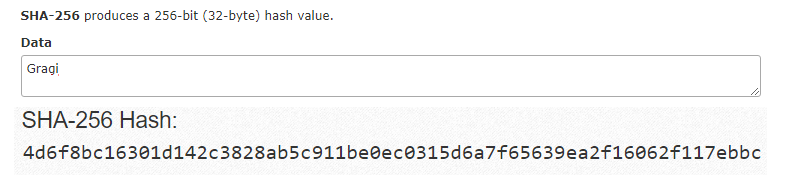
    In the diagram shown below, we have generated hash of a string using SHA 256 algorithm and you too can generate hash values from here. In ABAP you can use Method CALCULATE_HASH_FOR_RAW of Class CL_ABAP_MESSAGE_DIGEST to implement SHA-256 encryption hashing.

    SHA 256 Hashing in Blockchain

    SHA-256 Conversion

    In the example shown below we will write a function in JavaScript to achieve SHA-256 encryption:

    var sha256 = function sha256(ascii) {
      function rightRotate(value, amount) {
        return (value>>>amount) | (value<<(32 - amount));
      };
      
      var mathPow = Math.pow;
      var maxWord = mathPow(2, 32);
      var lengthProperty = 'length'
      var i, j; // Used as a counter across the whole file
      var result = ''
    
      var words = [];
      var asciiBitLength = ascii[lengthProperty]*8;
      
      //* caching results is optional - remove/add slash from front of this line to toggle
      // Initial hash value: first 32 bits of the fractional parts of the square roots of the first 8 primes
      // (we actually calculate the first 64, but extra values are just ignored)
      var hash = sha256.h = sha256.h || [];
      // Round constants: first 32 bits of the fractional parts of the cube roots of the first 64 primes
      var k = sha256.k = sha256.k || [];
      var primeCounter = k[lengthProperty];
      /*/
      var hash = [], k = [];
      var primeCounter = 0;
      //*/
    
      var isComposite = {};
      for (var candidate = 2; primeCounter < 64; candidate++) {
        if (!isComposite[candidate]) {
          for (i = 0; i < 313; i += candidate) {
            isComposite[i] = candidate;
          }
          hash[primeCounter] = (mathPow(candidate, .5)*maxWord)|0;
          k[primeCounter++] = (mathPow(candidate, 1/3)*maxWord)|0;
        }
      }
      
      ascii += '\x80' // Append Ƈ' bit (plus zero padding)
      while (ascii[lengthProperty]%64 - 56) ascii += '\x00' // More zero padding
      for (i = 0; i < ascii[lengthProperty]; i++) {
        j = ascii.charCodeAt(i);
        if (j>>8) return; // ASCII check: only accept characters in range 0-255
        words[i>>2] |= j << ((3 - i)%4)*8;
      }
      words[words[lengthProperty]] = ((asciiBitLength/maxWord)|0);
      words[words[lengthProperty]] = (asciiBitLength)
      
      // process each chunk
      for (j = 0; j < words[lengthProperty];) {
        var w = words.slice(j, j += 16); // The message is expanded into 64 words as part of the iteration
        var oldHash = hash;
        // This is now the undefinedworking hash", often labelled as variables a...g
        // (we have to truncate as well, otherwise extra entries at the end accumulate
        hash = hash.slice(0, 8);
        
        for (i = 0; i < 64; i++) {
          var i2 = i + j;
          // Expand the message into 64 words
          // Used below if 
          var w15 = w[i - 15], w2 = w[i - 2];
    
          // Iterate
          var a = hash[0], e = hash[4];
          var temp1 = hash[7]
            + (rightRotate(e, 6) ^ rightRotate(e, 11) ^ rightRotate(e, 25)) // S1
            + ((e&hash[5])^((~e)&hash[6])) // ch
            + k[i]
            // Expand the message schedule if needed
            + (w[i] = (i < 16) ? w[i] : (
                w[i - 16]
                + (rightRotate(w15, 7) ^ rightRotate(w15, 18) ^ (w15>>>3)) // s0
                + w[i - 7]
                + (rightRotate(w2, 17) ^ rightRotate(w2, 19) ^ (w2>>>10)) // s1
              )|0
            );
          // This is only used once, so *could* be moved below, but it only saves 4 bytes and makes things unreadble
          var temp2 = (rightRotate(a, 2) ^ rightRotate(a, 13) ^ rightRotate(a, 22)) // S0
            + ((a&hash[1])^(a&hash[2])^(hash[1]&hash[2])); // maj
          
          hash = [(temp1 + temp2)|0].concat(hash); // We don't bother trimming off the extra ones, they're harmless as long as we're truncating when we do the slice()
          hash[4] = (hash[4] + temp1)|0;
        }


  • Quorum on SAP Cloud Platform

    Preface – This post is part of the Blockchain on SAP Cloud Platform series.

    Introduction

    Smart contracts brought a new vision to improve for existing enterprise systems. These enterprises have multiple ledgers/data base with replicated data that is based upon duplicated business logics. The only problem with the smart contracts that was stopping their use in banking sectors were their data privacy. In July 2015, J.P. Morgan Chase & Co., an American multinational investment bank introduced an enterprise-ready distributed ledger and smart contract platform known as Quorum which processes private transactions within a permissioned group of known participants. In this article we will do implement Quorum on SAP Cloud Platform.

    In another article, we have discussed “Hyperledger Fabric on SAP Cloud Platform”. This article is similar to it. Here we will explore Quorum and discuss how SAP has integrated it in to its SAP Cloud Platform. Before we start with Quorum platform, it is recommended to read What is Blockchain?


    What is Quorum

    Quorum is a blockchain platform built upon Ethereum. It is a private/permissioned blockchain network. To achieve data privacy, Quorum utilizes cryptography and segmentation.

    As per Quorum whitepaper, A Quorum transaction contains the following:

    • The recipient: the one sending the money
    • Signature identifying the sender: to authenticate the sender
    • An amount of ether (although having an ether balance is not required within Quorum): This is the amount that gets transferred
    • An optional list of parties that the transaction should be private to: If the transaction is among multiple parties
    • An optional data field (containing hash in the case of private transaction): This makes the transaction private and secure

    Consensus in Quorum

    According to oxford dictionary, the meaning of consensus is “A general agreement”. A consensus in a Blockchain is a mechanism of validating a transaction based on general agreement i.e. an agreement of more than 51% voters in Quorum.

    In Quorum, consensus has been termed as Quorum Chain Consensus. Quorum Chain Consensus utilizes voting-based consensus mechanism.

    For example, Gargi sends $100 worth of Ether to Rudra, Gargi will lose 100$ worth of Ether from her wallet, and Rudra will gain 100$ worth of Ether in his wallet. It needs to be validated or verified that if Gargi had 100$ worth Ether in her wallet or not. This can be validated by the voters in the Quorum Blockchain and if more that 51% voters agreed upon this transaction, then only the transaction will be validated.

    Implementation of Quorum using SAP Cloud Platform

    Generic Architecture

    Architecture of Quorum on SAP Cloud Platform

    In the above diagram, it has been shown “how SAP Cloud Platform communicates with a Quorum Node”. To explore more about Quorum Architecture please refer here.

    Setup of Quorum on Cloud Platform

    To implement Quorum on SAP Cloud Platform, we need to setup our trial Global Account on SAP Cloud Platform and create a Quorum enabled sub-account. Then only we can proceed with the implementation.

    Follow the following steps to enable Quorum on your SAP Cloud Platform:

    Step 01: Go to your SAP cloud platform Cockpit and if you don’t have trial account, go here and click Free Trial and then select region as Europe (Rot) – US East(VA).

    Step 02: Create a sub account there by giving your desired display name and subdomain name.

    Step 03: Click Entitlements button from the left menu bar and it will display the list of entitlements.

    Step 04: Inside Entitlements menu we can see Edit button. Click it to change the mode to editable. Scroll down to Quorum as shown below:

    Add dev and channel nodes by clicking addition button icon ‘+’.

    Quorum Setup 01

    Step 05: Click your sub account to open it, as shown below. Click Spaces and create a new space to that space. Also give all the authorization as shown below:

    Quorum Setup

    Step 06: Click on the newly space created. Select Service Marketplace and scroll down to Quorum. Click to open it as shown below:

    Quorum Setup 03

    Once the initial setup of Quorum is achieved. Then you can create your own nodes and instances by following Hands on Exercise to create your own SAP Quorum service.

  • Hyperledger Fabric on SAP Cloud Platform

    Preface – This post is part of the Blockchain on SAP Cloud Platform series.

    Introduction

    Bitcoin was the first cryptocurrency launched in late 2008. Bitcoin is based on blockchain. Since then many techno players have launched multiple platforms based on Blockchain. In 2015, several companies interested in blockchain technology realized that they could achieve more by working together than by working separately. This marked the birth of Hyperledger Platform. SAP later introduced Hyperledger Fabric on SAP Cloud Platform.

    In this article, we will explore Hyperledger Fabric and how SAP has integrated the same in to its SAP Cloud Platform. Before we kick start with Hyperledger, it is recommended to read What is Blockchain?


    Types of Blockchain

    Blockchain classification is based upon restrictions on block or simply data accessibility. Following are the three types of Blockchain networks in the market:

    • Public Blockchains

    A public blockchain is a blockchain network which has absolutely no access restrictions and anyone on internet can become a user or validator/miner. These blockchains are widely used by crypto currencies. These blockchains utilizes a consensus mechanism to keep their transactions valid. Well known examples include Bitcoin and Ethereum.

    • Private Blockchains

    A Private Blockchain is just like a relatioal database i.e. fully centralized and owned by a single organization. All the participants are vetted before entering into this blockchain network. These types of blockchains are mainly used by banking organization, where data cannot be shared with and validated by anyone. Multichain is a tool to create private blockchains.

    • Consortium Blockchains

    The literal meaning of consortium is “an association of several companies”. As the name suggests, it is a blockchain that is jointly controlled by a group of organizations. It is best suited for business and ERP solutions. As of now, Hyperledger and R3Cev are leading blockchain networks in consortium area.

    What is Hyperledger

    In late 2008, Bitcoin was introduced in the market. Since then many companies started different platforms. However, in 2015, several companies decided to come together and create an open source Consortium blockchain platform under the guardianship of Linux Foundation and named it Hyperledger. Hyperledger, since then, has evolved a lot. It has launched multiple frameworks and tools for the same. Among them, Hyperledger Fabric is the most suited and stable framework for Enterprise.

    According to the Hyperledger whitepaper, “Hyperledger fabric is a platform for building distributed ledger solutions with a modular architecture that delivers a high degree of confidentiality, flexibility, resiliency, and scalability. This enables solutions developed with Fabric to be adapted for any industry”.

    To explore how Hyperledger Fabric works, watch this video.

    Consensus in Hyperledger

    According to oxford dictionary, the meaning of consensus is “A general agreement”. A consensus in a Blockchain is a mechanism of validating a transaction based on general agreement i.e. agreement of more than 51% miners in Bitcoin.
    For example, Gargi sends $100 worth of Bitcoin to Rudra, Gargi will lose 100$ worth of Bitcoin from her wallet, and Rudra will gain 100$ worth of Bitcoin in his wallet. But it needs to be validated and verified that if Gargi had 100$ worth Bitcoin in her wallet or not. This is validated by the miners in the Blockchain and if more that 51% miners agreed upon this transaction, then only the transaction will be validated.

    In Hyperledger fabric, consensus is the process by which block of transactions and their ordering are validated by the miners.

    According to Hyperledger Whitepaper, consensus must provide the following core functionality:

    • Confirms the correctness of all transactions in a proposed block, according to endorsement and consensus policies
    • Agrees on order and correctness and hence on results of execution which actually implies agreement on global state
    • Interfaces and depends on smart-contract layer. This layer verifies the correctness of an ordered set of transactions in a block

    Within Hyperledger, there are different types of consensus algorithms. These algorithms are used by different Hyperledger frameworks like Kafka, RBFT, Sumeragi and PoET. Hyperledger Fabric utilizes Kafka algorithm.

    Consensus in Hyperledger Fabric

    Consensus in Hyperledger Fabric consists of following three stages:

    1. Endorsement: To Endorse means “to approve”. In Hyperledger Fabric, predefined policies are defined under which it is stated that who will endorse whom. These policies of Endorsement are strictly followed and implemented during transaction validation.
    2. Ordering: This phase validates the order in which transaction are committed to the blockchain.
    3. Validation: At this phase, both endorsement and ordering are validated with double-spending.

    Implementation of Hyperledger Fabric using SAP Cloud Platform

    Generic Architecture

    Architecture of Hyperledger Fabric on SAP Cloud Platform

    Above a generic architecture is shown which defines how SAP Cloud Platform communicates with a Fabric Node. To explore more about Hyperledger Fabric Architecture refer here.

    Setup of Hyperledger Fabric on Cloud Platform

    To implement Hyperledger Fabric on SAP Cloud Platform we need to setup our Global Account on SAP Cloud Platform and create a Hyperledger Fabric enabled sub-account.

    Follow the following steps to enable Hyperledger Fabric on your Cloud Platform:

    Step 01: Go to your trial SAP cloud platform Cockpit [If you don’t have, go here and click Free Trial] and select region as Europe (Rot) – US East(VA).

    Step 02: Create a sub account there by giving your desired Display name and Subdomain name.

    Step 03: Click Entitlements button. You can find it in the left menu bar.

    Step 04: Inside Entitlements menu, you will see Edit button. Click it to change the mode to editable. Scroll down to Hyperledger Fabric as shown below:

    Hyperledger Setup 01

    Add dev and channel nodes by clicking ‘+’ button.


    Step 05: Click your sub account that you have just created to open it. Click Spaces and create a new space. Give all authorization to that space as shown below:

    Hyperledger Setup 02

    Step 06: Click on the newly space created and select Service Marketplace. Scroll down to Hyperledger Fabric and click to open it as shown below:

    Hyperledger Setup 03

    Once the initial setup of Hyperledger Fabric is done then you can proceed with creation of your own nodes and instances. Follow this Hands on Exercise and create your own SAP Hyperledger Fabric service.

  • MultiChain on SAP Cloud Platform

    Preface – This post is part of the Blockchain on SAP Cloud Platform series.

    Introduction

    Everybody is well aware with bitcoin. Bitcoin is the first cryptocurrency based on blockchain. Apart from cryptocurrency, this blockchain can be used as a platform for other data based sectors. Keeping this in mind, a private blockchain network was introduced by Multichain for Enterprises and finance sectors. In this article, we will explore basics of Multichain and how SAP has integrated it in to its SAP Cloud Platform. Before we start with Multichain, we recommend you to read What is Blockchain?


    What is Multichain

    According to the official Multichain whitepaper, Multichain is a platform which uses integrated management of user permissions to create private blockchains. Even, Multichain is derived from bitcoin. Multichain supports Windows, Linux and Mac servers. Multichain based blockchain network was developed to overcome shortcomings of Bitcoin such as generic mining, privacy and openness.

    Pros and Cons of Private Blockchains

    Multichain has both pros and cons. Private blockchains, such as Multichain, are the one that are controlled by single or multiple organizations that determines who can read it, submit transactions to it, and participate in the consensus or mining process. Thus, it brings both advantages and disadvantages with itself.

    One major disadvantage is that it does not support smart contracts [Although upcoming versions might have Smart contracts too]. According to official SAP website, “Since they are 100% centralized, private blockchains are useful as sandbox environments, but not for actual production.”


    Mining in Multichain

    Unlike Bitcoin, from which it is derived, Multichain does not depend only upon the concept of Proof of Work that can be owned by a single institute in some situation. It utilizes a round-robin schedule, in which the permitted/authorized miners have to create blocks in rotation to generate a valid blockchain. This scheme is implemented in Multichain using a parameter called Mining diversity.

    A mining diversity is a concept in which its values are defined value between 0(No restriction) and 1(Every permitted miner must be included into rotation). In actual scenario, mining diversity is kept 0.75 which means if some miners are inactive, still the mining and rotation is possible. Now, based upon mining diversity value fixed by the blockchain administrator or moderator, following are the steps for validations that are required to add a block in the blockchain:

    1. All the changes that a transaction defines should be applied successfully and in order (It means an incomplete and unordered transaction cannot be added into a block)
    2. Count the miners that are permitted to mine (suppose 10)
    3. Multiply the miner count to mining diversity (suppose 10 * .75 = 7.5), round it up to get spacing (here 8)
    4. If the miner of this block has already mined the previous spacing (spacing – 1, here 7) then the block is invalid

    Miners in Multichain neither charge transaction fees nor block rewards. Hence, transaction is free between two parties. However, a miner or an administrator can charge a fixed service fee from the blockchain network participants. SAP too applies this type of fees methodology and charges a fixed amount for a Block per hour.

    Configuration of Blockchain in Multichain

    In a configuration file, Multichain allows a user to set all the blockchain’s parameter that are mentioned below:

    • Type of chain protocol (Private Blockchain for Enterprises or Bitcoin like Public Blockchain)
    • Target time for each block (time taken to add block, e.g. 1 min)
    • Active permission types (e.g. Anyone can connect, only some can send/receive)
    • Mining diversity (as discussed above, it will be a value and it is mainly 0.75)
    • Level of consensus (authorization) required for creating/removing administrators, moderators and minors
    • Mining reward or fees (as discussed above, it can be zero too)
    • IP ports for peer-to-peer connection and the JSON-RPC API (will discuss later)
    • Permitted transaction type (e.g. pay-to-address, etc.)
    • Maximum block size (e.g. 1 MB)
    • Maximum metadata per transaction i.e. size of file that can be sent to the blockchain as transaction (termed as OP_RETURN; e.g. 4096 bytes)

    As discussed in the earlier blog, these configurations are maintained in the first node or Genesis block. To add a new node, Multichain requires to be run from another computer using a node address (e.g. chain1@12.34.56.78:8571) with three parameters:

    1. The destination blockchain name (here chain1)
    2. Its IP port number (here 12.34.56.78)
    3. The IP address of an existing node (here 8571)

    Implementation of MultiChain using SAP Cloud Platform

    Generic Architecture

    MultiChain on SAP Cloud Platform Architecture

    This is a generic architecture where it is shown how a MultiChain network is setup and how SAP Cloud Platform communicates with a MultiChain Node. If you want to explore more regarding Multichain Architecture, then refer here. We will be publishing individual courses of Multichain soon.

    Setup of MultiChain on Cloud Platform

    To Create a MultiChain on SAP Cloud Platform, initially we need to setup our Global Account on SAP Cloud Platform and create a MultiChain enabled sub-account. Then only we can proceed with development.

    Following the following steps to enable MultiChain on your Cloud Platform:

    Step 01: Go to your trial cloud platform and select region as Europe (Frankfurt) – Canary.

    Step 02: Create a sub account under your cloud platform space [Give your desired Display name and Subdomain name].

    Step 03: Click Entitlements button from the left menu bar as shown in image below.

    Step 04: Inside Entitlements menu, you will see Edit button, click it to change the mode to editable and scroll down to Multichain as shown in the image below:

    Multichain Setup 01

    Step 05: Click your sub account (the one you created above) to open it. Click Spaces and create a new space giving all authorization to that space as shown in the image below:

    Multichain Setup 02

    Step 06: Click on the space that you have just created above and select Service Marketplace. Scroll down to MultiChain and click to open it as shown in the image below:

    Multichain Setup


    Once the initial setup of MultiChain is done, you can create your own nodes and instances. Follow Hands on Exercise  created by a SAP developer to create your own SAP MultiChain service.

  • What is A Block in A Blockchain

    Preface – This post is part of the Blockchain Basics series.

    Introduction

    A block in a Blockchain is the smallest unit which contains list of records known as transaction data, a timestamp (i.e. a  UNIX time) and cryptographic hash (mainly SHA-256) of previous block (hash converts the previous block data into a fixed length of random data).

    The first block of a blockchain is known as Genesis block. This process of saving block is as shown below:

    blocks of blockchain

    Genesis Block

    The literal meaning of Genesis is origin. Hence, it is the origin block of any Blockchain. Since there is no previous block, hence the value is always hard coded. Since no previous block existed before it, hence the previous hash remains ‘0’ or null in this situation. All the transactions are maintained in the later blocks and the next block will store the Hash value of Genesis block in the “previous hash” section as shown in figure above.

    genesis block

    How a block is created in Blockchain

    The Genesis block, as discussed above, is created by default. All the records for given period are stored in the first block. Then Hash value of current block is created. This hash value is stored in a new block. In this these two blocks are connected. This new block saves hash of previous block, new records and hash of its own records.

    Important Topics associated with a block

    Hashing

    Hashing is a cryptographic process in which an algorithm converts a variable length string to a string of fixed length. Bitcoin uses SHA-256 algorithm to achieve the same.

    Transaction Data

    All the transaction records of a blockchain are stored as Transaction Data in a block.

    Merkle tree

    A Merkle tree represents data (in this case hash key of our transaction data) in a form of leaf and child node. Blockchains utilizes Merkle tree to store transactional data.

    Timestamp

    A timestamp in a blockchain is a converted value of GMT. Blockchain stores data with Unix Timestamp.

    Nonce

    According to oxford dictionary, the literal meaning of a nonce is “unique for particular occasion”. A nonce is a cryptographic term mainly discussed in terms of Bitcoin. It decides the difficulty level of blockchain’s block mining.

    Consensus Mechanisms

    A consensus in a Blockchain is a mechanism used by miners to validate a transaction based on general agreement (agreement of more than 51% miners in Bitcoin).

  • Relational Distributed Database and Blockchain

    Preface – This post is part of the Blockchain Basics series.

    Distributed Database

    A Relational Distributed Database is a database management system which utilizes the Primary Key(PK) and Foreign Key(FK) relationship. Almost every ERP solutions use Relational database. In simple context, this database divides all data based on relations among them. For example, data of employee can be saved into three tables i.e. Employee Details table, Employee Address table and Employee Salary table where each table has Employee ID as a common key.

    Blockchain Ledger

    A Blockchain can be defined as a decentralized database, or simply a decentralized linked list, where list of records (called blocks) are linked via cryptography. By decentralized, we intend that there is no single database where all records are saved rather the same set of data is saved in numerous databases. A block in a Blockchain contains catalogue of records (known as transaction data), a timestamp (i.e. UNIX time) and a cryptographic hash of previous block (hash converts the previous block data into a fixed length of random characters).

    Difference between Distributed database and Blockchain

    Both the database systems mentioned above carry their own advantages and disadvantages. Let us have a look on the basic differences between these database systems:

    Relational Distributed Database Blockchain Ledger
    Controlled by an Admin No Admin, everyone shares same data
    Access limited to view data Anyone can access (public) Blockchain
    Access limited to write data Anyone with right consensus can write
    Relational Databases are fast Blockchain, due to verification process, are slow
    No history trace of edited data unless log table is maintained History of data is maintained via hashing
    High performance & confidentiality High provenance and immutability

    Comparison between Database & Blockchain

  • What is a Database

    Preface – This post is part of the Blockchain Basics series.

    Introduction

    A database (DB) is an organized collection of information, just like a notebook, where you can read, write, update and delete data. It is one of the essential tools of all the organizations using computer technology. A database is also known as ledger. A ledger in accounting stands for a principal book where transactions are saved by date. In digital format these books take form of excel or DB. Going on further, wherever we discuss about ledger, it will stand for database.

    Types of Database

    There are different types of DB which are categorized based on their data saving format and structure. In this section we will discuss following two databases relevant to this paper:

    • Relational Database
      A Relational Database is database management system which utilizes the Primary Key(PK) and Foreign Key(FK) relationship. Almost every ERP solutions use Relational DB. In simple context, this ledger divides all data based on relations among them. For example, data of employee can be saved into three tables i.e. Employee Details table, Employee Address table and Employee Salary table where each table has Employee ID as a common key. The relationship among these tables can be seen below:
      A Relational Database
    • Blockchain
      A Blockchain can be defined as a decentralized database, or simply a decentralized linked list, where list of records (called blocks) are linked via cryptography. By decentralized, we intend that there is no single ledger where all records are saved rather the same set of data is saved in numerous databases. A block in a Blockchain contains catalogue of records (known as transaction data), a timestamp (i.e. UNIX time) and a cryptographic hash of previous block (hash converts the previous block data into a fixed length of random characters). This process of saving blocks is illustrated below (You can make your own blocks here):

      A Blockchain Database
      A Blockchain