Category: SAP

  • Concatenate in ABAP

    Preface – This post is part of the ABAP Programs series.

    Concatenate in ABAP is used to join two different strings together. It can be used to join any two string, number, special character or all together. In this article we will learn about the keyword CONCATENATE  and its implementation in an example program.

    Introduction

    Sometime we need to join two string, special character or numeric value in our code. In this case we can use ABAP keyword CONCATENATE and achieve our goal.

    Concatenate in ABAP
    Concatenate in ABAP Image Illustration

    ABAP Program

    Following program has implemented the same:

    PARAMETERS: lv_data1 type string, "VALUE 'BARRY'
                lv_data2 type string, "VALUE 'ALLEN'
    Data: lv_data type string.
    CONCATENATE lv_data1 lv_data2 into lv_data.
    WRITE: lv_data. "Output is 'BARRY ALLEN'
    

    Explanation

    This is a very easy program and self explanatory. Still given points explain the same:

    1. Initially, we have defined two parameters to take two different inputs: lv_data1 and lv_data2. We have given initial value to them too in comment.
    2. There after, we have defined a variable which will store the concatenated value.
    3. Now, we have done concatenation.
    4. Later, we have printed the concatenated output.
  • Leap Year Program in ABAP

    Preface – This post is part of the ABAP Programs series.

    Leap Year Program in ABAP is a mathematical expression based algorithm that is common across all other programming languages. In this article, we will discuss what is a leap year and how to write ABAP program to find if a year is a leap year or not.

    Introduction

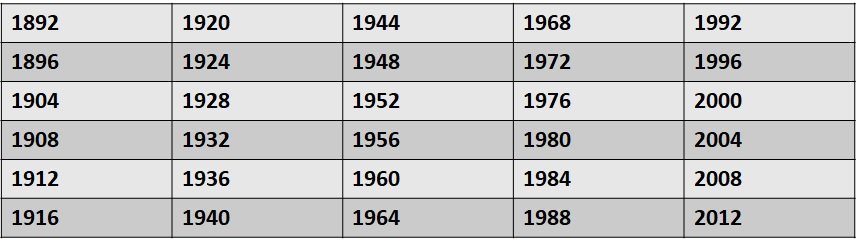
    Leap Year is a year that has 29 days in the month of February. It means 366 days in year. If a year is divisible by 100, then it must be also divisible by 400 to become a leap year. Also, if the year is not divisible by 100 then in case it is divisible by 4, then it is also a leap year.

    Following are the past years that were leap year:

    Leap Year Program in ABAP
    Leap Year Program in ABAP Image Illustration

    ABAP Program

    Following ABAP program will find a year is a leap year or not:

    PARAMETERS: p_date TYPE dats.
    DATA : lv_date TYPE num4.
    lv_date = p_date.
    IF lv_date MOD 4 = 0.
      IF lv_date MOD 100 = 0.
        IF lv_date MOD 400 = 0.
          WRITE : 'Leap Year '.
        ELSE.
          WRITE : 'Not a Leap Year '.
        ENDIF.
      ELSE.
        WRITE : 'Leap Year '.
      ENDIF.
    ELSE.
      WRITE : 'Not a Leap Year '.
    ENDIF.
    

    Explanation

    To understand this program, we will discuss each lines one by one:

    1. Initially we have defined a parameter p_date of type DATS that is date type in ABAP. Also, we have defined a variable which will convert the date in a numeric date type using type conversion.
    2. Now If a year is divisible by 4, 100 and 400 then it is a leap year. We have added IF-ELSE condition accordingly.
  • Type Conversion in ABAP

    Preface – This post is part of the ABAP Programs series.

    Introduction

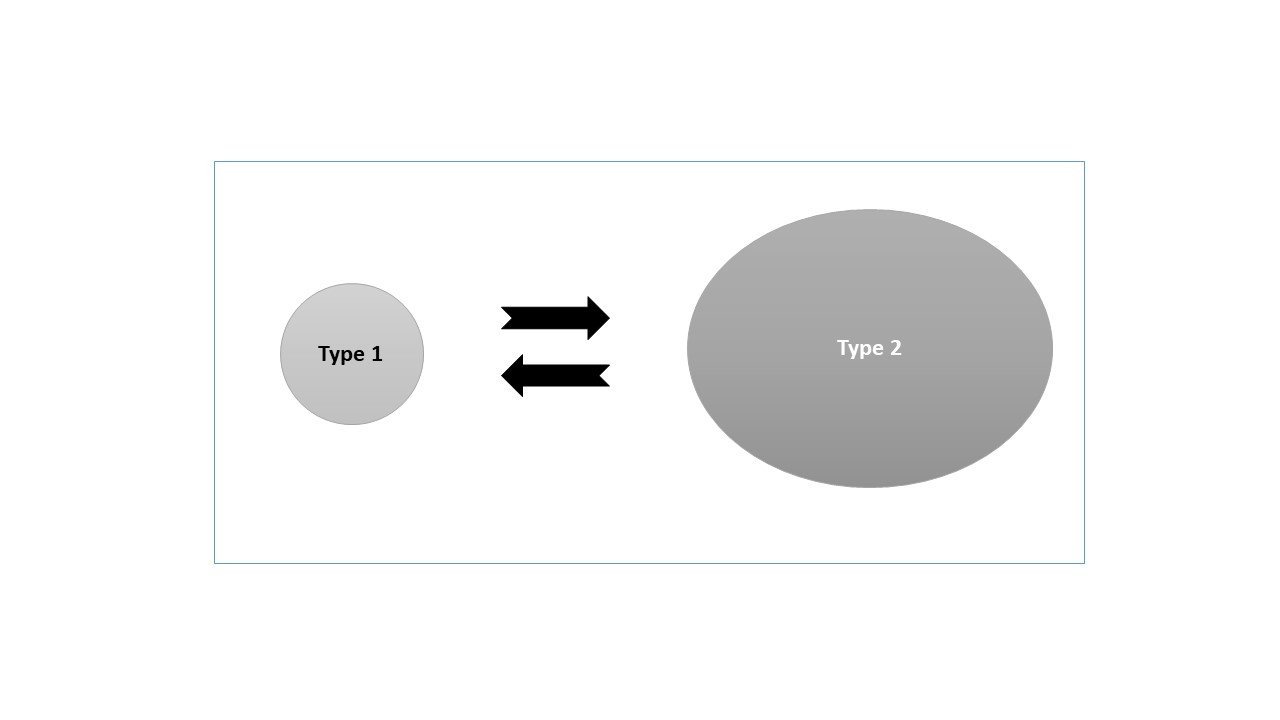
    Type conversion in ABAB means converting the type of a variable. In ABAP programs sometime we need to convert a variable from one type to other. This can be achieved with the help of type conversion or type casting. The same concept is illustrated in the image given below:

    Type Conversion in ABAP
    Type Conversion in ABAP Image Illustration

    Note: If you are searching for type casting/conversion of ABAP Classes,  click here.

    The given programs shows examples:

    1. Direct assignment based conversion

    Data : lv_string type string value '123' ,
            lv_num type num4.
    lv_num = lv_string.
    write : lv_num.
    

    Explanation

    The above code is explained line by line below:

    1. In the first line, we have defined two variables of different data types: one is lv_string of type string with value “123” and another is lv_num of type num4.
    2. This statement is used for type conversion. Here, we have directly assigned the value of lv_string to lv_num. Directly assigning the value causes conversion of the type.
    3. Now, we will directly print the converted value as output. In actual programming, it is further used according to the requirement.

    2. ABAP keyword based conversion

    Note: Type conversion  can also be performed explicitly using the ABAP keyword for conversion operator CONV.

    DATA lv_text TYPE c LENGTH 255 VALUE 'ABC'.
    DATA lv_xstr  TYPE xstring.
    DATA(lv_xstr) = cl_abap_codepage=>convert_to( source = CONV #( lv_text ) ).
    write : lv_xstr.

    Explanation

    The above code is explained line by line below:

    1. In the first and second line, we have defined two variables of different data types: one is lv_string of type string with value “ABC” and another is lv_xstr of type xstring.
    2. This statement is used for type conversion. Here, we have used CONV keyword to perform conversion.
    3. Now, we will directly print the converted value as output. In actual programming, it is further used according to the requirement.
  • Program to check vowel or consonant in ABAP

    Preface – This post is part of the ABAP Programs series.

    Program to check vowel or consonant in ABAP or in any other computer language utilizes its ASCII values. ASCII stands  for American Standard Code for Information Interchange. It is defined to represent every character on electronic communication in an encoded form. You can find list of all ASCII characters here.

    Steps to check vowel or consonant in a program

    To find whether a character is vowel or not we have two steps:

    1. Get ASCII of the character using Function Module URL_ASCII_CODE_GET and compare the ASCII code with 65, 69, 73, 79, 85 (A, E, I, O, U) and 97, 101, 105, 111, 117 (a,e,i,o,u).
    2. Directly compare the character with a set of characters as shown in program below:Program to check vowel or consonant in ABAP
      PARAMETERS: p_inp type c.
      IF p_inp  CA 'A,E,I,O,U'.
        Write: 'A Vowel'.
        ELSE.
          Write: 'A Consonant'.
          ENDIF.


    Explanation

    Lines mentioned below have line by line code explanation:

    1. In first line we have defined a parameter p_inp of type c. So, it takes only one character as input.
    2. In this line, we have compared the input using ABAP keyword “CA”. It is compared with vowels i.e. a, e, i, o and u.
    3. If the above line is successful then it is a vowel and thus ‘A Vowel’ is printed as output.
    4. If the second line is not successful then it is not a vowel and thus ‘A Consonant’ is printed as output.
  • Swapping of Two Numbers in ABAP

    Preface – This post is part of the ABAP Programs series.

    Swapping of Two Numbers in ABAP  is a way to interchange the value of two variables with each other. It is rarely used in coding but it is an important topic for interviews. In this article we will cover both: swapping using third variable and swapping without using third variable in ABAP.

    Introduction

    Everyone is aware what a swap is. A Swap is a way to exchange the value of two variables with each other. There are many ways to do swapping in ABAP:

    Swapping using third variable:

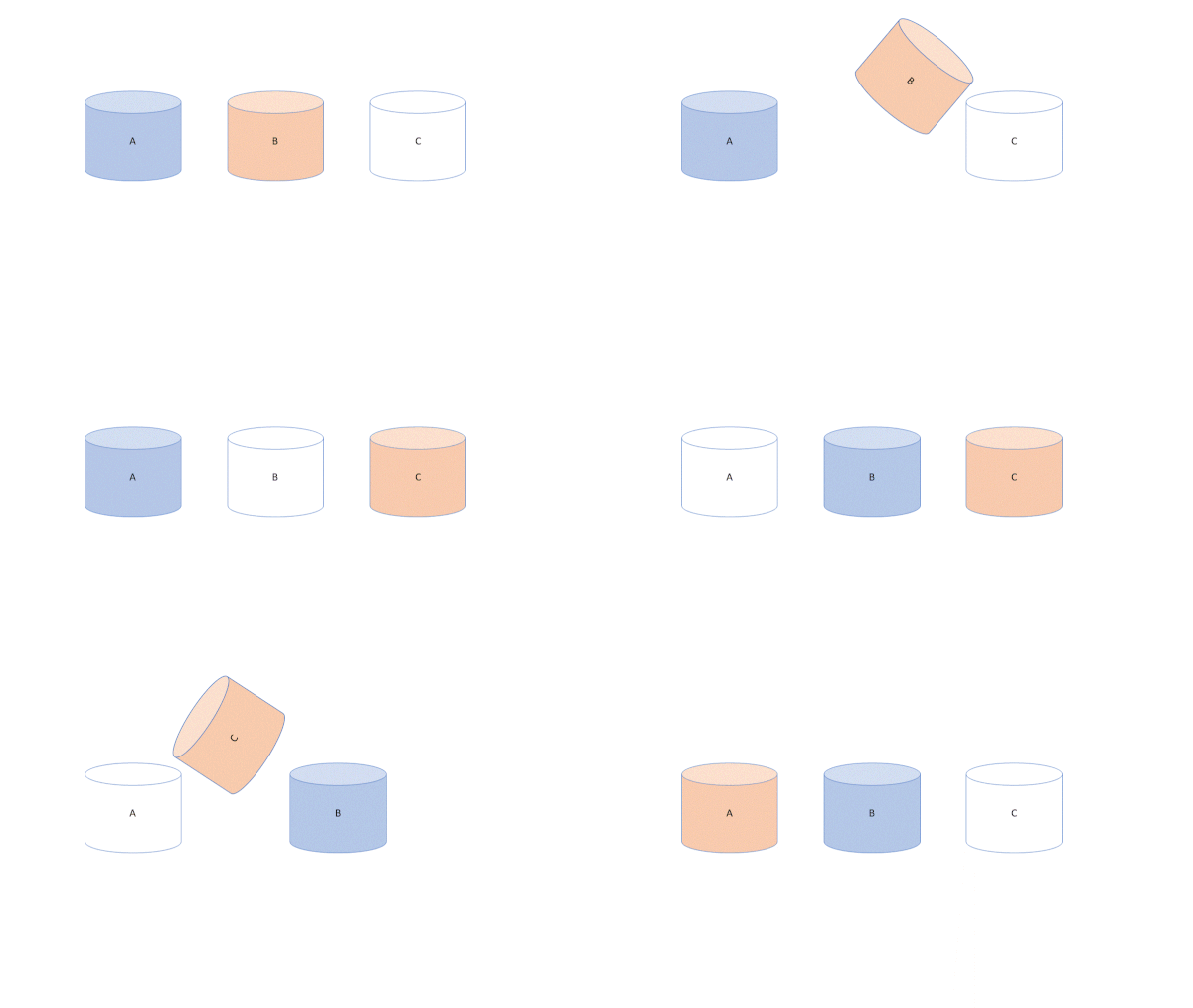
    Swapping of Two Numbers

    Swapping of Two Numbers Image Illustration

    Here we save the value of 1st variable into a new 3rd variable. Now the 1st variable saves the value of 2nd variable and the 2nd variable saves the value of 3rd variable. In this way the value is exchanged.

    *------Do not copy this code, this is just for illustration-------*
    Data: lv_var1, lv_var2, lv_var3. "Here we have 3 variables
    lv_var1 = 2. "Assinging values to variables
    lv_var2 = 5.
    * swapping code
    lv_var3 = lv_var1. "Saving value of var 1 in var 3
    lv_var1 = lv_var2. "Saving value of var 2 in var 1
    lv_var2 = lv_var3. "Saving value of var 3 in var 1
    
    *** Now the output will show lv_var1 = 5 and lv_var2  = 2

    Swapping without using third variable:

    This can be achieved using either addition-subtraction or multiplication-division methods. We will show how in below illustration code:

    *------Do not copy this code, this is just for illustration-------*
    Data: lv_var1, lv_var2. "Here we have 2 variables
    lv_var1 = 2. "Assinging values to variables
    lv_var2 = 5.
    * swapping code
    lv_var1 = lv_var1 + lv_var2 . "Now lv_var1 = 2+5 = 7.
    lv_var2 = lv_var1 - lv_var2. "Now lv_var2 = 7-5 = 2.
    lv_var1 = lv_var1 - lv_var2. "Now lv_var1 = 7-2 = 5.
    
    *** Now the output will show lv_var1 = 5 and lv_var2  = 2

    Similarly using multiplication-division, we will achieve the same.

    Now the ABAP program to achieve the swap is shown below:

    PARAMETERS : lv_num1(4) type i,
                 lv_num2(4) type i.
    lv_num1 = lv_num1 + lv_num2.
    lv_num2 = lv_num1 - lv_num2.
    lv_num1 = lv_num1 - lv_num2.
    Write: 'Swapped Values are :', lv_num1, lv_num2.


  • PDF Download in ABAP

    Preface – This post is part of the ABAP Programs series.

    In this article, you will learn how to convert xstring to pdf in abap and how to use GUI_DOWNLOAD Function Module to perform pdf download in ABAP.

    Introduction

    In our previous article we have uploaded a PDF file. To view it click here. Now we will be Downloading that file into our system. To do that we need to convert the XSTRING file into a PDF file. The program shown below uses Function Module GUI_DOWNLOAD to download the file and Function Module SCMS_XSTRING_TO_BINARY to convert the XSTRING File to a Binary file which is further converted to a PDF file using GUI_DOWNLOAD Function Module.
    Program to Download PDF in ABAP

    Parameters:
      p_fname type z1127582_upload-filename lower case,
      p_path type string lower case.
    
    
    Data:
          gs_store_file type z1127582_upload,
          xstr_content type xstring,
          gt_content type standard table of tdline,
          len type i,
          str_fname type string.
    
    Start-of-selection.
    
      select single * from z1127582_upload
        into gs_store_file
        where filename = p_fname.
    
      xstr_content  = gs_store_file-file_content.
    
      "Convert xstring/rawstring to binary ITAB
      call function 'SCMS_XSTRING_TO_BINARY'
        exporting
          buffer        = xstr_content
        importing
          output_length = len
        tables
          binary_tab    = gt_content.
      .
    
      if sy-subrc <> 0.
        message 'Unable to convert xstring to binary'
          type 'E'.
      endif.
    
      str_fname = p_fname.
    
      call function 'GUI_DOWNLOAD'
        exporting
          bin_filesize            = len
          filename                = p_path
          filetype                = 'BIN'
        tables
          data_tab                = gt_content
        exceptions
          file_write_error        = 1
          no_batch                = 2
          gui_refuse_filetransfer = 3
          invalid_type            = 4
          no_authority            = 5
          unknown_error           = 6
          header_not_allowed      = 7
          separator_not_allowed   = 8
          filesize_not_allowed    = 9
          header_too_long         = 10
          dp_error_create         = 11
          dp_error_send           = 12
          dp_error_write          = 13
          unknown_dp_error        = 14
          access_denied           = 15
          dp_out_of_memory        = 16
          disk_full               = 17
          dp_timeout              = 18
          file_not_found          = 19
          dataprovider_exception  = 20
          control_flush_error     = 21
          others                  = 22.
      if sy-subrc <> 0.
        message 'Unable to download file from SAP'
          type 'E'.
      endif.

    Explanation

    Initially, we have defined variables in two parts:

    • Parameter: p_fname is the name of file and p_path stores location of file
    • gs_store_file, gt_content, len, xstr_content: data related to file i.e. where file will be store, how the content will be stored, length of the file and type of content.

    Function Module used:

    • SCMS_XSTRING_TO_BINARY
    • GUI_DOWNLOAD

    What exactly is stored in the table that will be accessed by the Function Module to perform PDF download in ABAP:

    1. PDF file location
    2. PDF file name
    3. File type
    4. File X-STRING Data [This is the actual file that is converted in x-string]

    Later on we have called different Function Modules. We have added respective comment in the code itself.

    Tutorial Video

    You can watch the video below to learn implementation:

    [embedyt] https://www.youtube.com/watch?v=AWsp0EnHKTo[/embedyt]
  • PDF Upload in ABAP

    Preface – This post is part of the ABAP Programs series.

    In this article, you will learn how to get location of a pdf file, how to convert pdf to xstring in abap and how to use GUI_UPLOAD Function Module to perform pdf upload in ABAP.

    Introduction

    To Upload a PDF using ABAP Program, you need to get the location of the file and the pdf file. You need to convert this file in XSTRING. In the code shown below, we have used GUI_UPLOAD Function module to get data in an Internal Table.

    Program to Upload PDF in ABAP

    parameters:
      p_file type string lower case.
    
    data:
          gs_store_file type z1127582_upload,"z1127582_upload is a table to store PDF file and other relevant data
          gt_content type standard table of tdline,
          len type i,
          xstr_content type xstring.
    
    DATA:
       w_filename TYPE string, " File name
       w_length TYPE i,
       lt_file_table TYPE filetable,
       lv_filelength TYPE i,
       lv_rc TYPE i,
       lv_filename TYPE string,
       w_pdf_data TYPE xstring,
       lt_rawtab TYPE TABLE OF char255,
       w_pdf_file TYPE string,
    * Create PDF Object using destination 'ADS' (<-- this is how it is
    * defined in SM59)
       lo_pdfobj TYPE REF TO if_fp_pdf_object VALUE IS INITIAL,
       xslt_message TYPE string,
       exc TYPE REF TO cx_root.
    
    
    AT SELECTION-SCREEN ON VALUE-REQUEST FOR p_file.
      PERFORM f4_help_for_file.
    
    start-of-selection.
    
      "Upload the file to Internal Table
      call function 'GUI_UPLOAD'
        exporting
          filename                = p_file
          filetype                = 'BIN'
        importing
          filelength              = len
        tables
          data_tab                = gt_content
        exceptions
          file_open_error         = 1
          file_read_error         = 2
          no_batch                = 3
          gui_refuse_filetransfer = 4
          invalid_type            = 5
          no_authority            = 6
          unknown_error           = 7
          bad_data_format         = 8
          header_not_allowed      = 9
          separator_not_allowed   = 10
          header_too_long         = 11
          unknown_dp_error        = 12
          access_denied           = 13
          dp_out_of_memory        = 14
          disk_full               = 15
          dp_timeout              = 16
          others                  = 17.
    
      if sy-subrc <> 0.
        message 'Unable to upload file' type 'E'.
      endif.
    
      "Convert binary ITAB to xstring
      call function 'SCMS_BINARY_TO_XSTRING'
        exporting
          input_length       = len
    *     FIRST_LINE         = 0
    *     LAST_LINE          = 0
       importing
         buffer             = xstr_content
        tables
          binary_tab         = gt_content
       exceptions
         failed             = 1
         others             = 2
                .
      if sy-subrc <> 0.
        message 'Unable to convert binary to xstring' type 'E'.
      endif.
    
      clear gs_store_file.
    
      gs_store_file-filename = p_file.
      gs_store_file-file_content = xstr_content.
    
      "Insert file into table
      insert z1127582_upload from gs_store_file.
    
      if sy-subrc is initial.
        message 'Successfully uploaded' type 'S'.
      else.
        message 'Failed to upload' type 'E'.
      endif.
    
    FORM f4_help_for_file.
    CALL METHOD cl_gui_frontend_services=>file_open_dialog
      CHANGING
      file_table = lt_file_table
      rc = lv_rc
    * USER_ACTION =
    * FILE_ENCODING =
      EXCEPTIONS
      file_open_dialog_failed = 1
      cntl_error = 2
      error_no_gui = 3
      not_supported_by_gui = 4
      OTHERS = 5.
      IF sy-subrc <> 0.
    * MESSAGE ID SY-MSGID TYPE SY-MSGTY NUMBER SY-MSGNO
    * WITH SY-MSGV1 SY-MSGV2 SY-MSGV3 SY-MSGV4.
      ENDIF.
    *  READ TABLE lt_file_table
    *        INTO lv_filename
    *        INDEX 1.
        READ TABLE lt_file_table
            INTO p_file
            INDEX 1.
        IF sy-subrc EQ 0.
          lv_filename = p_file.
        ENDIF.
      cl_gui_frontend_services=>gui_upload(
        EXPORTING
          filename = lv_filename
          filetype = 'BIN' "Binary
        IMPORTING
          filelength = lv_filelength
        CHANGING
          data_tab = lt_rawtab
        EXCEPTIONS
          file_open_error = 1
          file_read_error = 2
          no_batch = 3
          gui_refuse_filetransfer = 4
          invalid_type = 5
          no_authority = 6
          unknown_error = 7
          bad_data_format = 8
          header_not_allowed = 9
          separator_not_allowed = 10
          header_too_long = 11
          unknown_dp_error = 12
          access_denied = 13
          dp_out_of_memory = 14
          disk_full = 15
          dp_timeout = 16
          not_supported_by_gui = 17
          error_no_gui = 18
          OTHERS = 19 ).
    ENDFORM.


    Explanation

    Initially, we have defined variables in three parts:

    • Parameter: p_file that is of type string and will store location of file
    • gs_store_file, gt_content, len, xstr_content: data related to file i.e. where file will be store, how the content will be stored, length of the file and type of content.
    • Third set of variables deals with the PDF file content detail. These details are the one that is stored in a table and whose type internal table is created above “gs_store_file”.

    Function Module used:

    • SCMS_BINARY_TO_XSTRING
    • GUI_UPLOAD

    What exactly to store in the table via upload in ABAP:

    1. PDF file location
    2. PDF file name
    3. File type
    4. File X-STRING Data [This is the actual file that is converted in x-string]

    Later on we have called different Function Modules. We have added respective comment in the code itself.

    Tutorial Video

    You can watch the video below to learn implementation:

    [embedyt] https://www.youtube.com/watch?v=AWsp0EnHKTo[/embedyt]
  • Binary Search in ABAP

    Preface – This post is part of the ABAP Programs series.

    Binary Search in ABAP is an important topic in terms of interview question. In general, ABAP provides keyword “SEARCH” for searching purpose and that is widely used everywhere. In this article, we will learn: What is a Binary Search and how to implement it in our ABAP programs.

    What is a Binary Search?

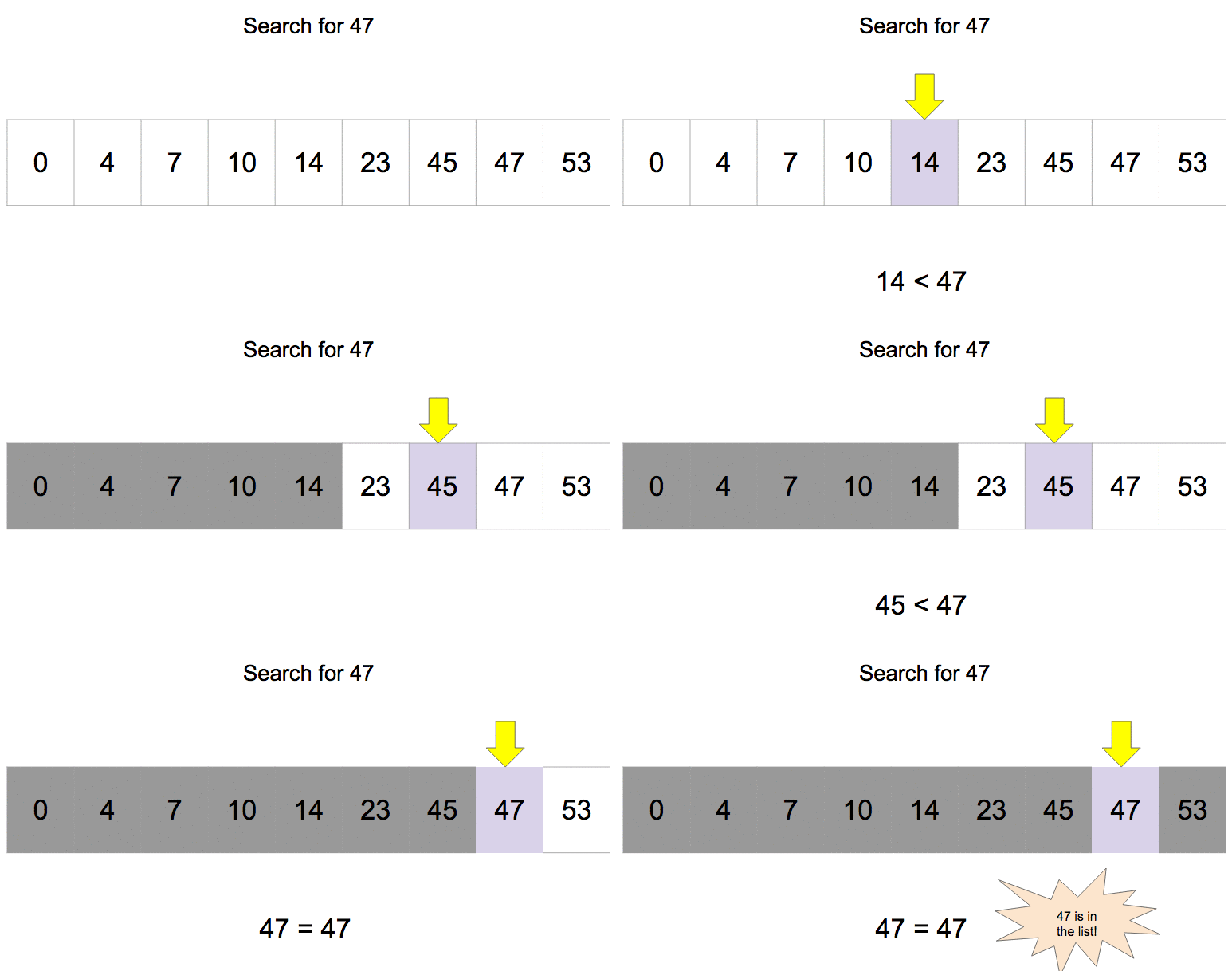
    A Binary Search is a search method in which a particular value is searched from an array (in case of ABAP, Internal Table) of values via a procedure as listed below:

    1. The whole array is firstly sorted.
    2. Then the searched value is compared with the middle value.
    3. If it is equal, then output is shown with index/position of value.
    4. If it is less than the middle value, then values after middle value is discarded and if it is greater than the middle value then the values before middle value is discarded.
    5. Repeat step 4 till we achieve step 3. If it is not achieved till end then “Not Found”  message is printed on the screen. The process is shown below using image (click on the image) and program:

    Binary Search

    Binary Search in ABAP:

    DATA : wa_data type int4,
          ITAB_data type TABLE OF int4,
          last_num type int1, " Index of Last Number
          first_num type int1 value 1, " Index of First number
          flag type int1 value 0,
          pos_length type int1.
    
    SELECTION-SCREEN BEGIN OF SCREEN 0100 . "Where we create a Screen 0100
    SELECT-OPTIONS: s_data FOR wa_data. "Seclect-Option for multiple Input
    PARAMETERS: p_input type int4.
    SELECTION-SCREEN END OF SCREEN 0100.
    DATA: wa_sdata LIKE LINE OF s_data.
    START-OF-SELECTION.
    CALL SELECTION-SCREEN 0100.
      LOOP AT s_data INTO wa_sdata.
        APPEND wa_sdata-low TO ITAB_data.
      ENDLOOP.
    
      DESCRIBE TABLE ITAB_data LINES last_num." Here we get total number of record and currently it the index of last number
      Sort ITAB_data.
      pos_length = ( last_num ) / 2 .
      while ( first_num <= last_num ).
       READ TABLE ITAB_data INTO wa_data INDEX pos_length.
       IF ( p_input = wa_data ) .
         flag = 1.
         Exit.
         ELSEIF ( p_input < wa_data ).
           last_num =  pos_length - 1.
           pos_length = ( first_num + last_num ) / 2 .
           ELSE.
             first_num = pos_length + 1.
             pos_length = ( first_num + last_num ) / 2 .
         ENDIF.
        ENDWHILE.
       IF ( Flag = 1 ).
        Write: 'Hurray! Found  your input @ position', pos_length.
        ELSE.
          Write 'Sorry! Not Found'.
        ENDIF.


    Explanation

    In the program above, initially we have defined data types: One internal tables [to store input array of data], one work area [To be used by the above mentioned internal tabls],  one variable [to save current line/index], one variable [to store current position], one variable to be used as a flag, two variable [to store first and last variable of internal table].

    We have then created a selection screen to take input and save it in an internal table. Now we will be using DESCRIBE, we will get the total number of records in that internal table. Then we will sort the internal table using “SORT” statement.

    Then we use a loop and use the algorithm steps mentioned above and set a flag as 1, if data is found. And in last, print either “Found” with position of the data or “Not Found”.

  • Linear Search in ABAP

    Preface – This post is part of the ABAP Programs series.

    Linear Search in ABAP is an important topic in terms of interview question. In general, ABAP provides keyword “SEARCH” for searching purpose and that is widely used everywhere. In this article, we will learn: What is a Linear Search and how to implement it in our ABAP programs.

    What is a Linear Search?

    A Linear Search is a search method in which a particular value is searched from an array(in case of ABAP, Internal table) of values via a procedure in which the value is compared with each of the values. The program to make a linear search in ABAP is shown below in the image and program:

    Linear Search

    Linear Search Program in ABAP

    DATA : wa_data type int4,
          ITAB_data type TABLE OF int4,
          lv_lines type int1,
          flag type int1 value 0,
          pos type int1.
    
    SELECTION-SCREEN BEGIN OF SCREEN 0100 . "Where we create a Screen 0100
    SELECT-OPTIONS: s_data FOR wa_data. "Seclect-Option for multiple Input
    PARAMETERS: p_input type int4.
    SELECTION-SCREEN END OF SCREEN 0100.
    DATA: wa_sdata LIKE LINE OF s_data.
    
    START-OF-SELECTION.
    CALL SELECTION-SCREEN 0100.
      LOOP AT s_data INTO wa_sdata.
        APPEND wa_sdata-low TO ITAB_data.
      ENDLOOP.
    
      DESCRIBE TABLE ITAB_data LINES lv_lines." Here we get total number of record
    loop at ITAB_data into wa_data.
      IF ( wa_data = p_input ).
        Flag = 1.
        pos = sy-tabix.
        EXIT.
        ENDIF.
      ENDLOOP.
      IF ( Flag = 1 ).
        Write: 'Hurray! Found  your input @ position',
                pos.
        ELSE.
          Write 'Sorry! Not Found'.
        ENDIF.
    

    Explanation

    In the program above, initially we have defined data types: One internal tables [to store input array of data], one work area [To be used by the above mentioned internal tabls],  one variable [to save current line/index], one variable [to store current position], one variable to be used as a flag.

    We have then created a selection screen to take input and save it in an internal table. Then using DESCRIBE, we will get the total number of records in that internal table. Then we use a loop and compare all the data and keep comparing the required data from them and set a flag as 1, if data is found. And in last, print either “Found” with position of the data or “Not Found”.

  • Bubble Sort in ABAP

    Preface – This post is part of the ABAP Programs series.

    Bubble Sort in ABAP is an important topic in terms of interview question. In general, ABAP provides keyword “SORT” for sorting purpose and that is widely used everywhere. In this article, we will learn: What is a bubble sorting and how to implement it in our ABAP programs.

    What is a Bubble Sorting?

    A Bubble Sorting is a way to sort given array of numbers. The sorting mechanism involves a procedure in which every value of array (in case of ABAP, Internal Table) is compared with the adjacent value and swapped in case the upper value is greater than lower value as shown in image here:

    bubble sort

    The program to perform Bubble sort in ABAP is shown below:

    DATA : ITAB_data       TYPE TABLE OF int4, "Internal Table to accept multiple data
           ITAB            TYPE TABLE OF string,
           wa_current_data type int4, " Work Area for this Internal Table
           wa_bubble_data  TYPE int4,
           lv_lines        TYPE int1,
           lv_data1        TYPE int2,
           lv_data2        TYPE int2,
           lv_current_line TYPE int1.
    
    SELECTION-SCREEN BEGIN OF SCREEN 0100 . "Where we create a Screen 0100
    SELECT-OPTIONS: s_data FOR wa_current_data. "Seclect-Option for multiple Input
    SELECTION-SCREEN END OF SCREEN 0100.
    DATA :   wa_sdata LIKE LINE OF s_data.
    
    START-OF-SELECTION. " Where we show output
      CALL SELECTION-SCREEN '0100' STARTING AT 10 10. "Where we call the Screen 0100 we created earlier.
      LOOP AT s_data INTO wa_sdata.
        APPEND wa_sdata-low TO ITAB_data.
      ENDLOOP.
    
      DESCRIBE TABLE ITAB_data LINES lv_lines." Here we get total number of record
      WHILE sy-index < lv_lines. " Loop the whole record till all data are compared
        READ TABLE ITAB_data INTO wa_bubble_data INDEX 1. "Read 1st data into a field
        LOOP AT ITAB_data INTO  wa_current_data   FROM 2 TO lv_lines - sy-index + 1. " Read data from 2nd record onwards
          lv_current_line = sy-tabix. " Gives current loop number
          IF ( wa_bubble_data > wa_current_data ). " If record no.2 > record no.1 => SWAP them
            MODIFY ITAB_data FROM wa_bubble_data INDEX lv_current_line.
            MODIFY ITAB_data FROM wa_current_data INDEX lv_current_line - 1.
          ELSE.
            wa_bubble_data = wa_current_data. " If not, 2nd record will become first and 3rd record will become 2nd record
          ENDIF.
        ENDLOOP.
      ENDWHILE.
    
      LOOP AT ITAB_data INTO wa_current_data.
        SKIP.
        WRITE : wa_current_data.
      ENDLOOP.
    

    Explanation:

    In the program above, initially we have defined data types: Two internal tables [one to store original and another sorted], two work area [To be used by these internal tables], two variables [to be used for swaping], one variable [to save current line/index].

    We have then created a selection screen to take input and save it in an internal table. Then using DESCRIBE, we will get the total number of records in that internal table. Then we use two loops [one inside another] and compare all the data and keep swaping them accordingly. And in last print the records as output that is sorted.