From the reference of an article: SAP ABAP Classes we have discussed the flavors of ABAP Classes & we came to know that ABAP classes are available in two flavors, one of which is Global Class.
The visibility section of the global class is always public, meaning all the ABAP programs in an R/3 system can access the global class. However, instantiation of that class could be set as either public, protected or private.
Definition
A class which is defined in the class builder (Transaction Code – SE24) is known as Global Class.
While creating a class from Class Builder (T-code: SE24), we get many options that indicate which type of global class we want to create, for example, usual ABAP class, exception class, persistent class or a test class. It also gives an option of whether we want to make it final or not.
After selecting the type of class and properties ( description & instantiation ), a screen will come where we can see the components of a global class like:
Interfaces – Independent structures which are used in a class to extend the functionality of a class.
Friends – If there is any class, which you want to make a friend of your class, you can define it here.
Attributes – variables or constant declared within the class and can be accessed by all the methods of that class.
Methods – Determines the behavior of an object, it provides some functionality. A method is allowed to access all the attributes of their class.
Events – A mechanism through which one method can raise method of another class.
Types – Table Types can be defined here, that can further be used anywhere in the whole class.
Alias – A concept of providing an alternate method name for an interface method in an implemented class.
While defining an attribute and method, there are two mandatory fields, which we need to provide:
Level: We have 2 level options:
Instance – Components declared as instance can only be addressed by the instance(object) of that class only.
Static – Components declared as static can be used independently of a class instance.
Visibility: We have 3 Visibility options:
Public – Components with this visibility will be available to all.
Protected – Components will be visible to that class, where they are defined and to the inherited class.
Private – Components will be visible to that class only, where they are defined.
Advantages:
Provides reusability of code functionality & fast implementation time.
Sometimes there is a need to instantiate an object at a time, that means only one instance is required at one point of time. This is a very common requirement while designing an application. To achieve such a scenario, there is one concept of ‘Singleton Pattern’ or ‘Singleton Class’ in OOABAP.
This was the theoretical part. Now, a question comes, that how to achieve it in real? So, here the answer is: By declaring the constructor as a ‘Private’ one. This private constructor can be created after changing the instantiation type to private. This helps us to restrict the further creation of an object of a class.
Definition of Singleton Class in ABAP
A class is said to be a singleton class if it can have the utmost one instance only.
Following is a procedure to create a singleton class :
Visibility of class should be private.
Declare a private attribute with reference to the same class, in which it is being declared.
Create a public static method with returning parameter, having a reference of the same class.
Create an implementation and an object inside the implementation of a public static method.
To create an instance for the singleton class, call this public static method in any program.
Program:
For the better understanding of this Singleton Concept, let’s consider this below sample program and here as you can see that object creation of a singleton class is not possible outside the class. So, this is how a singleton pattern works.
Singleton Class in ABAP – Image Illustration
Program Explanation:
In the above program, we have implemented a local class lcl_singleton_test inside an ABAP Report. In the class definition, we have kept the class as private and have declared a Public section. Under the public section, we have declared a static attribute lo_singleton which refers to the program itself. Also, we have defined a local variable v of type integer. Then, we have defined the class constructor and a method set_name for the class.
Later, we have implemented the class where we are creating an object under class constructor. Also, we have assigned a value i.e. “GEETANSHU” to the local variable v.
Now, in the report code, we are doing a static call to our class via its object r1.
Advantages of Singleton Class in ABAP:
With the use of Singleton class, testability improves.
Singleton pattern supports the main moto of Object Oriented Design principle by allowing it to open for enhancements and closed for modifications.
The advantage of using a private constructor in Singleton class (as no one create an object of your class).
In simpler words, a class can be called as an abstract class, if it would contain at least one abstract method. Now, the question comes, what is an abstract method? An abstract method is a method which does not have an implementation. Now, a question will come to your mind, if a method is not having any implementation, then what is the use of this abstract method or class.
So, the answer to your question is: We can implement that abstract method, but not like any other simple class. There is a particular way to implement it.
To implement an abstract method, a subclass of an abstract class is required. There is no need to instantiate an object of an abstract class. Instantiation is possible only for the subclass. An abstract class can have non-abstract methods as well and It is not necessary to redefine non-abstract methods in each and every inherited class.
Following points, we need to remember while creating an abstract method:
Abstract methods can never be private.
Only instance methods are allowed to be an abstract method.
Definition:
Class with at least one abstract method (which does have implementation) is known as ‘Abstract class’.
Example: Let’s take a simple real time scenario, where ‘TELEPHONE’ is your class. This class is having four Methods (each method depicts one functionality):
PICKUP_CALL
DROP_CALL
REJECT_CALL
DIAL_NUMBER
For the first three methods, the functionality would be the same (meaning, you just need to click on one button). But in the fourth method, there could be many possibilities of dialing a number, say in case of an emergency, the dial number would be of three digits. Similarly, there will be different cases like dialing a landline number or a mobile number or some service number or some toll-free number etc.
So, here ‘DIAL_NUMBER’ method will be declared as an abstract method. Here, the functionality of this method is same, that is dialing a number. But the implementation could be different in different scenarios.
Program:
CLASS ZCL_TELEPHONE DEFINITION ABSTRACT. “Abstract Class”
PUBLIC SECTION.
METHODS: DIAL_NUMBER ABSTRACT. “Abstract Method”
METHODS: PICKUP_CALL.
METHODS: DROP_CALL. “Non-Abstract Methods”
METHODS: REJECT_CALL
ENDCLASS.
CLASS ZCL_SUBCLASS_TELEPHONE DEFINITION INHERITING FROM ZCL_TELEPHONE. ‘
PUBLIC SECTION.
METHODS DIAL_NUMBER REDEFINITION.
ENDCLASS.
CLASS ZCL_SUBCLASS_TELEPHONE IMPLEMENTATION.
METHOD DIAL_NUMBER.
…
ENDMETHOD.
ENDCLASS.
Advantages:
Provide flexibility to add default operations with multiple flavors.
Abstract classes allow us to partially implement the class.
We can achieve Polymorphism by using an abstract class.
We can achieve Dynamic Binding also. The object of an abstract class can be used as a reference, which further could be replaced by the concrete object at runtime, this is known as dynamic binding.
A class is said to be a ‘Final Class’ when it is no longer available for inheritance. Therefore, we won’t be able to inherit the properties or behavior of a final class. A final class does not have a subclass.
However, if you don’t want to make a whole class final, and if you want to restrict some of the methods from getting redefined, then there is an option available to declare some of the methods of a class as ‘final’.
Definition:
If a class cannot be inherited further, then it is a Final Class. It is up to the developer if he wants to make a class ‘final’ or some of the methods ‘final’.
Example: Let’s take an example of this ellipse. Say, ‘ELLIPSE’ is your class. A circle inside this class is your subclass.
This is the first case, where the class ‘ELLIPSE’ is not declared as ‘final’. Therefore, a subclass ‘CIRCLE’ inherits all the components of the superclass, where the visibility section is public & protected.
Note: If there is an interface implemented in the superclass, it will get reflected in the subclass as well.
Final Class in SAP ABAP
Now, if class ‘ELLIPSE’ would be defined as ‘Final’, then this inheritance would not be possible.
Program:
Below is the sample program:
CLASS_1 declared as ‘FINAL’ and hence giving error while inheriting CLASS_2 from CLASS_1.
ABAP Final Class Example 1
In second example, one of the methods of a class is defined as ‘Final’. The subclass is not having an implementation of final method.
ABAP Final Class Example 2
Advantages:
Inheritance is one of the powerful pillars of OOABAP but not every time, this may lead to weakens encapsulation, can create a bug hazard. To prevent this, sometimes a class is declared as ‘Final’.
Disclaimer: All the images here are taken from Google, and the Admin has no possession over it.
In the previous article, we have discussed the classes, its components and the visibility of components. As per the visibility section, only public methods or attributes of a class are allowed to be used by some other classes. Now, what if we want to access non-public (protected or private) components (methods or attributes) of a class, to solve this problem, OOABAP has a concept of ‘Friend Class’.
‘Friend’ in a real life is a person, with whom you can share your secrets. Just like that, in OOABAP, if a class is declared to be a friend of some other class, then it can access the non- public components of that class.
Definition:
The class to which friendship is granted can access all the components (irrespective of components visibility) of the friendship granting class.
This Friendship is unilateral though, that means the friendship granted class cannot access the private and protected components of the class, to which friendship is granted.
Example:
Suppose, there is one global class ‘CL_DEMO_TEST_FRND’ class, this class is having 2 private methods. Now, I want to create one test class (ABAP Unit Test Class) for this global class say, LTC_DEMO_TEST_FRND, the task of this class is to check the code coverage of a global class, that means this test class should have access of all the components of a global class. We will make this local test class ‘LTC_DEMO_TEST_FRND’ a local friend of global class ‘CL_DEMO_TEST_FRND’ so that its private methods can be tested.
Syntax:
CLASS LTC_DEMO_TEST_FRNDDEFINITION DEFERRED.
CLASS CL_DEMO_TEST_FRNDDEFINITION LOCAL FRIENDS LTC_DEMO_TEST_FRND.
NOTE: In the above example, keyword ‘Definition Deferred’ is used, it makes the class ‘LTC_DEMO_TEST_FRND’ known without having a definition.
Program:
Scenario: There are 2 classes, class ‘DEPARTMENT’ having private attribute ‘NAME’. The other class ‘EMPLOYEE’ having one method ‘SET_NAME’. Class ‘EMPLOYEE’ needs the private attribute ‘NAME’ to set the employee name.
In the first program, class ‘EMPLOYEE’ is trying to access the private attributes of class ‘DEPARTMENT’, without declaring ‘EMPLOYEE’ as a friend of ‘DEPARTMENT’, and hence it is giving an error.
ABAP Friend Class Example 1
After declaring ‘EMPLOYYE’ friend of ‘DEPARTMENT’. Now, ‘EMPLOYEE’ class can access the private attributes of class ‘DEPARTMENT’.
ABAP Friend Class Example 2
Advantages of Friend Class in SAP ABAP:
Allows sharing non-public information of a class by a non-member function.
The sub-classes and interfaces of a class (to which friendship is granted), can also access the non-public components of a class (friendship granting class).
With the help of friend class, we can use the additional functionality, kept outside the class.
We can use the data which is not being used by that class.
Disclaimer: All the images here are taken from Google, and the Admin has no possession over it.
In the last article, we have learnt about the concepts and advantages of OOABAP through which we came to know that it mainly revolves around the classes & its object. The last article gives us the overview only, now it’s time to take a deep dive into the major concepts of OOABAP. Let’s start with the SAP ABAP Classes.
Classes in OOABAP defines the object it is having. A class can have infinite number of objects, with a unique combination of state and behavior. Classes contain properties, methods and other things that allow developers to define what the class represents. But a class alone will be of no use, unless it is having some objects, that is why an object is known as the instance of a class. We instantiate an object that points to classes.
Example:
SAP ABAP Classes
The above figure depicts Car as a Class and car models as the Objects of a class ‘CAR’.
Flavors of SAP ABAP Classes:
ABAP Classes can be declared as either globally or locally. Following are the flavors in which ABAP classes are available:
Local Class:
Local class can only be defined within a program, and accessibility of this class is restricted to that program (within which it is defined) only. Defining a local class consist of two things:
a. Class Declaration: This is being done inside a coding block of CLASS DEFINITION. It contains the declaration of all the components (attributes, methods, events) of the class.
Syntax: CLASS ABC DEFINITION.
Coding Block
ENDCLASS.
Note:
1. ABC is a name of class.
2. This Class definition should always be at the beginning of the program because the declaration inside this block belongs to global program data.
b. Class Implementation: This part contains the implementation of all the methods declared in CLASS DEFINITION. The CLASS IMPLEMENTATION block of local class is a processing block (meaning consist code of functionality).
Syntax: CLASS ABC IMPLEMENTATION.
Coding Block
ENDCLASS.
Note: If you are declaring methods in CLASS DEFINITION, then the CLASS IMPLEMENTATION of that method is must.
Global Class:
To create a global class, T-code is SE24 (Class Builder) in ABAP workbench. The name itself is suggesting the accessibility of global class, all ABAP programs can use these global classes by instantiating the object of that class.
Structure of Class:
A class structure comprises of 3 things:
Class Components.
Visibility section of Components.
Implemented methods of class.
Components of Class:
It defines the attribute of the objects in a class. While defining a class, components are declared in the declaration part of the class with one of the three visibility section (Public, Private, Protected). The components of classes are available in two types:
Instance Component – These components exist separately for each object in a class.
Static Component – Exist only once for whole class.
Following are the components of the class (with each component type):
a. Attribute – variables or constant declared within the class and can be access by all the methods of that class.
Instance Attribute – Attributes that would be instance specific for an object. It can be declared in local class by using DATA
Static Attribute – Defines the state of class. It can be declared in local class by using CLASS-DATA
b. Method – Determines the behavior of an object, it provide some functionality.
Instance Method – It can be declared in local class by using METHODS Accessible by all the attributes of a class.
Static Attribute – It can be declared in local class by using CLASS-METHODS They can access static attributes only.
c. Events – A mechanism through which one method can raise method of another class.
Instance Event – It can be declared in local class by using EVENTS This can only be triggered in an instance method.
Static Event – It can be declared in local class by using CLASS- EVENTS All methods (static and instance) can trigger static events.
Note: Each component name should be unique within a class.
Visibility Section:
Components of a class have their own visibility section which defines where they can be accessible. There are total three types of visibility:
a. Private – Components will be visible to that class only, where they are defined.
b. Public – Components with this visibility will be available to all.
c. Protected – Components will be visible to that class, where they are defined and to the inherited class.
Types of ABAP Class:
When you create a class through T-Code SE-24(Class Builder), it will ask you which type of class, you want to create. So, there are total five types of classes:
Usual ABAP Class:
As the name itself suggests, usual or a normal class which we create through SE24.
Exception Class:
A class to handle the exceptions occurred during runtime or program execution.
Types of Exception classes: Total 3 exceptions classes exist, that are inherited from one super class ‘CX_ROOT’.
SAP ABAP Exception Class
While creating an exception class, a check box ‘WITH MESSAGE CLASS’ is there. If u select this, a message class then will be generated. This message class, we can separately generate from t-code SE91.
Message Class:
Suppose, one message is being used frequently in one program. One thing we can do is hardcoding, but that would be against coding standards.
Instead of doing that, we can collect it somewhere (say in a container), and from there we can use it anywhere we want, even in different programs as well. So, a message class is like container only, which holds a bunch of different messages.
Persistent Class:
Before going for persistent class, let’s first discuss the meaning of ‘persistent’. A data is said to be persistent if it can be preserved beyond the runtime of program.
For a session, ABAP program stays in local ABAP memory till the runtime of that program. To store it permanently, we use persistence service (implemented by persistence class).
Test Class (ABAP Unit):
This class is mainly created for unit testing. Now unit testing of what? When we create any class, we usually check if the required functionality is achieved or not. Before going for any testing, we usually test our code by creating a unit test class.
This unit test class consists some test methods corresponding to the methods of original class (for which testing is being done), and this executes the comparison between the expected and actual values.
Object Oriented ABAP or OOABAP is the object-oriented extension of ABAP, which mainly focuses on the object rather than the code flow. An object-oriented approach enables programmers to think like they are working with real-life entities.
Just take a real-life scenario, a person having knowledge can do various works, same in oops, object have fields to store data and with which it can do various works.
The Object-Oriented concept of ABAP mainly revolves around the classes and object, which are the basic elements of OOABAP.
Before moving further, let’s learn about the very basic and the most important elements of OABAP:
Objects
It’s a working entity of a class. Each object is unique at its own, meaning with unique identity and attributes. Attributes defines the state of an object whereas behavior of an object refers to the changes that occur in its attributes over a period of time. An object can be associated with the class by declaring it with the same data type as of the class within which an object has been created.
An object has three characteristics –
Has a state.
Has unique identity.
May or may not display behavior.
Class
A class is like a blueprint of an object or a template that binds similar kind of data. It defines the characteristics of an object. Following are the components of class:
Attribute – variables or constant declared within the class and can be access by all the methods of that class.
Method – Determines the behavior of an object, it provide some functionality. A method can access all the attributes of their class.
Events – A mechanism through which one method can raise method of another class.
Interface – Independent structure which are used in a class to extend functionality of a class.
Alias – A concept of providing alternate method name for interface method in an implemented class.
Component types of class
Instance Component (instance attributes, instance methods & instance events) – These components can only be addressed by the instance(object) of that class only.
Static Component (static attributes, static method & static events) – These components can be used independently of a class instance.
The three pillars of OOABAP (Advance elements of OOABAP):
Encapsulation: It is a concept of preventing your data from being arbitrarily accessed by some other outside interference or protect your data from being misused. It Allows us to bind similar kind of data in one unit. It restricts the visibility of components of class.
There are 3 levels of visibility:
Private – Components will be visible to that class only, where they are defined.
Protected – Components will be visible to that class, where they are defined and to the inherited class.
Public – Components with this visibility will be available to all.
Polymorphism: A concept which allows to overwrite some functionality. That is, a same functionality of a class (i.e., method) can be reused in other classes with some enhancement in it.
‘Interface’ is a concept in object-oriented ABAP to achieve polymorphism. An interface is a place where a functionality(method) can be defined with some parameters, which later can have different implementations in different classes.
Advantage of polymorphism is that we don’t need to define a method for different scenarios of implementation. Same definition can be used for different implementations.
Inheritance: A name itself explaining the concept, i.e., it allows a sub class or a child class to inherit the properties from a parent class. In OOABAP, only single and multilevel inheritance is allowed.
Single inheritance means only one parent class and its child class.
Multilevel Inheritance means a parent class can have a child class, it grandchild class and so on with the hierarchy.
The main advantage of inheritance is reusability of code functionality & fast implementation time.
Advantages of OOPS Concept in ABAP
In OOABAP, programs are divided into objects leading to better and powerful data management.
Provide properties like data hiding(encapsulation) & code reusability(inheritance) with more data security.
Better performance with less consumption of time.
Helps in future orientation.
Simple and it much easier to maintain as compare to procedural ABAP programming.
Relatively flexible & adaptable to changing business needs.
Object Oriented programming languages include features such as “Class”, “Instance”, “Inheritance” and “Polymorphism” that increase the power and flexibility of an object.
Preface – This post is part of the ABAP Beginner series.
ABAP Field Symbols
In ABAP reports, very often you will be having a situation where you need to store single record of a table or take input from user and append that record to table, both at run-time. In this situation you will need a structure which has all the fields of that particular table with the same namespace. Every time the content of the table changes, you will have to update your structure. So, instead of using structure you can use something called workarea and field symbols that are the replica of single row of that table with same fields.
Introduction
In programming language C/C++, there is a concept of pointers. Let us understand pointers first, before understanding Field Symbols.
Pointers in C/C++:
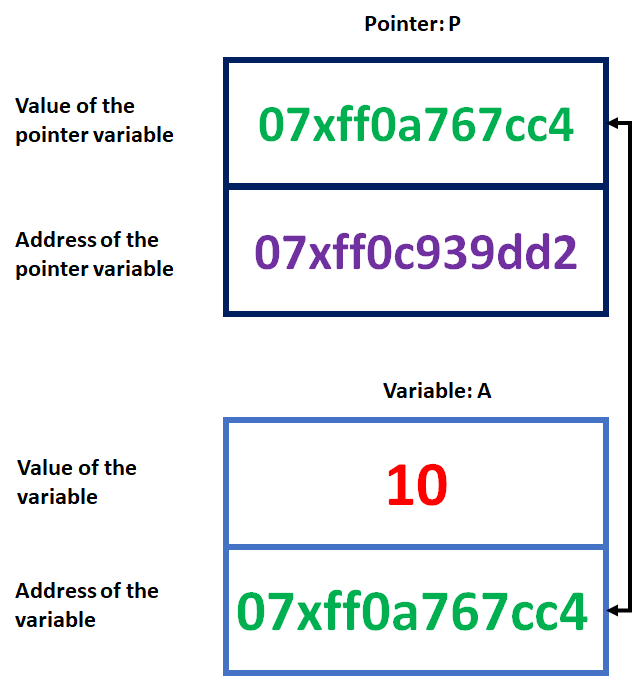
A pointer is also a variable that hold an address which is the location of another variable in memory. Since a pointer is also a variable, therefore its value is also stored in the memory in another location. In given image, we have assigned the address of a variable “A” to a pointer variable “P”. The link between the variables “P” and the variable “A” can be visualized as shown in the figure.
ABAP Field Symbols – Pointer Illustration
The address of A is 07xff0a767cc4. We can see that the value of variable “P” is the address of the variable “A”. Thus, we may access the value of “A” by using the value of “P” [how to access is explained later]. Therefore, we say that the variable “P” points to the variable “A”, hence “P” got the name ‘pointer’.
Referencing and Dereferencing Pointer:
Referencing Pointer: As the name suggest, Referencing is used for reference. A referencing pointer is the one that uses & operator (ampersand character) to set a pointer variable i.e. Address assignment of a variable to a pointer.
int a;
int* p1;
a = 11;
p1 = &a; //p1 references c1
Dereferencing Pointer: As the name suggests, Dereferencing is used to get values out of a reference. A dereferencing pointer is the one that uses * operator (asterisk character) to get the value stored at a pointer.
int b;
b = *p1; //value of b will be then 11. Since we have assigned address of a to p1 in above example
Why to use a pointer:
A pointer is used to reduce the length and complexity of a program and hence increase the execution speed.
What is a Field Symbol?
Just like a pointer discussed above, SAP also introduced something called Field-Symbols. It refers either a table, a field or even anything. When I say anything, I mean that the structure of field symbol will be determined dynamically. In simple words, a field symbol is just a pointer that is used to point a specific line of internal table.
Definition
A field symbol in ABAP is a dereferencing pointer that is mainly used to point specific lines of Internal table. It can be used to point either a table, a field or a dynamic structure. It is used as an alternative to work area to reduce the memory consumption and increase the performance of a program.
Syntax
FIELD-SYMBOLS <fs> { typing | obsolete_typing }.
The ABAP keyword FIELD-SYMBOLS is used to declare a field symbol <fs>. Fs is the part of naming convention and the mandatory angle brackets distinguish them from the other data objects.
Syntax for declaring a field symbol using different data types:
FIELD-SYMBOLS: <fs_example1> TYPE field name.
FIELD-SYMBOLS: < fs_example2> TYPE table.
FIELD-SYMBOLS: < fs_example3> TYPE REF TO DATA. "here DATA is a reference type
The keywords which are used to assign a value to the field symbol are ASSIGNING and ASSIGN.
ASSIGN <itab> [ KEY primary_key (‘…’) = ‘…’] TO <fs_example>.
It is done because, a pointer must have an address to refer, here we assign an address to the field symbol.
It is very important to check if a field symbol is assigned or not else, we will get a run-time error.
IF <FS_EXAMPLE> IS ASSIGNED.
**Your code
ENDIF.
Dynamic Field Symbol or Field-Symbols Inline-Declaration
With the introduction of inline declaration of field symbols, we don’t have to check whether it is assigned or not. Also, we don’t have to declare a field symbol directly.
Syntax:
…. FIELD-SYMBOL(<fs>) ….
Example
LOOP AT <itab> ASSIGNING FIELD-SYMBOL(<fs_line>).
*** Your Code
ENDLOOP.
Preface – This post is part of the ABAP Beginner series.
Modularization Techniques in ABAP is a way to write codes in different processing blocks like subroutine, Function Modules and ABAP objects. In this article, we will learn what is a Modularization, its types and advantages.
Introduction
The literal meaning of Modularization is “design or production of something in a separate section”. All the ABAP programs are modular in structure. This can be easily understood from ABAP Events. All these events are different blocks and are part of general execution of ABAP programs.
Apart from this internal modularization, ABAP also provides external Modularization techniques. In this external modularization technique, ABAP codes are written in different processing blocks like subroutine, Function Modules and ABAP objects, and are called from ABAP report.
These processing blocks that we call from ABAP programs are called procedures.
Modularization Techniques in ABAP – Image Illustration
Definition:
Modularization Techniques in ABAP is a way to incorporate reusability in ABAP programs. It improves the readability and maintainability of ABAP programs, prevents redundancies, incorporates reusability of functions, and the encapsulation of data.
Type of Modularization in ABAP
Following are the processing blocks that can be called from ABAP programs: 1. Subroutines
2. Function modules
3. Methods (see ABAP Objects)
Following are the modularization technique ABAP allows you to modularize source code by placing ABAP statements: 1. Local Macros
2. Global Include Programs
Advantages of Modularization in ABAP
Modularization Technique in ABAP brings following advantages to ABAP programs:
Improves the readability and maintainability of ABAP programs
Preface – This post is part of the ABAP Beginner series.
Parallel Cursor in ABAP is a way to modify the conventional nested loop in such a way that the overall performance of the ABAP program gets improved.
Introduction
Suppose we have two tables, one table has Employee basic details and another table has Employee monthly salary details. And the requirement is to print Employee Basic details with all his salaries. What a programmer will do, he will write two Loops. The first loop will get the employee basic details one by one and the other loop will get employee salary details. You can check this thing in below ABAP code:
LOOP AT zemployee_basic INTO wa_employee_basic.
LOOP AT zemployee_salary INTO wa_employee_salary where employee_id = wa_employee_basic-employee_id.
Write: wa_employee_basic-employee_id, wa_employee_salary-month, wa_employee_salary-amount.
ENDLOOP.
ENDLOOP.
The above code will work fine and will print Employee ID, Month of the Salary and Amount of the salary of each and every employee.
Parallel Cursor: Loop in Loop Image Illustration
What if you want to find Salary Amount of one person for a particular month? You will again write the same loops to find the required details.
Also, for every new Employee ID, the second Loop still goes through the whole data.
What we conclude with this process is that, this process is neither good for printing data nor good for search operation as it wastes ample amount of time.
Parallel Cursor Concept
To curb this problem, a concept called Parallel Cursor was introduced by SAP ABAP.
According to Parallel cursor concept, we need to follow following steps:
Step 01: Sort both the tables
Step 02: Write the first loop, like the previous way itself.
Step 03: Read the second table with the key that was required to search the data. This would give the first value regarding the key and also its position in the table [SY-TABIX].
Step 04: If the above step executed successfully, it means data is there in the second table associated with the key. Hence the SY-SUBRC will be set to zero. In this step we will check the value of SY-SUBRC. If it is zero, than we will proceed.
Step 05: Assign the SY-TABIX value into a local variable. We do this step to preserve the SY-TABIX value as it changes with the loop.’
Step 06: Now it’s the time to write the second loop. This time we don’t write the WHERE condition. This time we will write FROM condition with the local variable we initialized above.
Step 07: In this step we check if the key of first table is equal to the key of second table or not. If not, then exit the loop. This stops the loop from reading non required data.
Step 08: In this step we write our actual logic or print statements. And then close both the loops.
Parallel Cursor Example
Let us implement parallel cursor algorithm in the last example we discussed.
From above steps and example, it is clear that Parallel cursor is better than conventional nested loops. Actually nested loops take O(n1*n2) time to execute both the loops while parallel cursor takes O(n1+n2) time to execute the same.