Category: ABAP RAP

  • SAP ABAP RAP / Restful Application Programming Model: Projected association is not draft enabled

    SAP ABAP RAP / Restful Application Programming Model: Projected association is not draft enabled

    In case you are getting this error:

    Error in entity ‘(Projection_View_Name(CDS))’: Projected association _AssociationName of Projection_View_Name is not draft enabled.”

    And you tried to fix it, but now getting this error:

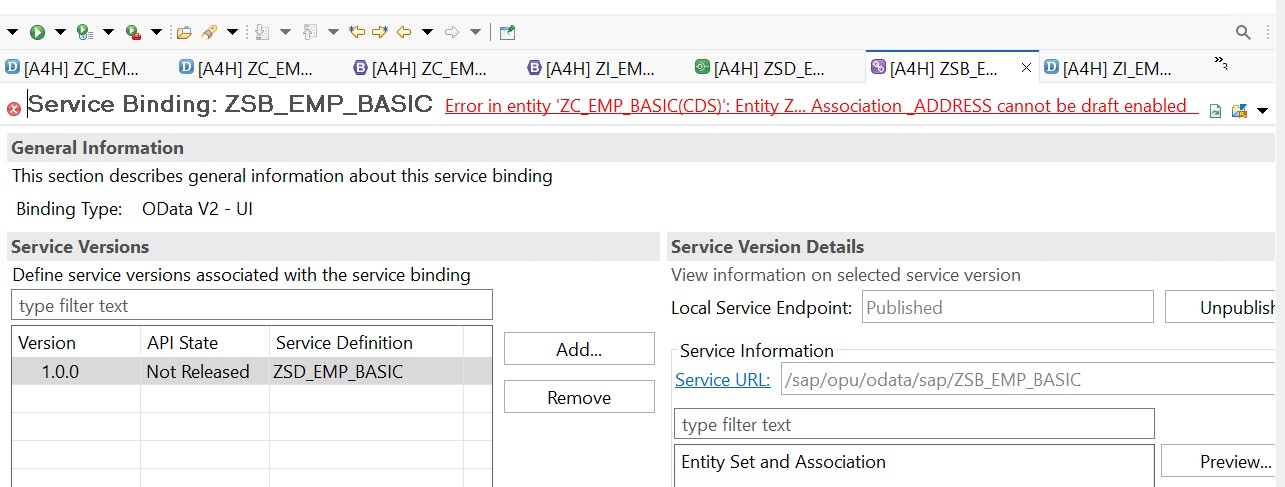
    “Error in entity ‘Projection_View_Name(CDS)’: Entity Projection_View_Name: Association _AssociationName cannot be draft enabled.”

    SAP Community Ref: Similar question on SAP

    You can perform the following steps to fix it:

    Step 01: Start from your Behaviour Definition [both consumption/projection view as well as I view] and check if the draft is enabled everywhere as required.

    Step 02: If you have enabled draft at every association level using {with draft;} and still not able to fix it, then visit each CDS file linked with the Behaviour definition and try to hove over all the yellow underlines and fix them [by clicking right click and choosing “Quick Fix”]

    Step 03: Also, check if you have missed adding etag master at the association level behaviour definition.

    Step 04: Try to change the cardinality from [0..*] to [0..1] and then try to activate the Service Binding again.

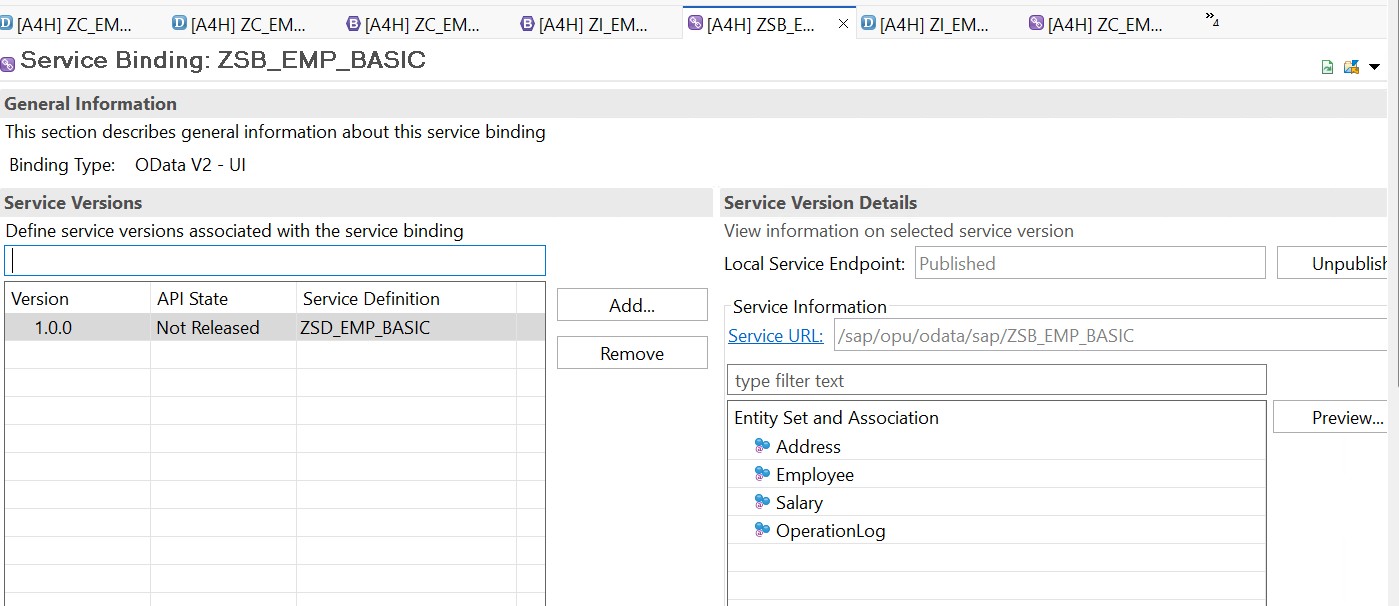
    If the above steps are fine, and you try to refresh the screen and activate the screen, you will see the success screen as below:

    You can check the SAP ABAP RAP Course here.

  • SAP ABAP RAP CRUD Operation in S/4HANA Cloud [Managed]

    Preface – This post is part of the SAP ABAP RAP series.

    Introduction

    SAP RAP stands for Restful Application Programming. It is the newest framework by SAP to develop projects using ABAP and S/4HANA. In this project, we will learn simple steps to learn how to create a program on SAP ABAP RAP CRUD Operation in S/4HANA Cloud [Managed].

    Types of Projects using SAP RAP

    • S/4HANA On Premise [Managed]
    • S/4HANA Cloud [Managed]
    • S/4HANA On Premise [Managed with Save]
    • S/4HANA Cloud [Managed with Save]
    • S/4HANA On Premise [Unmanaged]
    • S/4HANA Cloud [Unmanaged]

    ABAP RAP Configuration Flow

    ABAP RAP Configuration Flow

    ABAP RAP Data Flow

    ABAP RAP Data Flow

    Project Structure

    Here is what we will do

    • Create ABAP Table
    • Create CDS Views
    • Add Metadata
    • Create Behaviour Definition
    • Create Service Definition
    • Create Service Binding
    • Test the RAP Fiori Application

    RAP Project Structure

    Steps to Follow

    1. Create a Z table => Populate Table
    2. On top of the table, create an Interface CDS View => Metadata Extension
    3. On top of your basic or Interface CDS view, create a root view (Consumption View)
    4. On top of the CDS view, create Behaviour Definition
    5. On top of the Consumption CDS view, create a Service Definition
    6. On top of Service Definition, we add Service Binding
    7. Activate and Click Publish


    Code

    1. Table

    @EndUserText.label : 'Employee Data'
    @AbapCatalog.enhancement.category : #NOT_EXTENSIBLE
    @AbapCatalog.tableCategory : #TRANSPARENT
    @AbapCatalog.deliveryClass : #A
    @AbapCatalog.dataMaintenance : #RESTRICTED
    define table zemp_data {
    
      key client : abap.clnt not null;
      key empid  : abap.int4 not null;
      fname      : abap.sstring(20);
      lname      : abap.sstring(20);
      phone      : abap.sstring(20);
    
    }

    Program to Upload data via Class:

    CLASS zemp_data_rudra DEFINITION
      PUBLIC
      FINAL
      CREATE PUBLIC .
      PUBLIC SECTION.
      Interfaces if_oo_adt_classrun.
    METHODS
     UPLOAD_EMP_DATA.
      PROTECTED SECTION.
      PRIVATE SECTION.
    ENDCLASS.


    CLASS zemp_data_rudra IMPLEMENTATION.
    METHOD : UPLOAD_EMP_DATA.
    Data: lt_type_emp TYPE STANDARD TABLE OF Zemp_data.
          lt_type_emp = Value #( ( empid = 1
         fname = 'Rudra'
         lname = 'Pandey'
         phone = '999999')
         ( empid = 2
         fname = 'Deepak'
         lname = 'Ram'
         phone = '888888')
         ).
    
    INSERT Zemp_data from TABLE @lt_type_emp.
    ENDMETHOD.
    METHOD if_oo_adt_classrun~main.
    UPLOAD_EMP_DATA( ).
    ENDMETHOD.
    
    
    ENDCLASS.


    2. Interface CDS View

    @AbapCatalog.sqlViewName: 'ZV_EMPDATA'
    @AbapCatalog.compiler.compareFilter: true
    @AbapCatalog.preserveKey: true
    @AccessControl.authorizationCheck: #NOT_REQUIRED
    @EndUserText.label: 'Interface View'
    define root view Z_I_EMP_DATA as select from zemp_data {
        key empid,
        fname,
        lname,
        phone
    }


    3. Metadata Extension

    @Metadata.layer: #CORE
    @UI: { 
    headerInfo: { 
    typeName: 'Employee Data',
    title: { type: #STANDARD, label: 'Employee Data', value: 'empid'}
    }
    }
    annotate view Z_C_EMP_DATA
        with 
    { 
    @UI.facet: [{ id: 'EmpView',
    purpose: #STANDARD,
    type: #IDENTIFICATION_REFERENCE,
    label: 'Employee Data',
    position: 10 }]
    
    @UI: { lineItem:[{
    position: 10,
    importance: #HIGH,
    label:'Employee ID'}],
    identification: [{ position: 10}],
    selectionField: [{ position: 10}]
    }
      Empid;
      
      
      @UI: { lineItem:[{
    position: 20,
    importance: #HIGH,
    label:'First Name'}],
    identification: [{ position: 20}],
    selectionField: [{ position: 20}]
      }
      Fname;
      
    @UI: { lineItem:[{
    position: 30,
    importance: #HIGH,
    label:'Last Name'}],
    identification: [{ position: 30}],
    selectionField: [{ position: 30}]
      }
      Lname;
      
      @UI: { lineItem:[{
    position: 40,
    importance: #HIGH,
    label:'Phone Number'}],
    identification: [{ position: 40}],
    selectionField: [{ position: 40}]
      }
    
      Phone;
        
    }


    4. Consumption View

    @AccessControl.authorizationCheck: #NOT_REQUIRED
    @EndUserText.label: 'Root View for Employee Data'
    @Search.searchable: true
    @Metadata.allowExtensions: true
    define root view entity Z_C_EMP_DATA provider contract transactional_query
     as projection on Z_I_EMP_DATA as EmpView 
    {   @EndUserText.label: 'ID'
        key empid as Empid,
         @EndUserText.label: 'First Name'
         @Search.defaultSearchElement: true
        fname as Fname,
         @EndUserText.label: 'Last Name'
        lname as Lname,
         @EndUserText.label: 'Phone Number'
        phone as Phone
    }


    5. Behaviour Definition on Interface CDS View

    managed;// implementation in class zbp_i_emp_data unique;
    //strict ( 2 ); //Uncomment this line in order to enable strict mode 2. The strict mode has two variants (strict(1), strict(2)) and is prerequisite to be future proof regarding syntax and to be able to release your BO.
    
    define behavior for Z_I_EMP_DATA  alias EmpView
    implementation in class zbp_i_emp_data unique
    persistent table ZEMP_DATA
    lock master
    //authorization master ( instance )
    //etag master <field_name>
    {
    
    field(mandatory) empid, fname, lname, phone;
    create;
    update;
    delete;
    //static function DefaultForCreate result [1] $self;
    
    mapping for Zemp_data
    {
    empid = empid;
    fname = fname;
    lname = lname;
    phone = phone;
    }
    }


    6. Behaviour Definition on Consumption CDS View

    projection;
    //strict ( 2 ); //Uncomment this line in order to enable strict mode 2. The strict mode has two variants (strict(1), strict(2)) and is prerequisite to be future proof regarding syntax and to be able to release your BO.
    
    define behavior for Z_C_EMP_DATA alias EmpView
    use etag
    {
      use create;
      use update;
      use delete;
    }


    7. Service Definition

    @EndUserText.label: 'Service Definition for Employee Data'
    define service ZEMP_SRV {
      expose Z_C_EMP_DATA;
    }


    8. Service Binding

    Service Binding

    9. Fiori Application

    A. List Page

    Fiori List View

    B. Object Page

    Fiori Object View

    Tutorial Video

    You can watch the video below to learn implementation:

    [embedyt] https://www.youtube.com/watch?v=oAphoD3o90s[/embedyt]
  • SAP EML (Entity Manipulation Language) in RAP: Guide

    SAP EML (Entity Manipulation Language) in RAP: Guide

    Preface – This post is part of the SAP ABAP RAP series.

    Introduction

    SAP Entity Manipulation Language (EML) is an ABAP language that is used to control the behavior of business objects in the context of the RESTful Application Programming model (also called SAP ABAP RAP). The business objects developed with the SAP ABAP RAP model can be consumed not only by OData protocol (Web API, Fiori UI) but also in ABAP using EML statements.

    There are two flavors of EML:

    • Standard API: Uses signature of business object entities
    • Generic API: Used for dynamic consumption of the business object

    The Generic API is used for the dynamic integration of business objects into other frameworks, such as the Cloud Data Migration Cockpit. Generic API is not in our scope. We will focus on Standard API’s.

    The Standard API’s are used when target business object is statically specified. It provides READ and MODIFY statements for the access of transactional scenarios of objects and COMMIT access for triggering save sequence. Using these syntaxes we will be able to perform the transactional behavior ( Create, Update, Delete, Actions, Read ) of business objects that are defined in Behaviour Definition.

    SAP EML Scenarios

    The following table gives you an overview of different SAP EML scenarios:

    Scenario Description Relevant EML statements
    Develop(BO with IN LOCAL MODE within its own behaviour pool) In EML develop scenario, when you provide the functionality for your own BO in its own behaviour pool, you use IN LOCAL MODE. It bypasses the access control, authorization control and feature instance control.  You can use it with CRUD and Actions. ·         READ/READ by ASSOCIATION

    ·         CREATE/CREATE BY ASSOCIATION

    ·         UPDATE/UPDATE BY ASSOCIATION

    ·         DELETE/DELETE BY ASSOCIATION

    ·         EXECUTE

    ·         AUGMENTING BY ASSOCIATION

    Consume (BO from other behaviour pool/ released objects) In consume scenario, you can use EML to consume other BO in or released BO’s. Here, you are not allowed to used IN LOCAL MODE. ·         READ/READ by ASSOCIATION

    ·         CREATE/CREATE BY ASSOCIATION

    ·         UPDATE/UPDATE BY ASSOCIATION

    ·         DELETE/DELETE BY ASSOCIATION

    ·         EXECUTE

    ·         GET PERMISSION

    ·         SET LOCK

    Test To test the BO outside of ABAP behaviour pool, you can use EML statements. Here, it is mandatory to add COMMIT statement to end RAP LUW. When in case of implementation inside behaviour pool, save it is done by the framework and we need not to write explicit COMMIT there. ·         READ/READ by ASSOCIATION

    ·         CREATE/CREATE BY ASSOCIATION

    ·         UPDATE/UPDATE BY ASSOCIATION

    ·         DELETE/DELETE BY ASSOCIATION

    ·         EXECUTE

    ·         GET PERMISSION

    ·         SET LOCK

    ·         COMMIT ENTITIES

    ·         ROLLBACK ENTITIES


    SAP EML Syntax

    SAP EML syntax has three major sections:

    • READ
    • MODIFY
    • COMMIT


    READ syntax

    READ is used to retrieve the data or you can say read the data of the entity. The syntax supports:

    • Read: Read the entity
    • Read by association: Read child entity using parent key


    Short syntax –

    READ ENTITY
    
     EntityName [FIELDS ( field1 field2 ... ) WITH] | [FROM] it_instance
    
    RESULT et_result
    
    BY \association_name [FIELDS ( field1 field2 ... ) WITH] | [FROM] it_instance_rba
    
    RESULT et_result_rba
    
    LINK et_link_rba
    
    [FAILED ct_failed].
    
    where,
    
    EntityName: specifies the CDS view entity
    
    FIELDS: specifies the direct read for the given fields
    
    RESULT: used to store the retrieved data in variable
    
    LINK: used to store the key pair that is used for read by association operation
    
    Failed: used to store the response about failed retrieve (key-value, fail cause etc)

    Long syntax-

    READ ENTITIES OF RootEntityName
    
    ENTITY entity_1 " entity alias name [FIELDS ( field1 field2 ... ) WITH] | [FROM] it_instance_1
    
    RESULT it_result
    
    BY \association1_name [FIELDS ( field1 field2 ... ) WITH] | [FROM] it_instance_rba
    
    RESULT et_result_rba
    
    LINK et_link_rba
    
    ENTITY entity_2_name " entity alias name [FIELDS ( ......
    
    ENTITY entity_3_name " entity alias name
    
           ... [FAILED ct_failed].

    The long syntax allows you to club READ operation of multiple entities of Business Object specified by RootEntity name at one go. Also, we can use alias names of entities defined in Behavior Definition.

    Example:

    READ ENTITIES OF /dmo/i_travel_m
    
    ENTITY travel
    
    FIELDS ( travel_id
    
      agency_id
    
                          customer_id
    
                          booking_fee
    
                          total_price
    
                          currency_code )
    
    WITH CORRESPONDING #( keys )
    
    RESULT DATA(ct_read_result)
    
    FAILED DATA(ct_failed)
    
    REPORTED DATA(ct_reported).

    MODIFY syntax

    MODIFY statement is used when we want to perform the change of data in entities. It includes:

    • Create
    • Create by association
    • Update
    • Delete
    • Execute (for Action)

    Short syntax-

    MODIFY ENTITY EntityName
    
    CREATE [FIELDS ( field1 field2 ... ) WITH] | [FROM] it instance_crt
    
    CREATE BY \association_name [FIELDS ( field1 field2 ... ) WITH] | [FROM] it_instance_cba
    
    UPDATE [FIELDS ( field1 field2 ... ) WITH] | [FROM] it_instance_upd
    
    DELETE FROM it_instance_del
    
    EXECUTE action_name FROM it_instance_act
    
    [RESULT et_result_a] [FAILED ct_failed] [MAPPED ct_mapped] [REPORTED ct_reported].

    Long syntax-

    MODIFY ENTITIES OF RootEntityName
    
    ENTITY entity1_name CREATE [FIELDS ( field1 field2 ... ) WITH] | [FROM] it_instance1_crt
    
    CREATE BY \association_name [FIELDS ( field1 field2 ... ) WITH] | [FROM] itinstance1_cba
    
    UPDATE [FIELDS ( field1 field2 ... ) WITH] | [FROM] itinstance1_u
    
    DELETE FROM it_instance1_del
    
    EXECUTE action FROM it_instance1_act
    
    [RESULT et_result]


    ENTITY entity2_name
    
    CREATE FROM it_instance2_crt
    
    ...


    ENTITY entity3_name
    
    ... [FAILED ct_failed] [MAPPED ct_mapped] [REPORTED ct_reported].

    The long syntax allows clubbing multiple MODIFY operations of entities specified by RootEntity of the business object. We can specify alias names for entities if they are defined in behaviour definition.

    Example

    MODIFY ENTITIES OF /dmo/i_travel_m
    
    ENTITY travel
    
    CREATE FIELDS ( travel_id
    
       agency_id
    
       customer_id
    
       begin_date
    
       end_date
    
       booking_fee
    
       total_price
    
       currency_code
    
       description
    
       overall_status )
    
    WITH lt_create
    
    MAPPED ct_mapped
    
    FAILED ct_failed
    
    REPORTED ct_reported.


    COMMIT syntax

    The COMMIT syntax is used along with the MODIFY statement. As MODIFY statement does not change the data at database level, it is required to call COMMIT after MODIFY to persist the database changes.

    The modify statement set the data to transaction buffer and buffer data gets cleared after the ABAP session is closed. That means we need to trigger save sequence to save the data from the transactional buffer to the database. This trigger is called by executing the COMMIT statement. For save sequence methods you can refer to our previous articles.


    Simple syntax-

    COMMIT ENTITIES.


    Long syntax-

    COMMIT ENTITIES
    
       [RESPONSE OF rootentityname1
    
    [FAILED ct_failed]
    
     [REPORTED ct_reported]]
    
    [RESPONSE OF rootentityname2
    
    [FAILED ct_failed]
    
    [REPORTED ct_reported]].

    Using long syntax we can call COMMIT for multiple entities by explicitly specifying  RootEntity names. Whereas, the simple syntax COMMIT ENTITIES will also work for multiple entities in the same LUW. Here we need to specify the RootEntity name.

  • SAP ABAP RAP CRUD operation

    Preface – This post is part of the SAP ABAP RAP series.

    Introduction

    To enable the CRUD operations in SAP ABAP RAP managed scenario, you need to enable the transactional behavior in Behavior Definition. There is no need to explicitly implement the CRUD operation in behavior implementation class, the RAP framework itself handles this.

    Steps for enabling CRUD in RAP Managed scenario

    1. Create CDS views
    2. Create Behavior Definition
    3. Enable transactional behavior of Business Object and activate.
    4. Test using EML (Entity Manipulation Language)

    Create CDS views

    Procedure

    1. Right-click on package
    2. Go to New >> Other Repository Objects >> Core Data Services >> Data Definition
    3. Provide the details (Name, Description).
    4. Select Next and provide the Transport Request number.
    5. Select Finish.

    Interface view SAP RAP

    Create Behavior Definition

    Procedure

    1. Right-click on root CDS view
    2. Select New Behavior Definition
    3. Provide the details (Name, Description).
    4. Select Next and provide the Transport Request number.
    5. Select Finish.

    Create Behavior Definition

    Enable transactional behaviour and activate

    Add transactional behaviour in Behavior Definition

    Test using EML

    In Report, implement EML statements to test the CRUD operations

  • OData Development using SAP ABAP RAP

    Preface – This post is part of the SAP ABAP RAP series.

    Introduction

    In SAP ABAP RESTful Application programming, the business service is RESTful service which is called by end-users/customers. It consists of two parts: Service Definition and service binding. The service binding implements the protocol such as OData and the services to be consumed by customers. In this article we will learn OData development using SAP ABAP RAP.

    Steps for OData development using SAP ABAP RAP

    1. Create Service Definition
    2. Expose Services
    3. Create Service Binding
    4. Select service type as OData while creation. Click Finish.
    5. Activate service

    Create Service Definition

    Right-click on Package >> New >> Other Repositories Objects >> Service Definition.
    Provide the details to create a Service Definition.

    Create Service Definition

    Once the Service Definition is created, expose the required entities and activate it.

    expose the required entities

    Create Service Binding

    Right-click on Package >> New >> Other Repositories Objects >> Service Binding.
    Provide Package details, Name, Description and Service Definition name. Select the Binding Type as ODATA to create OData Service Binding.

    SAP RAP Create Service Binding

    Verify the information and click on activate.

    OData Publish SAP RAP

  • Service Consumption and Web APIs using SAP ABAP RAP

    Preface – This post is part of the SAP ABAP RAP series.

    Introduction

    In this article, we will see how to create services in SAP RAP (RESTful Application Programming) and consume the same in UI5/Fiori using the given steps:

    1. Create service definition
    2. Expose entities in the Service Definition
    3. Create Service Binding
    4. Publish OData service
    5. Implement OData in UI5/Fiori

    Create Service Definition

    Right-click on Package >> New >> Other Repositories Objects >> Service Definition.
    Provide the details to create a Service Definition.

    SAP RAP Create Service Binding

    Once the Service Definition is created, expose the required entities and activate it.

    expose the required entities


    Create Service Binding

    Right-click on Package >> New >> Other Repositories Objects >> Service Binding.
    Provide Package details, Name, Description and Service Definition name. Additionally, select the Binding Type to create Service Binding.

    SAP RAP Create Service Binding

    Verify the information. To expose the service, click on activate.

    You can access the metadata details by following the Service URL provided in Service Binding. To preview the application, click on provided Preview button.

    OData Publish SAP RAP

    How to consume OData create by SAP RAP

    Like any other OData created by CDS or SEGW, the OData of SAP RAP can be used similarly in UI5/Fiori Applications. Read more about OData here.

  • Dealing with Existing Code in SAP RAP

    Preface – This post is part of the SAP ABAP RAP series.

    Introduction

    This article will provide the step-by-step enabling of existing code in RAP. Using the steps below we will learn “Dealing with Existing Code in SAP RAP”.

    Steps:

    1. Create data model with CDS views
    2. Create Behavior Definition
    3. Add transactional behaviour in Behavior Definition
    4. Create Behavior Pool
    5. Implement transactional behavior of the existing application

    Create data model with CDS views

    Click here to follow step 1

    Create Behavior Definition

    Procedure

    1. Right-click on root CDS view
    2. Select New Behavior Definition
    3. Provide the details (Name, Description).
    4. Select implementation type as unmanaged
    5. Click Next and provide the Transport Request number.
    6. Select Finish.

    Create Behavior Definition SAP RAP

    Add transactional behaviour in Behavior Definition

    Add transactional behavior (Create/Update/Delete/Actions) of business objects.

    Add transactional behaviour in Behavior Definition SAP RAP

    Add transactional behaviour in Behavior Definition ABAP RAP

    Create Behavior Pool

    You can assign any number of behavior pools to behavior definition. Within a single global class, you can implement multiple local classes which defines the transactional behavior of the business object.


    Procedure

    Behavior Definition >> Right-click >> select New Behavior Implementation >> Provide details >> Finish

    Splitting implementation into different behavior pools

    Figure 1:Splitting implementation into different behavior pools


    Behavior Pool

    Figure 2: Behavior Pool

    When you go to Local Types in Behavior Pool, you can see below local classes.

    local classes in Behavioral Pool

    local implementation classes SAP RAP

    Within these local implementation classes, you can implement the business logic of existing behavior objects and test the end-to-end scenario using EML (Entity Manipulation Language) syntax.

  • Enabling the Transactional Behavior of an App in SAP RAP

    Preface – This post is part of the SAP ABAP RAP series.

    Introduction

    This article will provide a step-by-step guide to enable the transactional behaviour of an application in SAP RAP.

    1. Create data model with CDS views
    2. Create Behavior Definition
    3. Add transactional behaviour in Behavior Definition
    4. Create OData service
      1. Create a Service Definition
      2. Expose CDS view
      3. Create Service Binding
      4. Publish OData service
    5. Application preview

    Create data model with CDS views

    Procedure

    1. Launch ADT (ABAP Development Tool).
    2. Select package for your development.
    3. Right-click on package and choose NEW > Other Repository Objects > Core Data Services > Data Definition.
    4. Provide the details (Name, Description).
    5. Select Next and provide the Transport Request number.
    6. Select Finish.
    7. Provide the data source name and add the elements in the CDS views.
    8. Provide the root statement to the top node as shown below.
      data model with CDS views
    9. Similarly, create consumption views and add required annotations.


    Result Screen

    Interface view SAP RAP

    Figure 1: Interface view

    Consumption view SAP RAP

    Figure 2: Consumption view

    Create Behavior Definition

    Procedure

    1. Right-click on root CDS view
    2. Select New Behavior Definition
    3. Provide the details (Name, Description).
    4. Select Next and provide the Transport Request number.
    5. Select Finish.

    Create Behavior Definition

    Add transactional behaviour in Behavior Definition

    Add transactional behaviour to Behavior Definition as shown below.

    Add transactional behaviour in Behavior Definition

    Create OData service

    a.       Create Service Definition

    Procedure

    1. Right-click on root CDS view
    2. Select New Service Definition
    3. Provide the details (Name, Description).
    4. Select Next and provide the Transport Request number.
    5. Select Finish.

    Create Service Definition

    b.      Expose CDS view

    Expose CDS view


    c.       Create Service Binding

    Procedure

    1. Right-click on Service Definition
    2. Select New Service Binding
    3. Provide the details (Name, Description).
    4. Select Next and provide the Transport Request number.
    5. Select Finish.

    SAP RAP Create Service Binding

    d.      Publish OData Service

    Publish OData Service SAP RAP

    Application Preview

    Fiori App SAP RAP

    Fiori Detail Page SAP RAP


  • How to create a SAP ABAP RAP Project

    Preface – This post is part of the SAP ABAP RAP series.

    Introduction

    SAP ABAP RAP provides the intrinsic approach to build SAP Fiori based applications that are optimized for S/4 HANA and can run over on-premise as well as on the cloud. In this article we will learn how to create a SAP ABAP RAP Project.

    Prerequisites

    Before we start with the development of our first project using SAP ABAP RAP, we need a few things ready:

    SAP Cloud Platform ABAP Environment

    You should have access to and an account for SAP Cloud Platform ABAP Environment.

    Development Environment (IDE)

    • Install ABAP Development Toolkit (ADT).

    SAP recommends the latest version of the client installation. The download is available on https://tools.hana.ondemand.com/.

    • Access to and an account for the relevant space in SAP Cloud Platform Cloud Foundry.

    Authorization

    To create development artifacts, you need to have a developer role in the ABAP environment.

    Basic knowledge

    • ABAP Core Data Services (CDS)
    • ABAP Objects
    • ABAP Syntax

    Steps to create a SAP ABAP RAP Project

    1. Create an ABAP CDS View enabled with OData. Follow the steps mentioned here. This ABAP CDS View can be either basic, composite or consumption based upon the use case. The basic view is just a simple view created based upon ABAP table, the composite views are the ones that are created using multiple basic views or existing composite views. The consumption is the one that is consumed by the Fiori Apps (other views too can be consumed, it is created with final annotations such that UI5 has to call just this view and not the others).
    2. The very next thing that we create in ABAP RAP is a behavior definition. You can read the steps here. A behavior definition is an ABAP repository that represents the behavior of business objects in the context of SAP ABAP RAP. This is the place where we define the CRUD operations for the CDS Views.
    3. The last and important step is behavior Implementation. The steps to implement the same is mentioned here. This is the place where business logics are written.

    Thus in above steps we have created an ABAP CDS View, an ABAP OData, behavior definition and behavior Implementation.

    What is SAP RAP

    That’s it, this is how we create a SAP ABAP RAP Project. In our next articles, we will show you the implementation, step by step.

  • Developing Read-Only List Reporting Apps

    Preface – This post is part of the SAP ABAP RAP series.

    Introduction

    Using persistent data sources, we are going to implement a query for the OData service to get an application with the read-only feature. This OData service will be consumed by the Fiori Element application.

    This article will provide the step-by-step guide to build a read-only list reporting application.

    1. Create data model with CDS views.
    2. Add associations to CDS views for navigation purpose.
    3. Add relevant annotations.
    4. Changing UI field labels and description
    5. Create OData service
      1. Create a Service Definition
      2. Expose CDS views
      3. Create Service Binding
      4. Publish OData service
    6. Application preview

    Create data model with CDS views

    Procedure

    1. Launch ADT (ABAP Development Tool).
    2. Select package for your development.
    3. Right-click on package and choose NEW > Other Repository Objects > Core Data Services > Data Definition.
    4. Provide the details (Name, Description).
      Create data model with CDS views
    5. Select Next and provide the Transport Request number.
    6. Select Finish.

    Result Screen

    An inactive version of the data definition is created. You need to provide the data source name and add the elements in the CDS views. Similarly, create all the required CDS views.

    Generated Template code

    Figure 2: Generated Template code


    Add associations to CDS views for navigation purpose

    1. Define association and cardinality
      Define association and cardinality
    2. Define mapping condition
      Define mapping condition
    3. Add association element list in CDS view
      Add association element list in CDS view

    Add relevant annotations

    Add required annotations to fields (see the below figure).

    ABAP CDS Annotation

    Changing UI field labels and description

    UI field labels and description allows you to customize your UI application. You can add text annotation (@ObjectModel.text.association:'<_AssocToTextProvider>’),value help (@Consumption.valueHelpDefinition: [{ entity: { name: ‘<target_view>’ , element: ‘<target_element>’ }}]), search capability ( @Search.searchable: true ) and as many functionality to your field element.

    Changing UI field labels and description

    Create OData service

    a.       Create a service definition

    In service definition, we will expose our data models.

    Procedure

    1. Launch ADT (ABAP Development Tool).
    2. Select package for your development.
    3. Right-click on package and choose NEW > Other Repository Objects > Business Service > Service Definition.
    4. Provide the details (Name, Description).
      Create a service definition
    5. Select Next and provide the Transport Request number.
    6. Select Finish.


    b.      Expose CDS views

    In service definition, add the CDS view that you want to expose to UI. You can provide an alias also for the same. Once the CDS views are exposed, activate the service definition.

    Expose CDS views

    c.       Create Service Binding

    In service definition, we will expose our data models.

    Procedure

    1. Launch ADT (ABAP Development Tool).
    2. Select package for your development.
    3. Right-click on the package and choose NEW > Other Repository Objects > Business Service > Service Binding.
    4. Provide the details (Name, Description).
      Create Service Binding
    5. Select Next and provide Transport Request number.
    6. Select Finish.

    When you open the created service binding from editor you can see the below screen. As soon as the service binding is created, it is registered in your local system.

    Activate the service binding

    Activate the service binding and it is ready for consumption.

    d.      Publish OData service

    Once you activate the service binding, the OData service is published and is activated in SAP Gateway. Now it can be consumed by UI5 application.

    Publish OData service

    The service URL on the right side will provide the metadata information of OData service. Preview button will navigate you to the resulting UI service.

    Application preview

    The resulting UI5 application will look like this:

    Application preview