Blog

  • Merkle Tree

    Preface – This post is part of the Blockchain Basics series.

    Introduction

    In Blockchain, it is very important to keep our transaction and other data encrypted and secure. The security of data is not a new requirement and there is a whole different department working 365 x 24 for the same. This department is the department of cryptography. Under cryptography, a tree is an organization of data in form nodes and leaves as shown below. Since, it resembles a real life tree, that’s why it is named so. In this article we will explore more about tree and one of its important type i.e. Merkle tree.

    a tree

    What is a Cryptography Tree

    A Tree in Cryptographic world is a graphical structure which looks like upside down of a real tree with following features:

    • Root is at the top
    • Elements are known as nodes
    • Lines connecting elements are known as branches
    • Nodes without any further children are known as leaves

    The above points can be also seen in the image shown below:

    A cryptographic tree

    Here, Subject is the root. Science and English are the nodes. Physics, Chemistry, Biology, Grammar and Literature are the leaves. The line connecting all of them are the branches.

    What is a Merkle Tree

    A Merkle Tree, also known as Hash Tree, is a cryptographic tree in which every leaf node contains hash value of a data block, while the non-leaf nodes contains hash of child nodes. Thus the root of the tree is actually the hash of all of its child nodes. This concept was given by Ralph Merkle, hence named so.

    Merkle Tree in Blockchain

    As discussed above, A Merkle tree in a blockchain is also a representation of blockchain data (in our case hash key of the transaction data) in a form of leaf and child node. All the nodes are ultimately connected to a single root. The root is the representation of all the transaction data stored in the nodes as hash keys into a single hash key. Let us make it simple, a Merkle tree is there with multiple branches and each branch has its own branch. Now the last level of branches will have the transactional data in form of hash keys. These hashed keys will be put into pairs and will be hashed again, as shown in the image below. This process gets repeated until we get only one hash. This hash is then stored in the Blockchain as Data and using it only other data can be retrieved or searched. This high level of hashing makes it tamper proof.

    Merkle Tree

    Advantages

    • It makes Blockchain Tamper proof
    • It makes the blockchain light in terms of space requirement, hence it makes the blockchain fast and light
    • It helps to verify the information of a blockchain
  • Timestamp

    Preface – This post is part of the Blockchain Basics series.

    Introduction

    Whenever a transaction happens anywhere, it is very important to keep the time and date of that transaction in record. This record not only helps in tracing down the transaction for validity but also helps in reducing the number of frauds and maintaining the transaction details in current sequence. To maintain data and time separately is a tedious job. To get rid of this problem, timestamp was introduced which is a mixture of both. In this article we will explore all about it.

    What is a Timestamp

    A timestamp is a sequence of encoded date and time information almost accurate to a small fraction of seconds. There are many ways to represent timestamps, some are shown below:

    Examples:

    • Wed 01-01-1999 6:00
    • 1995-10-30 T 10:45 UTC
    • 1997-11-09 T 11:20 UTC
    • Sat Jul 23 02:16:57 1995
    • 1256953731 (Unix time)
    • (1979-07-21 T 02:56 UTC) –
    • 07:38, 11 December 2019 (UTC)
    • 1995-102 T 10:15 UTC (year 1985, day 102 = 12 April 1995)
    • 1995-W15-5 T 10:15 UTC (year 1985, week 15, day 5 = 12 April 1995)
    • 20190203073000 (02/03/2019 7:30:00)

    Timestamp in Blockchain

    A timestamp in a blockchain is a Date-time value that is stored in a block.  As mentioned earlier, any transaction is incomplete without date and time information. In blockchain, it also tells at which time that block was created. In Blockchain this value is in the form of a Unix Timestamp.

    UNIX Timestamp

    Unix Timestamp is the number of seconds that have elapsed since 01.01.1970 which means 0000000000 in UNIX time is equal to January 1, 1970 12:00:00 AM.

    A timestamp is converted value of GMT. If a block is created, it will take current time of GMT and convert it into Unix Time. Once converted, it will validate it if it is greater than the saved time of previous block. Once validated, then only it is saved. We can convert any time to UNIX time here.

    Timestamp

    In above figure, you can convert any time to Unix Time-stamp.

    How to get Timestamp

    Different languages provide different modules and functions to get time-stamp. In JavaScript, we can achieve using the code below:

    Date.now()

    Advantages

    • It keeps the transaction in timely order
    • It helps to create a log
    • It helps to reduce the cases of frauds
  • Transaction Data in Blockchain

    Preface – This post is part of the Blockchain Basics series.

    Introduction

    Many times you might have transacted money from ATM. That particular transaction results in deduction of some amount from your bank balance and the same amount you might have received from the ATM. This transaction happens at a particular instant of time. This data of amount deduction, the user name or ID and the timestamp together is termed as transaction data. Apart from this, transaction data might also include other important data. In this article we will discuss transactional data in detail.

    What is a Transaction Data

    Transaction data is a data that includes following information:

    • Timestamp
    • User Information
    • Transaction Information
    • Other Relevant Information such as Bank information, location information, security information

    Transactional Data in Blockchain

    In a blockchain, all the transaction records are saved as a transactional Data. Each block of a Blockchain contains thousands of transactional data and it becomes inefficient to store all the data inside each block as a series of data. This will not only decrease the search efficiency of a data but also increase the size of a block. To solve this issue, data inside a block is firstly converted into a hash data and then stored in the form of a Merkle tree.

    Blockchain Transaction Data

    Transaction Data in Database

    In a database, we have multiple types of information. All information cannot be saved together so there was a requirement to separate these data from one another. All the data that do not change for a long time, like name and educational details, were kept together and were named as Master Data. And all the data that gets updated at regular interval of time, like online shopping data gets updated on regular interval for online shopping websites, then it is termed as Transaction or Transactional Data.

    Advantages

    Following are the advantages of Transactional Data:

    • It helps to create a transaction log
    • It helps to maintain correct information of all
    • It helps to keep the transaction process simple and stable
  • Hashing in Blockchain

    Preface – This post is part of the Blockchain Basics series.

    Introduction

    In the world of database, hashing is a very famous term. Either it is used to sort a table based on hash keys or to encrypt a data using hash function. In this article we will discuss only the second part that in encryption of data. This encrypted data is the actual transaction value stored in a block.

    What is Hashing

    Hashing in blockchain is an encryption process in which an algorithm is used to convert a string of any length to a string of fixed length. It is a very important aspect in case of Blockchain as it helps us to keep track of huge transaction data without even saving them and rather saves hash of that data. There are various mechanism of hashing, such as Bitcoin uses SHA 256 while Ethereum uses Keccak-256 algorithms respectively. The only important thing to take away from this article is that this generated hash keys are the only that stores data of current block and address of the next block, hence helps in linking both the blocks and also keeping track of the previous block.

    How to do Hashing

    If you have understood what a hashing is, then you will be thinking how to implement it. Different programing language provide different modules to hash a data. These modules take a data as input and returns fixed length output. The output length depends upon the algorithm used within the module. For example, if the algorithm is SHA-256, then the output length will be 256 bits long. You can find SHA-256 Module for Node.js here.

    Example of Hashing

    In the diagram shown below, we have generated hash of a string using SHA 256 algorithm and you too can generate hash values from here. In ABAP you can use Method CALCULATE_HASH_FOR_RAW of Class CL_ABAP_MESSAGE_DIGEST to implement SHA-256 encryption hashing.
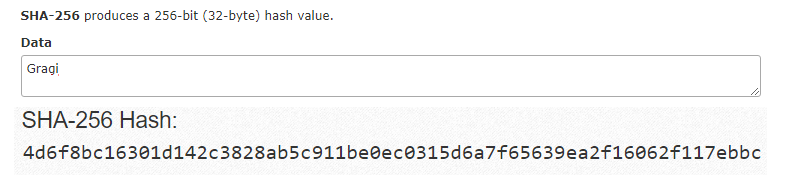
    SHA 256 Hashing in Blockchain

    SHA-256 Conversion

    In the example shown below we will write a function in JavaScript to achieve SHA-256 encryption:

    var sha256 = function sha256(ascii) {
      function rightRotate(value, amount) {
        return (value>>>amount) | (value<<(32 - amount));
      };
      
      var mathPow = Math.pow;
      var maxWord = mathPow(2, 32);
      var lengthProperty = 'length'
      var i, j; // Used as a counter across the whole file
      var result = ''
    
      var words = [];
      var asciiBitLength = ascii[lengthProperty]*8;
      
      //* caching results is optional - remove/add slash from front of this line to toggle
      // Initial hash value: first 32 bits of the fractional parts of the square roots of the first 8 primes
      // (we actually calculate the first 64, but extra values are just ignored)
      var hash = sha256.h = sha256.h || [];
      // Round constants: first 32 bits of the fractional parts of the cube roots of the first 64 primes
      var k = sha256.k = sha256.k || [];
      var primeCounter = k[lengthProperty];
      /*/
      var hash = [], k = [];
      var primeCounter = 0;
      //*/
    
      var isComposite = {};
      for (var candidate = 2; primeCounter < 64; candidate++) {
        if (!isComposite[candidate]) {
          for (i = 0; i < 313; i += candidate) {
            isComposite[i] = candidate;
          }
          hash[primeCounter] = (mathPow(candidate, .5)*maxWord)|0;
          k[primeCounter++] = (mathPow(candidate, 1/3)*maxWord)|0;
        }
      }
      
      ascii += '\x80' // Append Ƈ' bit (plus zero padding)
      while (ascii[lengthProperty]%64 - 56) ascii += '\x00' // More zero padding
      for (i = 0; i < ascii[lengthProperty]; i++) {
        j = ascii.charCodeAt(i);
        if (j>>8) return; // ASCII check: only accept characters in range 0-255
        words[i>>2] |= j << ((3 - i)%4)*8;
      }
      words[words[lengthProperty]] = ((asciiBitLength/maxWord)|0);
      words[words[lengthProperty]] = (asciiBitLength)
      
      // process each chunk
      for (j = 0; j < words[lengthProperty];) {
        var w = words.slice(j, j += 16); // The message is expanded into 64 words as part of the iteration
        var oldHash = hash;
        // This is now the undefinedworking hash", often labelled as variables a...g
        // (we have to truncate as well, otherwise extra entries at the end accumulate
        hash = hash.slice(0, 8);
        
        for (i = 0; i < 64; i++) {
          var i2 = i + j;
          // Expand the message into 64 words
          // Used below if 
          var w15 = w[i - 15], w2 = w[i - 2];
    
          // Iterate
          var a = hash[0], e = hash[4];
          var temp1 = hash[7]
            + (rightRotate(e, 6) ^ rightRotate(e, 11) ^ rightRotate(e, 25)) // S1
            + ((e&hash[5])^((~e)&hash[6])) // ch
            + k[i]
            // Expand the message schedule if needed
            + (w[i] = (i < 16) ? w[i] : (
                w[i - 16]
                + (rightRotate(w15, 7) ^ rightRotate(w15, 18) ^ (w15>>>3)) // s0
                + w[i - 7]
                + (rightRotate(w2, 17) ^ rightRotate(w2, 19) ^ (w2>>>10)) // s1
              )|0
            );
          // This is only used once, so *could* be moved below, but it only saves 4 bytes and makes things unreadble
          var temp2 = (rightRotate(a, 2) ^ rightRotate(a, 13) ^ rightRotate(a, 22)) // S0
            + ((a&hash[1])^(a&hash[2])^(hash[1]&hash[2])); // maj
          
          hash = [(temp1 + temp2)|0].concat(hash); // We don't bother trimming off the extra ones, they're harmless as long as we're truncating when we do the slice()
          hash[4] = (hash[4] + temp1)|0;
        }


  • Table Maintenance Generator in SAP ABAP

    Preface – This post is part of the ABAP Beginner series.

    Introduction

    In SAP ABAP Tables, it is sometime required to maintain a table (Create, update, edit or delete a record) manually. In this case, Table Maintenance Generator helps us to achieve the same. In this article, we will explore Table Maintenance Generator and will also learn the events associated with it.

    Definition

    • A tool used to tailor the tables created by end users.
    • End user do not have access to SE11 or SE11 T-Codes in production system so by using the generator they can customize the tables.
    • The end users can create, delete and modify entries.
    • After every changes done, user must go to SM30 T-code and by passing view/table name, select the maintain button to get the changes reflected.

    Prerequisite

    When we create a table in SE11 ABAP Dictionary, some features need to be activated.

    1. Delivery class
    • Delivery class are used for controlling data transport of tables for installation, upgrade, and client copy, and for transporting between customer systems.
    • The delivery class is also used in extended table maintenance.

    TMG Delivery Class


    • It helps in filling seven entries.

     Delivery Class Entries


    1. Data Browser/Table View Maint.
      This tab states whether data can be displayed or maintain a database table or view using the tools Data Browser T-code SE16 and Table View Maintenance T-codes SM30 and SM31.

    It has 3 features:-

    • Display/Maintenance allowed – A user can view in data browser as well as make changes in the data browser and also maintain and display in SM30 and generate table maintenance dialog in SE54.
    • Display/Maintenance allowed with restrictions – A user can view and make changes but with some restrictions.
    • Display/Maintenance not allowed – A user can neither view in data browser (SE16) nor maintain.

    Table View Maint

    How to Create a Table Maintenance Generator

    • Go to SE11 (ABAP Dictionary) => pass the table name => change => utilities => table maintenance generator => Generate table maintenance dialog: Generation Environment.

    Generate table maintenance dialog

    • Pass the Authorization Group name, if there is no specific group of people then assign it to &NC& (without authorization group). In total 759 groups can be assigned.
    • Authorization object – Element of the authorization system. Authorization objects allow complex checks linked to several conditions of an authorization which allows a user to carry out an action.
    • Function Group – Pass the name where generated maintenance modules can be stored. It can be same as the table name.
    • Maintenance Screens
      • Maintenance type
        • Select the maintenance type and click on find screen numbers on the tool bar=> propose screen numbers => Screen number gets populated => Create a button on the application toolbar => Assign TMG and function group to the proper package and click OK.
        • A pop up appears (Request completed without errors).
        • Table maintenance generator is created with this message in the status bar.
    • Description of maintenance types
      • One step maintenance, one screen that is overview screen is displayed in which the entries are displayed in the form of lists.
      • It is processed at run time.
      • Entries should be displayed in one line of the screen.
      • Two step maintenance, an additional screen (single screen) is processed at run time.
      • The single screen can be called from the overview screen by function key for every entry.

    How to Use a Table Maintenance Generator

    Follow the given steps to use a Table Maintenance Generator:

    1. Go to SM30

    Table Maintenance Generator

    1. Pass the name of the table => Maintain (click) => the overview screen appears.

    TMG New Entries

    1. Click on NEW entries => add new entries and save (this is a part of another screen).

    As mentioned, only one record at a time is allowed to enter, since it is user friendly.

    1. If we do any changes in the table, then we need to re -adjust, re-create TMG.

    Events of a Table Maintenance Generator

    Follow given steps to create Events in ABAP TMG

    1. SE11 => Change => TMG => Environment => Events

    TMG Events

    1. After selection of type of event => Editor => Write the code between FORM/ENDFORM.

    TMG Event Form

    1. List of available events:

    TMG Event List 1 TMG Event List 2


  • What are Restful Web Services

    Preface – This post is part of the SAP ABAP OData Tutorial series.

    Introduction

    In our previous article we have discussed what is an API. There are different types of API calls e.g. Simple Object Access Protocol (SOAP), Remote Procedure Call (RPC) and Representational State Transfer (REST). All these API calls have same purpose i.e. to transfer data securely among two or more systems. In this article we will only explore the Restful Web Services.

    What is REST

    As stated earlier, REST stands for Representational State Transfer. It is a simple way of sending and receiving data between client and server. It doesn’t require any software or standards to transfer data. It has a predefined structure to do the API call. Developers just need to use the predefined way and pass their data as JSON payload.

    Restful Web Services

    Attributes of Restful Web Services

    A RESTful web service has following six constraints/attributes:

    1. Client-Server: It is a very important aspect of REST APIs. A REST API follows client-server architecture and these both should be separate. It means both the server and client can not be same server. In case it is same, you will receive CORS error.
    2. Stateless: In REST, all calls are treated as a new call and any previous call state will not give any advantage to the new call. Hence during each call, it is required to maintain all the necessary authentication and other information.
    3. Cache: A REST API encourages the browser and server caching process to enhance its processing speed.
    4. Uniform Interface: The interface between the Client and Server remains uniform, hence any changes in either side will not affect the API functionality. This help in development of Client and Server system independently.
    5. Layered System: REST allows usage of layered structure in server side i.e. you can have data on different server, authentication on different server while the API on different server. The client will never come to know that it is getting the data from which server.
    6. Code on Demand: It is an optional feature of REST API where server can even send executable code to the client that can run directly during run time.

    Methods in Restful Web Services

    Using Restful web services, we can perform these basic four operations:

    1. GET: This method is used to get a list of data from server.
    2. POST: This method is used to post/create a new record in server.
    3. PUT: This method is used to update an existing record of server.
    4. DELETE: This method is used to perform deletion of a record at server side.

    Note: Just calling the above method doesn’t guarantee that the operations will be performed until these operations are implemented at the server side too.

    Advantages of Restful Web Services

    Following are the major advantages of a RESTful API:

    • They are simpler and flexible to implement
    • It supports greater variety of data formats e.g. JSON, XML, YAML, etc.
    • It is faster and provides better performance

    Disadvantages of Restful Web Services

    Although REST services tend to provide multiple benefits, still it has given demerits:

    • To implement state related query the REST Headers are required which is a clumsy work
    • The PUT and DELETE operations are not usable through firewalls or in some browsers.
  • Differences between Constructor and Class Constructor

    Preface – This post is part of the SAP ABAP OData Tutorial series.

    Before discussing the difference between Constructor and Class Constructor, let’s have a short introduction of the two.

    Introduction

    Constructors are a special type of method in a class that is called automatically by the system to set the initial state of a new object or the class. They cannot be called using the CALL METHOD statement. The constructors are always present in a class but to implement a constructor it must be declared explicitly with the METHODS or CLASS-METHODS statements.

    There are two types of constructors: Instance constructor and Static Constructor.

    Constructor

    The predefined method CONSTRUCTOR is an instance constructor of the class.  This instance constructor is automatically called when an instance of the class is created. Its signature can have only importing parameters or exceptions. Since it is an instance method, it can access all the attributes of the class.

    Syntax to declare :

                    METHODS : constructor.

    Class Constructor

    The predefined method CLASS_CONSTRUCTOR is a static constructor of the class and is automatically called when the components of the class are accessed for the first time. Its signature cannot have importing parameter or exceptions.  It is called once for each class irrespective of the instance created.

    Syntax to declare :

                    CLASS-METHODS : class_constructor.

    Now, let’s have a look at their difference.

    Constructor and Class Constructor

    Differences between Constructor and Class Constructor

    Constructor Class Constructor
    It is executed automatically whenever an object is created or instantiated. It is executed automatically whenever the first call to the class is made.
    It is called once for each instance. It is called only once for each class and internal session.
    It is declared using METHODS statement. It is declared using CLASS-METHOD statement.
    It has only Importing Parameters. It has no Importing and Exporting Parameters.
    It can raise exception. It cannot raise exception.
    It is an Instance method. It is a static method.
    It can access all attributes of a class. It can access only static attributes of a class.


  • Differences between Call by Value and Call by Reference

    Preface – This post is part of the SAP ABAP OData Tutorial series.

    Before discussing the differences between Call by Value and Call by Reference, let’ have a quick introduction of the two.

    Introduction

    Modularization techniques in ABAP is a way to write codes in different processing blocks like subroutine, Function Modules and ABAP objects. If these blocks have any parameter interface, while calling them it is required to pass values to all the formal parameter interface. These blocks with parameters can be called via either Call by Value or Call by Reference.

    Call by Value

    In Call by Value, the value of the actual parameters is copied to the formal parameter of the function. The value of the two types of parameters is stored in different memory locations. The memory location of the formal parameter is allocated when the function/subroutine is called and gets freed when the function/subroutine returns. The references to the formal parameter refer to a unique memory and are only known within the function/subroutine. Any changes done inside the function/subroutine are not reflected in the actual parameter.

    Call by Reference

    In Call by Reference, the address of the actual parameters is copied to the formal parameters of the function. The references to the formal parameter reference the same memory as of the actual parameter. Any changes done inside the function/subroutine are reflected in the actual parameter i.e. all the operations are performed on the value stored at the address of the actual parameter, and the modified value is stored at the same address.

    Now, let’s have a look at their difference.

    call by value and call by reference

    Differences between Call by Value and Call by Reference

    Call by Value Call by Reference
    The value of the actual parameter is copied into the formal parameter. The address of the actual parameter is copied into the formal parameter
    Both the parameters are stored in different memory locations. Both the parameters refer the same memory location.
    The change in formal parameters is not reflected in the actual parameters. The change in formal parameters is reflected in the actual parameters.
    Original value cannot be changed. Original value is changed.


  • How APIs work

    Preface – This post is part of the SAP ABAP OData Tutorial series.

    Introduction

    Everything is online nowadays. From grocery website to online medical services, we can do anything and everything right from our home with the help of any electronic device such as laptop, PC or mobile. Have you ever wondered that how the App or the website you visit understands you and processes your payment. This all happens with the help of different APIs. In this article, we will learn all about APIs. All the OData servies are also an example of APIs.

    What is an API

    An API stands for Application Programming Interface. As the name suggest, an API is an interface between two applications. These are the programs written in such a way that they accept certain inputs, process them and returns an output.

    E.g. We can create an API which can accept two numbers and return their sum. It sounds crazy to do such basic job, but it is just an example.

    How APIs Works

    To better understand this flow, we will illustrate the same using step by step process, as shown below:

    How API Works

    The API is triggered by a script code in UI, in our case UI5/FIORI App. The call is in the form of either of any CRUD operation. In case of Read calls, the returning response consist of JSON data. In case of Create, Update and Delete operations, the response is just a status where 200/201 represents success. We will study more about API Response codes in upcoming article.

    An API is in the form of a URL i.e. Uniform Resource Locator.

    Example: https://service_name/payload

    An API contains the following:

    • HTTP Request: It defines which CRUD operation is being called. E.g. GET is for Read call and POST is for Create call
    • Service Name: It can be your website name or any other registered service name. In case of OData it varies with the OData name.
    • Payload: In case of Create, Update and Delete call, payload is an object sent to the API
    • Response: This is a status with response data. The status represents if the API call was successful or not.

    Example:

    In real world, we can take an example that the API accepts Credit Card details with an amount to deduct, process deduction and returns success status. These types of APIs are widely used by payment gateway industries. The same is illustrated in the GIF below:

    APIs

    Advantages of an APIs

    • It helps in abstraction of Data between two systems
    • It reduces the duplication of code and architecture and enhances modularity
    • It reduces the coding language dependency as any two systems using different coding languages can be connected via an API
    • It reduces rework and enhances code quality as well as readability
  • Difference between Static Attribute and Instance Attribute

    Preface – This post is part of the Differences in ABAP for Interviews series.

    Introduction

    Before discussing the differences between a Static attribute and Instance attribute, let’ have a quick introduction.

    ABAP Class Attribute

    Attributes are data objects of any data type within a class. The state of the class is defined by the content of the attribute. They are defined in the declaration section of the class.

    Static Attribute

    Static attributes and instance attributes are two common types of attributes in the class.

    Static attribute defines the state of the class and this state is common to all the instances of the class. Static attributes can be accessed before any instance of the class is created. For a static attribute, memory for it is allocated only once irrespective of the class instance.  All the instances of the class share the same static attribute. Whenever there is a change in the value of this attribute, it is visible to all the instances of the class.

    Syntax to declare a static attribute:

                    CLASS-DATA static_attribute TYPE data_type.

    Instance Attribute

    Instance attribute defines the instance-specific state of the object. An instance attribute can only be accessed using a reference variable. Memory for an instance attribute is allocated for each instance of the class i.e. if a class have 3 instance attributes and 2 instances of the class then 6 memory locations are allocated for this attribute. Whenever there is a change in the content of the attribute, this change is only visible to that instance which has changed it.

    Syntax to declare an Instance attribute:

    DATA instance_attribute TYPE data_type.

    Difference between Static Attribute and Instance Attribute

    Now, let’s have a look at their difference.

    Static Attribute Instance Attribute
    It can be called irrespective of the class instance. It can be only called using object reference.
    It is declared using CLASS-DATA keyword. It is declared using DATA keyword.
    Memory is allocated only once. Memory is allocated for each instance.
    Every instance shares the same static attribute. Each instance has its own copy of the instance attribute.
    Change to static attribute are reflected to all the instances of the class. Change to an instance attribute is restricted to that particular instance.
    It cannot be redefined in subclasses. It can be redefined in subclasses.