Category: ABAP

ABAP

  • Constructor Program in ABAP

    Preface – This post is part of the ABAP Programs series.

    TYPE-POOLS truxs.
    PARAMETERS p_file TYPE rlgrap-filename.
    TYPES : BEGIN OF t_tab,
              workstream TYPE char50,
              task       TYPE zci_task,
              task_type  TYPE char50,
            END OF t_tab.
    DATA : t_upload1  TYPE STANDARD TABLE OF ZDEMO_TEST2,
           wa_upload1 TYPE ZDEMO_TEST2.
    
    AT SELECTION-SCREEN ON VALUE-REQUEST FOR p_file.
      CALL FUNCTION 'F4_FILENAME'
        EXPORTING
          field_name = 'P_FILE'
        IMPORTING
          file_name  = p_file.
    
    START-OF-SELECTION.
      CALL FUNCTION 'TEXT_CONVERT_XLS_TO_SAP'
        EXPORTING
          i_tab_raw_data       = it_type
          i_filename           = p_file
        TABLES
          i_tab_converted_data = t_upload[]
        EXCEPTIONS
          conversion_failed    = 1
          OTHERS               = 2.
      IF sy-subrc <> 0.
        MESSAGE ID sy-msgid TYPE sy-msgty NUMBER sy-msgno
                WITH sy-msgv1 sy-msgv2 .
      ENDIF.
    
    CALL FUNCTION 'UPLOAD_XLS_FILE_2_ITAB'
      EXPORTING
        i_filename       = p_file
      tables
        e_itab           = t_upload1
     EXCEPTIONS
       FILE_ERROR       = 1
       OTHERS           = 2
              .
    IF sy-subrc <> 0.
     Implement suitable error handling here
    ENDIF.
    
    
    END-OF-SELECTION.
      DATA : ls_cc_impl TYPE ZDEMO_TEST2,
             lt_cc_impl TYPE STANDARD TABLE OF  ZDEMO_TEST2.
      LOOP AT t_upload1 INTO wa_upload1.
        ls_cc_impl-mandt = sy-mandt.
        ls_cc_impl-INCIDENT                  = wa_upload1-INCIDENT.
        APPEND ls_cc_impl TO lt_cc_impl.
      ENDLOOP.
      MODIFY ZDEMO_TEST2 FROM TABLE lt_cc_impl.
    
    CLASS cl_grand DEFINITION.
      PUBLIC SECTION.
        CLASS-DATA v_test TYPE char40.
        CLASS-METHODS class_constructor.
        METHODS constructor.
        DATA a type i.
        CLASS-DATA b TYPE i.
    ENDCLASS.                    "cl_grand DEFINITION
    
    *----------------------------------------------------------------------*
    *       CLASS cl_grand IMPLEMENTATION
    *----------------------------------------------------------------------*
    *
    *----------------------------------------------------------------------*
    CLASS cl_grand IMPLEMENTATION.
      METHOD class_constructor.
        v_test = 'Static Constructor - Grand Parent'.
        b = 30.
        WRITE: /3 v_test.
      ENDMETHOD.                    "class_constructor
      METHOD constructor.
        a = 30.
        v_test = 'Instance Constructor - Grand Parent'.
        WRITE: /3 v_test.
      ENDMETHOD.
    ENDCLASS.                    "cl_grand IMPLEMENTATION
    
    *----------------------------------------------------------------------*
    *       CLASS cl_parent DEFINITION
    *----------------------------------------------------------------------*
    *
    *----------------------------------------------------------------------*
    CLASS cl_parent DEFINITION INHERITING FROM cl_grand.
      PUBLIC SECTION.
        CLASS-METHODS class_constructor.
        METHODS constructor.
    
    ENDCLASS.                    "cl_parent DEFINITION
    
    *----------------------------------------------------------------------*
    *       CLASS cl_parent IMPLEMENTATION
    *----------------------------------------------------------------------*
    *
    *----------------------------------------------------------------------*
    CLASS cl_parent IMPLEMENTATION.
      METHOD class_constructor.
        v_test = 'Static Constructor - Parent'.
        b = 20.
        WRITE: /3 v_test.
      ENDMETHOD.                    "class_constructor
      METHOD constructor .
    *    data a type i.
    
        super->constructor( ).
        a = 20.
        v_test = 'Instance Constructor -Parent'.
        WRITE: /3 v_test.
      ENDMETHOD.
    ENDCLASS.                    "cl_parent IMPLEMENTATION
    
    *----------------------------------------------------------------------*
    *       CLASS cl_child DEFINITION
    *----------------------------------------------------------------------*
    *
    *----------------------------------------------------------------------*
    CLASS cl_child DEFINITION INHERITING FROM cl_parent.
      PUBLIC SECTION.
        CLASS-METHODS class_constructor.
        METHODS constructor.
    *    DATA a.
    ENDCLASS.                    "cl_child DEFINITION
    
    *----------------------------------------------------------------------*
    *       CLASS cl_child IMPLEMENTATION
    *----------------------------------------------------------------------*
    *
    *----------------------------------------------------------------------*
    CLASS cl_child IMPLEMENTATION.
      METHOD class_constructor.
        v_test = 'Static Constructor - Child'.
        WRITE: /3 v_test.
        b = 10.
      ENDMETHOD.                    "class_constructor
      METHOD constructor.
        data a type i.
    a = 10.
        super->constructor( ).
    
        v_test = 'Instance Constructor - Child'.
        WRITE: /3 v_test.
      ENDMETHOD.
    ENDCLASS.                    "cl_child IMPLEMENTATION
    START-OF-SELECTION.
    DATA obj_child TYPE REF TO cl_child.
    CREATE OBJECT obj_child.
    data: a type i,
          b type i.
    a = obj_child->a.
    write a.
    
    write sy-uname.
    delete from ztms_score .
    delete from ztms_ans .
    TYPES: BEGIN OF TY_DATA, "user defined type
           ID TYPE N ,
           NAME TYPE CHAR20,
           SALARY TYPE I,
          END OF TY_DATA.
    DATA : ITAB TYPE TABLE OF TY_DATA. "internal table
    DATA : WA TYPE TY_DATA. "work area
    
    WA-ID = 1.
    WA-NAME = 'Sapnuts'.
    WA-SALARY = 5000.
    COLLECT WA INTO ITAB. "collect
    CLEAR WA.
    
    WA-ID = 2.
    WA-NAME = 'SAPabap'.
    WA-SALARY = 50000.
    COLLECT WA INTO ITAB. "collect
    CLEAR WA.
    
    WA-ID = 1.
    WA-NAME = 'Sapnuts'.
    WA-SALARY = 15000.
    COLLECT WA INTO ITAB. "collect
    CLEAR WA.
    
    LOOP AT ITAB INTO WA.
      WRITE:/ WA-ID, WA-NAME, WA-SALARY. "loop and display data
    ENDLOOP.
    **delete from ztms_score .
    **delete from ztms_ans .
    delete from ztms_user .
    delete from ztms_set .
    delete from ztms_ques .


  • Casting in ABAP Program

    Preface – This post is part of the ABAP Programs series.

    CLASS a1 DEFINITION.
    PUBLIC SECTION.
    DATA: num1 TYPE i VALUE 100.
    METHODS:m1.
    ENDCLASS.
    
    CLASS a1 IMPLEMENTATION.
    METHOD m1.
    WRITE: 'a1:',num1.
    ENDMETHOD.
    ENDCLASS.
    
    CLASS b1 DEFINITION INHERITING FROM a1.
    PUBLIC SECTION.
    METHODS:m2, m1 REDEFINITION.
    ENDCLASS.
    
    CLASS b1 IMPLEMENTATION.
    METHOD m1.
    num1 = num1 .
    WRITE: 'b1:',num1.
    ENDMETHOD.
    
    METHOD m2.
    WRITE: 'M2 in class b1'.
    ENDMETHOD.
    ENDCLASS.
    
    START-OF-SELECTION.
    
    DATA: a TYPE REF TO a1.
    DATA: b TYPE REF TO b1.
    *data: c type REF TO c1.
    
    
    ****************************************************************
    CREATE OBJECT b.
    a = b. "upcasting
    CALL METHOD a->m1( ).
    *call METHOD a->m2( ). " we can't access the own sub class methods using super class ref.
    NEW-LINE.
    
    b ?= a. " down casting
    CALL METHOD b->m1( ).
    NEW-LINE.
    CALL METHOD b->m2( ).
    
    *****************************************************************
    " error null ref
    create OBJECT a.
    b ?= a. "down casting still its giving dump
    call METHOD b->m1( ).
    
    *****************************************************************
    
    CREATE OBJECT a.
    TRY.
     b ?= a. "u r attempted to use a 'NULL' object reference dump
    CATCH cx_sy_move_cast_error.
     CALL METHOD b->m1( ).
    ENDTRY.
    
    *****************************************************************
    
    CREATE OBJECT a.
    CREATE OBJECT b.
    TRY.
     b ?= a.
    CATCH cx_sy_move_cast_error.
     CALL METHOD b->m1( ).
     call METHOD b->m2( ).
    ENDTRY.


    CLASS lcl_shape DEFINITION.
      PUBLIC SECTION.
        METHODS draw.
    ENDCLASS.
    
    CLASS lcl_circle DEFINITION INHERITING FROM lcl_shape.
      PUBLIC SECTION.
        METHODS: draw REDEFINITION,
          calc_area.
    ENDCLASS.
    
    CLASS lcl_shape IMPLEMENTATION.
      METHOD draw.
        WRITE :/ 'Drawing any Shape'.
      ENDMETHOD.
    ENDCLASS.
    
    CLASS lcl_circle IMPLEMENTATION.
      METHOD draw.
        WRITE :/ 'Drawing specific shape: Circle'.
      ENDMETHOD.
    
      METHOD calc_area.
        WRITE :/ 'Area Of Crcle = 2iiR'.
      ENDMETHOD.
    ENDCLASS.
    
    START-OF-SELECTION.
      DATA : o_cir TYPE REF TO lcl_circle.
      CREATE OBJECT o_cir.
      CALL METHOD o_cir->draw( ). " calls subclass Draw() method
      CALL METHOD o_cir->calc_area( ).
      ULINE.
      "--------- Narrow cast(Upcast)---------------"
      DATA : o_shp TYPE REF TO lcl_shape.
      o_shp = o_cir. "  Narrow cast(Upcast)
      CALL METHOD o_shp->draw( ). " calls sub class Draw() method
      "call METHOD o_shp->calc_area( ) . " compilation error
      ULINE.
    
      "---------- Widening Cast(Downcast) -----------"
    
      DATA : o_cir1 TYPE REF TO lcl_circle.
    
      " o_cir1 = o_shp. "  complilation error
      o_cir1 ?= o_shp.  " Widening Cast(Downcast)
      CALL METHOD o_cir1->draw( ). " calls subclass Draw() method
      CALL METHOD o_cir1->calc_area( ).
    
    CLASS a1 DEFINITION.
    PUBLIC SECTION.
    DATA: num1 TYPE i VALUE 100.
    METHODS:m1.
    ENDCLASS.
    
    CLASS a1 IMPLEMENTATION.
    METHOD m1.
    WRITE: 'a1:',num1.
    ENDMETHOD.
    ENDCLASS.
    
    CLASS b1 DEFINITION INHERITING FROM a1.
    PUBLIC SECTION.
    METHODS:m2, m1 REDEFINITION.
    ENDCLASS.
    
    CLASS b1 IMPLEMENTATION.
    METHOD m1.
    num1 = num1 .
    WRITE: 'b1:',num1.
    ENDMETHOD.
    
    METHOD m2.
    WRITE: 'M2 in class b1'.
    ENDMETHOD.
    ENDCLASS.
    
    START-OF-SELECTION.
    
    DATA: parent TYPE REF TO a1.
    DATA: child TYPE REF TO b1.
    *data: c type REF TO c1.
    
    
    ****************************************************************
    CREATE OBJECT child.
    parent = child. "upcasting
    CALL METHOD parent->m1( ).
    CALL METHOD child->m1( ).
    CALL METHOD child->m2( ).
    *call METHOD a->m2( ). " we can't access the own sub class methods using super class ref.
    NEW-LINE.
    
    child ?= parent. " down casting
    CALL METHOD child->m1( ).
    NEW-LINE.
    CALL METHOD child->m2( ).
    
    ******************************************************************
    *" error null ref
    *create OBJECT a.
    *b ?= a. "down casting still its giving dump
    *call METHOD b->m1( ).
    
    ******************************************************************
    *
    CREATE OBJECT a.
    TRY.
     b ?= a. "u r attempted to use a 'NULL' object reference dump
    CATCH cx_sy_move_cast_error.
     CALL METHOD b->m1( ).
    ENDTRY.
    
    ******************************************************************
    *
    CREATE OBJECT a.
    CREATE OBJECT b.
    TRY.
     b ?= a.
    CATCH cx_sy_move_cast_error.
     CALL METHOD b->m1( ).
     call METHOD b->m2( ).
    ENDTRY.
    
    ******** Unique Values******************
     
    DATA : lv_string       TYPE string,
           lv_string2      TYPE string,
           lv_string_final TYPE string.
    TYPES: BEGIN OF ty_data,
             auth TYPE c,
           END OF ty_data.
    DATA: ls_user  TYPE ty_data,
          ls_user2 TYPE ty_data,
          lt_user2 TYPE TABLE OF ty_data,
          lt_user  TYPE TABLE OF ty_data.
    lv_string = 'a,b,c,a'.
    lv_string2 = 'd,b,c,a'.
    SPLIT lv_string AT ',' INTO TABLE lt_user.
    SPLIT lv_string2 AT ',' INTO TABLE lt_user2.
    LOOP AT lt_user2 ASSIGNING FIELD-SYMBOL(<fs_field>).
      INSERT  <fs_field> INTO TABLE lt_user.
    ENDLOOP.
      SORT lt_user BY auth.
      DELETE ADJACENT DUPLICATES FROM lt_user COMPARING auth.
      IF sy-subrc = 0.
        LOOP AT lt_user ASSIGNING FIELD-SYMBOL(<fs_user_table>).
            IF lv_string_final IS INITIAL.
              lv_string_final = <fs_user_table>-auth.
            ELSE.
              CONCATENATE  lv_string_final <fs_user_table>-auth INTO lv_string_final SEPARATED BY ','.
            ENDIF.
        ENDLOOP.
      ENDIF.
    WRITE lv_string_final.


  • Editable ALV Program in ABAP

    Preface – This post is part of the ABAP Programs series.

    Introduction

    ALV in ABAP enables users to view data in a tabular format. We can even make it editable. In this article, we will explore the same.

    Editable ALV Program in ABAP

    ************************************************************************
    *   INTERNAL TABLES
    ************************************************************************
    
    DATA: lt_mapping  TYPE STANDARD TABLE OF zBarry_emp,
          lt_fieldcat TYPE lvc_t_fcat.
    
    ************************************************************************
    *   WORK AREAS
    ************************************************************************
    DATA: ls_fieldcat TYPE lvc_s_fcat,
          ls_mapping  TYPE zBarry_emp,
          lw_layout   TYPE lvc_s_layo.
    
    ************************************************************************
    *   REFERENCE OBJECT
    ************************************************************************
    DATA:  r_container TYPE REF TO cl_gui_custom_container,
           r_grid      TYPE REF TO cl_gui_alv_grid.
    
    
    ************************************************************************
    *   Field symbol
    ************************************************************************
    
    FIELD-SYMBOLS: <ls_fieldcat>   TYPE lvc_s_fcat.
    
    ************************************************************************
    *   START-OF-SELECTION.
    ************************************************************************
    START-OF-SELECTION.
      SELECT *
        FROM zBarry_emp
        INTO TABLE lt_mapping
        UP TO 20 ROWS.
    
    * Call screen 200
      CALL SCREEN 200.
    
    MODULE status_0200 OUTPUT.
      SET PF-STATUS 'PF-STATUS'.
      SET TITLEBAR 'TITLE'.
    
      CREATE OBJECT r_container
        EXPORTING
          container_name = 'CUSTOM_1'.
    
      CREATE OBJECT r_grid
        EXPORTING
          i_parent = r_container.
    
    
    * create Field Catalog
      ls_fieldcat-fieldname = 'EMP_FNAME'.
      ls_fieldcat-tabname   = 'zBarry_emp'.
      ls_fieldcat-seltext   = 'Employee Name'.
      ls_fieldcat-edit      = 'X'.
      APPEND ls_fieldcat TO lt_fieldcat.
      CLEAR ls_fieldcat.
    
      ls_fieldcat-fieldname = 'EMP_LNAME'.
      ls_fieldcat-tabname   = 'zBarry_emp'.
      ls_fieldcat-seltext   = 'Employee Last Name'.
      ls_fieldcat-edit      = 'X'.
    *ls_fieldcat-hotspot   = 'X'.
      APPEND ls_fieldcat TO lt_fieldcat.
      CLEAR ls_fieldcat.
    
      CALL METHOD r_grid->set_table_for_first_display
        EXPORTING
    *     I_BUFFER_ACTIVE               =
    *     I_BYPASSING_BUFFER            =
    *     I_CONSISTENCY_CHECK           =
          i_structure_name              = 'zBarry_emp'
    *     IS_VARIANT                    =
          i_save                        = 'A'
          i_default                     = abap_true
          is_layout                     = lw_layout
    *     IS_PRINT                      =
    *     IT_SPECIAL_GROUPS             =
    *     IT_TOOLBAR_EXCLUDING          =
    *     IT_HYPERLINK                  =
    *     IT_ALV_GRAPHICS               =
    *     IT_EXCEPT_QINFO               =
    *     IR_SALV_ADAPTER               =
        CHANGING
          it_outtab                     = lt_mapping
          it_fieldcatalog               = lt_fieldcat
    *     IT_SORT                       =
    *     IT_FILTER                     =
        EXCEPTIONS
          invalid_parameter_combination = 1
          program_error                 = 2
          too_many_lines                = 3
          OTHERS                        = 4.
      IF sy-subrc <> 0.
    * Implement suitable error handling here
      ENDIF.


    ENDMODULE.
    
    *&---------------------------------------------------------------------*
    *&      Module  USER_COMMAND_0200  INPUT
    *&---------------------------------------------------------------------*
    *       text
    *----------------------------------------------------------------------*
    MODULE user_command_0200 INPUT.
    
      CASE sy-ucomm.
        WHEN 'BACK' OR 'EXIT' OR 'CANCEL'.
          LEAVE PROGRAM.
          LEAVE TO SCREEN 0.
        WHEN 'SAVE'.
          DATA: lt_t_row TYPE lvc_t_row,
                ls_t_row LIKE LINE OF lt_t_row
                .
          FIELD-SYMBOLS: <fs_changed_data> LIKE LINE OF lt_mapping.
          CALL METHOD r_grid->check_changed_data.
          CALL METHOD r_grid->get_selected_rows
            IMPORTING
              et_index_rows = lt_t_row.   " Indexes of Selected Rows
    
          LOOP AT lt_t_row INTO ls_t_row.
    
            READ TABLE lt_mapping ASSIGNING <fs_changed_data> INDEX ls_t_row-index.
            IF sy-subrc = 0.
              MODIFY zBarry_emp FROM  <fs_changed_data>.
            ENDIF.
          ENDLOOP.
      ENDCASE.
    ENDMODULE.


  • Local Classes in ABAP

    Preface – This post is part of the ABAP Programs series.

    In ABAP, you might have learned to create global classes using SE24, Transaction code. But some time, there is a requirement to create a local class and its method call altogether in a report. In this article, we will learn how to implement Local Classes in ABAP.

    Introduction

    Local Classes in ABAP are just like classes of Programming language C/C++. We define following while doing Local classes implementation in ABAP:

    • Class: We define a class with different section: Public, Private and Protected
    • Method: We define Importing, Exporting and Exception parameters for a Method
    • Create Object: This we create for our Global classes too, used to create an object for a Class in our regular ABAP programs
    • CALL METHOD: To call the methods of class, using the object created above.
    Local Classes in ABAP - Image Illustration
    Local Class Implementation in ABAP – Image Illustration


    ABAP Program

    Program Requirement: Get basic and salary details of an employee from two different classes. Take Employee ID as input.

    CLASS class_test DEFINITION DEFERRED.
    PARAMETERS: p_empid TYPE char8.
    DATA: wa_emp  TYPE zBarry_emp,
          wa_emp2 TYPE zBarry_sal.
    DATA: obj TYPE REF TO class_test.
    
    INTERFACE interface.
      METHODS: method2
        IMPORTING imp2 TYPE char8
        EXPORTING exp2 TYPE zBarry_sal.
    ENDINTERFACE.
    
    CLASS class_test DEFINITION.
      PUBLIC SECTION.
        EVENTS: event1.
        INTERFACES: interface.
        METHODS: method1
          IMPORTING imp TYPE char8
          EXPORTING exp TYPE zBarry_emp.
        METHODS: eventhandler FOR EVENT event1 OF class_test.
    
    ENDCLASS.
    
    CREATE OBJECT obj.
    
    SET HANDLER obj->eventhandler FOR obj.
    CALL METHOD obj->method1
      EXPORTING
        imp = p_empid
      IMPORTING
        exp = wa_emp.
    
    CALL METHOD obj->interface~method2
      EXPORTING
        imp2 = p_empid
      IMPORTING
        exp2 = wa_emp2.
    
    WRITE:/ wa_emp.
    write:/ wa_emp2-empid, wa_emp2-tid,wa_emp2-mon.
    *&---------------------------------------------------------------------*
    *&       Class (Implementation)  class_test
    *&---------------------------------------------------------------------*
    *        Text
    *----------------------------------------------------------------------*
    CLASS class_test IMPLEMENTATION.
      METHOD method1.
        SELECT * FROM zBarry_emp INTO exp WHERE empid = imp.
        ENDSELECT.
        IF sy-subrc NE 0.
          RAISE EVENT event1 .
        ENDIF.
      ENDMETHOD.
    
      METHOD interface~method2.
        SELECT * FROM zBarry_sal INTO exp2 WHERE empid = imp2.
        ENDSELECT.
      ENDMETHOD.
    
      METHOD eventhandler.
        WRITE:/ 'wrong empid'.
      ENDMETHOD.
    ENDCLASS.               "class_test
    

    Code Explanation

    In the above code, we have done following implementation, step by step:

    1. Initially, we have defined Parameters to take Employee ID as input, variables to define work area to store data of Employee basic details and Salary details and object obj 
    2. Implementation of  one local class and an interface.
    3. Exporting Employee ID and getting relevant data from these classes/interface.
    4. Printing above result using Write statement.
  • ENQUEUE & DEQUEUE Lock Objects in SAP ABAP (Examples)

    Preface – This post is part of the ABAP Programs series.

    Lock Objects in SAP ABAP are global reusable component which generates function modules i.e. ENQUEUE_E_TABLE and DEQUEUE_E_TABLE that are used to set and release locks on data record. This Enqueue and Dequeue method is used to lock and unlock any object in SAP ABAP. In this article, we will learn these methods with the help of a program. Before starting this, you must read the basic concepts of Lock Objects in SAP ABAP.

    Introduction

    It is very important to lock an object that is under development. By object we mean everything i.e. Tables, Views, Reports, Methods, Function Modules, and all. ABAP too provides these features by default for their standard interfaces. But what if you need to create one for your own table. Then you need to use the given two Function Modules:

    1. ENQUEUE_E_TABLE:  To Add Lock
    2. DEQUEUE_E_TABLE: To Remove Lock
    Enqueue and Dequeue in ABAP- Image Illustration
    Enqueue and Dequeue in ABAP- Image Illustration

    ABAP Program to perform Enqueue and Dequeue Operations

    DATA: varkey LIKE rstable-varkey.
    varkey = sy-mandt.
    CALL FUNCTION 'ENQUEUE_E_TABLE' "Add Lock
      EXPORTING
    *   MODE_RSTABLE   = 'E'
        tabname        = 'ZBarry_TEST'
        varkey         = varkey
    *   X_TABNAME      = ' '
    *   X_VARKEY       = ' '
    *   _SCOPE         = '2'
    *   _WAIT          = ' '
    *   _COLLECT       = ' '
      EXCEPTIONS
        foreign_lock   = 1
        system_failure = 2
        OTHERS         = 3.
    CASE sy-subrc.
      WHEN 1.
        MESSAGE i184(bctrain) WITH 'Foreign lock'.
      WHEN 2.
        MESSAGE i184(bctrain) WITH 'system failure'.
      WHEN 0.
        MESSAGE i184(bctrain) WITH 'success'.
      WHEN OTHERS.
        MESSAGE i184(bctrain) WITH 'others'.
    ENDCASE.
    CALL FUNCTION 'DEQUEUE_E_TABLE' "Remove Lock
      EXPORTING
    *   MODE_RSTABLE       = 'E'
        tabname = 'ZBarry_TEST'
        varkey  = varkey
    *   X_TABNAME          = ' '
    *   X_VARKEY           = ' '
    *   _SCOPE  = '3'
    *   _SYNCHRON          = ' '
    *   _COLLECT           = ' '
      .
    
    IF sy-subrc <> 0.
    * Implement suitable error handling here
    ENDIF.
    

    Code Explanation

    The above program is self explanatory, still we will explain key points below:

    • Initially, we have defined  a variable varkey which will give the client information. It tells, ABAP, for which client, you want to block/unblock the table. It is taken automatically using sy-mandt.
    • Then we have called Function ‘ENQUEUE_E_TABLE’, it returns either either success, failure or Foreign lock exception.
    • Later, when we are done with our changes regarding our table, we need to unlock the same. For that we call Function ‘DEQUEUE_E_TABLE’.
  • Interactive Report Program in ABAP

    Preface – This post is part of the ABAP Programs series.

    Interactive Report in SAP ABAP is a report where you can interact with the output page of report. You can click on an item of a list to get its details. In this article, we will discuss an example of Interactive Reports. To know more about Events in Interactive Report click here. Do check Interactive Reporting – FAQs for more clarification.

    Introduction

    ABAP report has more often a requirement to display expandable lists.

    For example, On first page you have been provided basic details of employees.

    Interactive Report - Page 1 Illustration
    Report – Page 1 Illustration

    On click of  a line item i.e. Employee ID (Here, we have clicked, 1117582), you are navigated to another page where you can see the employee Annual Salary.

    Interactive Report - Page 2 Image Illustration
    Report – Page 2 Image Illustration

    If you still want to know further, you again clicked on Employee ID(Here, we have clicked, 1117582) here and now you are navigated to third page where you see employee’s salary structure.

    Interactive Report Page 3 - Image Illustration
    Report Page 3 – Image Illustration

    These all things are possible in SAP ABAP using Interactive Reports.

    ABAP Interactive Report Program

    Program Requirement: Create an ABAP report to take Employee ID as Input and display basic details i.e. Employee ID, First Name and Last Name on First page (list 0). On click of Employee ID, display employee salary details on list 1. Again on click of Employee ID, display address details on list 2.

    TABLES zBarry_emp.
    TABLES zBarry_sal.
    
    DATA : it_emp1 TYPE TABLE OF zBarry_emp,
           it_emp2 TYPE TABLE OF zBarry_sal,
           wa_emp  TYPE zBarry_emp,
           wa_emp2 TYPE zBarry_sal,
           it_emp3 TYPE TABLE OF zBarry_add,
           wa_emp3 TYPE zBarry_add,
           fnam    TYPE char20,
           fval    TYPE INT4,
           fnam1   TYPE char20,
           fval1   TYPE INT4.
    set PF-STATUS 'PFSTATUS'.
    SELECT-OPTIONS : p_empid FOR zBarry_emp-empid.
    AT USER-COMMAND.
    
    CASE SY-UCOMM.
    
        WHEN 'MAIN'.
    
         sy-lsind = 1.
         PERFORM display_data.
      ENDCASE.
    
    AT SELECTION-SCREEN.
      PERFORM validate_input.
    
    START-OF-SELECTION.
      PERFORM get_data.
      PERFORM display_data.
    
    TOP-OF-PAGE.
      FORMAT COLOR COL_HEADING INVERSE.
      WRITE 'BASIC EMPLOYEE DETAILS'.
    
    TOP-OF-PAGE DURING LINE-SELECTION.
      IF sy-lsind = 1.
        FORMAT COLOR COL_HEADING INVERSE.
        WRITE 'EMPLOYEE SALARY DETAILS'.
      ELSEIF sy-lsind = 2.
    
        FORMAT COLOR COL_HEADING INVERSE.
        WRITE 'EMPLOYEE ADDRESS DETAILS'.
      ENDIF.
    
    AT LINE-SELECTION.
      PERFORM primary_list.
      PERFORM secondary_list.


    *&---------------------------------------------------------------------*
    *&      Form  VALIDATE_INPUT
    *&---------------------------------------------------------------------*
    *       text
    *----------------------------------------------------------------------*
    *  -->  p1        text
    *  <--  p2        text
    *----------------------------------------------------------------------*
    FORM validate_input . "validating input
      IF p_empid  IS INITIAL.
        MESSAGE 'Please Enter Employee Number' TYPE 'E'. "if the employee id field is left blank
    
      ELSE.
        SELECT empid FROM zBarry_emp INTO TABLE it_emp1 WHERE empid IN p_empid.
        IF sy-subrc <> 0.
          MESSAGE 'Please Enter Correct Employee Number' TYPE 'E'. "if wrong employee id is entered
        ENDIF.
      ENDIF.
    ENDFORM.
    *&---------------------------------------------------------------------*
    *&      Form  GET_DATA
    *&---------------------------------------------------------------------*
    *       text
    *----------------------------------------------------------------------*
    *  -->  p1        text
    *  <--  p2        text
    *----------------------------------------------------------------------*
    FORM get_data . "fetching basic employee details from table
      SELECT * FROM zBarry_emp INTO TABLE it_emp1 WHERE empid IN p_empid.
    ENDFORM.
    *&---------------------------------------------------------------------*
    *&      Form  DISPLAY_DATA
    *&---------------------------------------------------------------------*
    *       text
    *----------------------------------------------------------------------*
    *  -->  p1        text
    *  <--  p2        text
    *----------------------------------------------------------------------*
    FORM display_data . "displaying data
      FORMAT COLOR COL_NEGATIVE INVERSE.
      WRITE:/,3 'Employee ID',
          20 'First NAME',
          35 'Last NAME'.
      SKIP.
      LOOP AT it_emp1 INTO wa_emp.
        FORMAT COLOR COL_POSITIVE INVERSE.
        WRITE : /3 wa_emp-empid,20 wa_emp-emp_fname,35 wa_emp-emp_lname.
      ENDLOOP.
    ENDFORM.
    *&---------------------------------------------------------------------*
    *&      Form  PRIMARY_LIST
    *&---------------------------------------------------------------------*
    *       text
    *----------------------------------------------------------------------*
    *  -->  p1        text
    *  <--  p2        text
    *----------------------------------------------------------------------*
    FORM primary_list . "fetching employee salary details on list 1
      IF sy-lsind = 1.
        GET CURSOR FIELD fnam VALUE fval.
    
        IF fnam =  'WA_EMP-EMPID'. "if employee id is selected
          SELECT * FROM zBarry_sal INTO TABLE it_emp2 WHERE empid = fval .
          FORMAT COLOR COL_NEGATIVE INVERSE.
          WRITE:/,3 'Employee ID',
                   20 'Transaction ID',
                   35 'Month',
                   55 'Date Of Salary'.
          SKIP.
          LOOP AT it_emp2 INTO wa_emp2.
            FORMAT COLOR COL_POSITIVE INVERSE.
    
            WRITE : /3 wa_emp2-empid,20 wa_emp2-tid,35 wa_emp2-mon,55 wa_emp2-dos.
    
          ENDLOOP.
    
        ENDIF.
    
        IF  fnam = 'WA_EMP-EMP_FNAME'. "if employee name is selected
    
          WRITE: / 'name'.
        ENDIF.
      ENDIF.
    ENDFORM.
    *&---------------------------------------------------------------------*
    *&      Form  SECONDARY_LIST
    *&---------------------------------------------------------------------*
    *       text
    *----------------------------------------------------------------------*
    *  -->  p1        text
    *  <--  p2        text
    *----------------------------------------------------------------------*
    FORM secondary_list . "fetching employee address details on list 2
      IF sy-lsind = 2.
        GET CURSOR FIELD fnam1 VALUE fval1.
        IF fnam =  'WA_EMP-EMPID'. "if employee id is selected
          SELECT * FROM zBarry_add INTO TABLE it_emp3 WHERE empid = fval1 .
          FORMAT COLOR COL_NEGATIVE INVERSE.
          WRITE:/,3 'Employee ID',
                   20 'Flat No.',
                   35 'Street Name',
                   55 'City Name'.
          SKIP.
          LOOP AT it_emp3 INTO wa_emp3.
            FORMAT COLOR COL_POSITIVE INVERSE.
            WRITE : /3 wa_emp3-empid,20 wa_emp3-flat_no,35 wa_emp3-street_name,55 wa_emp3-city_name.
          ENDLOOP.
    
        ENDIF.
    
      ENDIF.
    ENDFORM.
    

    Important Points to Consider

    The fields fval and fval1 will hold the value of field that you will double click. In our usecase, we store Employee ID in it and use the same to fetch data from table, hence its field type is similar to the Emp ID, i.e. INT4 .

    Also, You need to double click on set PF-STATUS ‘PFSTATUS’.

    And enter the following as shown below:

    At Line Selection Not Working in ABAP

    If F2 value is not set as ‘PICK’ as shown above then it will cause issue and you will wonder why double click is not working for ABAP Interactive report.

    Code Explanation

    In the program mentioned above, we have discussed Interactive operation in ABAP Report. This program has comments wherever required. Still, we will be explaining the key points of this program. This program utilizes ABAP Interactive Events, do read it here, before proceeding.

    • Initially, we have defined Parameters to take Employee ID as input, variables to perform query and have set PF-STATUS as ‘PFSTATUS’. This PF Status is used to display standard Menu buttons on the top i.e. Execute, Close, Back, etc
    • Forms/Performs : Here we have written following forms as per the requirement:
      • validate_input: Here we check if the employee id field is left blank or if wrong employee id is entered. In both cases we raise error
      • get_data:  Here we are fetching basic employee details from table
      • display_data: Here we are displaying data (list 0)
      • primary_list: Here we are fetching employee salary details on list 1
      • secondary_list: Here we are fetching employee address details on list 2

    Output

    Screen 1:

    Main Screen


    Screen 2:

    Second Screen

    Screen 3:

    Third Screen

    Tutorial Video

    You can watch the below video to learn implementation:

    [embedyt] https://www.youtube.com/watch?v=eFAmrMuuiWQ[/embedyt]
  • Create, Read, Update & Delete – CRUD Operations in ABAP Report

    Preface – This post is part of the ABAP Programs series.

    In ABAP, if you know basic SQL operation to perform CRUD Operations in ABAP report, then this article will teach you multiple ways to perform the same.

    Introduction

    ABAP report has more often a requirement to perform any of the following operation:

    • Create : It means, you add data into a table
    • Read : It means, you read data from a table
    • Update : It means, you update any data of a table
    • Delete : It means, you delete a record from a table

    Everything in programming are directly or indirectly performing CRUD operations only. Let’s take example of Facebook.

    Whenever anyone create a profile on Facebook, the data of new Facebook ID is added into a table.

    Create Operation - CRUD operations Image illustration
    Create Operation in Facebook

    If you want to see your profile, data is read from the same table.

    Read Operation in Facebook - CRUD operations Image illustration
    Read Operation in Facebook

    If you want to update your profile, data is updated in the same table.

    Update Operation in Facebook
    Update Operation in Facebook

    And if, you plan to delete your account permanently, data is deleted from the same table.

    Delete Operation in Facebook
    Delete Operation in Facebook

    You see, here we have performed CRUD operations only.

    ABAP Program to perform CRUD Operations

    Program Requirement: Create an ABAP report to provide four radio buttons with name Create, Update, Read and Delete. Employee ID input box will be always visible. If Create button is clicked, Input boxes will be available for Employee Details Input. On Save, it will save data in table. If Update button is clicked, Input boxes will be visible with pre-loaded data for the Employee ID. On Update, it will update data in the table. If Read is clicked, the data for the Employee ID will be visible. If delete radio button is clicked, on click of Delete button, data will be deleted.

    Some Tables you will need:

    Employee Basic Table
    Employee Basic Table


    Employee Salary Table
    Employee Salary Table


    Employee Address Table
    Employee Address Table


    "Program for Reading , Updating , Inserting & Deleting data from a table
    
    
    TABLES: zBarry_emp. "Employee Table
    DATA: lt_itab   TYPE TABLE OF zBarry_emp,  "Internal table for employee basic details table
          lwa_emp   TYPE zBarry_emp, "Workarea for employee basic details table
          lt_itab1  TYPE TABLE OF zBarry_add, "Internal table for employee address details table
          lwa_emp1  TYPE zBarry_add, "Workarea for employee address details table
          lt_itab2  TYPE TABLE OF zBarry_sal,  "Internal table for employee salary details table
          lwa_emp2  TYPE zBarry_sal, "Workarea for employee salary details table
          total_sal TYPE zBarry_salary, "total salary
          tax       TYPE zBarry_salary, "total tax
          c         TYPE zBarry_salary, "tax percentage
          inhand    TYPE zBarry_salary. "inhand salary
    
    PARAMETER: p_empid TYPE char8.
    
    SELECTION-SCREEN BEGIN OF BLOCK blk1 WITH FRAME TITLE text-101. "selection screen block
    
    PARAMETERS:p_rad1 RADIOBUTTON GROUP rg1 USER-COMMAND flag DEFAULT 'X',
               p_rad2 RADIOBUTTON GROUP rg1,
               p_rad3 RADIOBUTTON GROUP rg1,
               p_rad4 RADIOBUTTON GROUP rg1.
    
    SELECTION-SCREEN END OF BLOCK blk1.


    PARAMETERS:
      p_fname TYPE char20 MODIF ID pa1, "parameter for first name
      p_lname TYPE char20 MODIF ID pa2, "parameter for last name
      p_city  TYPE char20 MODIF ID pa3. "parameter for city name


    AT SELECTION-SCREEN OUTPUT.
    
      LOOP AT SCREEN.
        CASE screen-group1. "selecion of parameters on the basis of radiobutton selection
    
          WHEN 'PA1'.
            IF p_rad1 = 'X'.
              screen-active = '0'.
            ENDIF.
    
            IF p_rad2 = 'X'.
              screen-active = '1'.
            ENDIF.
    
            IF p_rad3 = 'X'.
              screen-active = '1'.
            ENDIF.
    *
            IF p_rad4 = 'X'.
              screen-active = '0'.
            ENDIF.
    
            MODIFY SCREEN.
    
          WHEN 'PA2'.
            IF p_rad1 = 'X'.
              screen-active = '0'.
            ENDIF.
    
            IF p_rad2 = 'X'.
              screen-active = '1'.
            ENDIF.
            IF p_rad3 = 'X'.
              screen-active = '1'.
            ENDIF.
            IF p_rad4 = 'X'.
              screen-active = '0'.
            ENDIF.
            MODIFY SCREEN.
    
          WHEN 'PA3'.
            IF p_rad1 = 'X'.
              screen-active = '0'.
            ENDIF.
    
            IF p_rad2 = 'X'.
              screen-active = '1'.
            ENDIF.
            IF p_rad3 = 'X'.
              screen-active = '1'.
            ENDIF.
            IF p_rad4 = 'X'.
              screen-active = '0'.
            ENDIF.
            MODIFY SCREEN.
        ENDCASE.
      ENDLOOP.
    
    
    AT SELECTION-SCREEN ON RADIOBUTTON GROUP rg1. "Auto-Popullating data in parameters
    
      IF p_rad3 EQ 'X'. "if update radio button is selected
    
        SELECT emp_fname emp_lname
             FROM zBarry_emp
             INTO CORRESPONDING FIELDS OF TABLE lt_itab
           WHERE empid = p_empid.
        IF sy-subrc = 0.
    
          LOOP AT lt_itab INTO lwa_emp.
    
            p_fname = lwa_emp-emp_fname.
            p_lname = lwa_emp-emp_lname.
    
          ENDLOOP.
    
        ENDIF.
      ENDIF.
    
    START-OF-SELECTION.
    
      IF p_rad3 EQ 'X'. "Updating data
    
        SELECT *
             FROM zBarry_emp
             INTO TABLE lt_itab
             WHERE empid = p_empid.
    
        UPDATE zBarry_emp SET emp_fname = p_fname
            emp_lname = p_lname WHERE empid = p_empid.
        UPDATE zBarry_add SET city_name = p_city WHERE empid = p_empid.
    
        IF sy-subrc = 0.
          MESSAGE 'Employee Record Updated' TYPE 'I'.
        ELSEIF sy-subrc <> 0 .
          MESSAGE 'Wrong Employee ID3' TYPE 'E'.
          EXIT.
        ENDIF.
    
        EXIT.
    
      ENDIF.
    
      IF p_rad1 EQ 'X'. "Displaying Data
        SELECT *
          FROM zBarry_emp
          INTO TABLE lt_itab
          WHERE empid = p_empid.
        IF sy-subrc = 0 .
    
          LOOP AT lt_itab INTO lwa_emp.
    
            FORMAT COLOR 1 INTENSIFIED ON. "adding dark color to headings
            WRITE: /3 'Employee Id',
                    20 'First Name',
                    35 'Last Name',
                    70  'Date Of Birth',
                    90  'Gender',
                    110  'Marital Status',
                    130  'Created By',
                    150  'Creation Date'.
            ULINE. " FOR UNDERLINE
    
            FORMAT COLOR 2 INTENSIFIED ON. "adding dark color to fields
    
            WRITE:/3 lwa_emp-empid, 20 lwa_emp-emp_fname,35 lwa_emp-emp_lname,70 lwa_emp-dob,90 lwa_emp-gender,110 lwa_emp-marital,
            130 lwa_emp-created_by,150 lwa_emp-created_date.
          ENDLOOP.
          ULINE.
    
          SELECT *
         FROM zBarry_add
         INTO TABLE lt_itab1
         WHERE empid = p_empid.
    
          LOOP AT lt_itab1 INTO lwa_emp1.
    
            FORMAT COLOR 1 INTENSIFIED ON. "adding dark color to headings
            WRITE: /3 'Employee Id',
                    20 'Flat No.',
                    35 'Street Name',
                    70  'City Name',
                    90  'State',
                    110  'Pincode'.
            ULINE. " FOR UNDERLINE
    
            FORMAT COLOR 2 INTENSIFIED ON. "adding dark color to fields
    
            WRITE:/3 lwa_emp1-empid, 20 lwa_emp1-flat_no, 35 lwa_emp1-street_name,70 lwa_emp1-city_name,90 lwa_emp1-state,110 lwa_emp1-pincode.
          ENDLOOP.
          ULINE.
    
          SELECT *
          FROM zBarry_sal
          INTO TABLE lt_itab2
          WHERE empid = p_empid.
    
          LOOP AT lt_itab2 INTO lwa_emp2.
    
            FORMAT COLOR 1 INTENSIFIED ON. "adding dark color to headings
            WRITE: /3 'Employee Id',
                    20 'Transaction ID',
                    35 'Month',
                    70  'Date Of Salary',
                    90  'Basic Salary',
                    110  'Food Card',
                    130  'Transport',
                    150  'Variable_M',
                    170  'Variable_Q',
                    190  'Medical',
                    210  'Others'.
            ULINE. " FOR UNDERLINE
    
            FORMAT COLOR 2 INTENSIFIED ON. "adding dark color to fields
    
    
            WRITE:/3 lwa_emp2-empid,20 lwa_emp2-tid,35 lwa_emp2-mon,70 lwa_emp2-dos,90 lwa_emp2-bs,110 lwa_emp2-fc,130 lwa_emp2-transport,
            150 lwa_emp2-variable_m,170 lwa_emp2-variable_q,190 lwa_emp2-medical,210 lwa_emp2-others.
          ENDLOOP.
          ULINE.
          total_sal = lwa_emp2-bs + lwa_emp2-fc + lwa_emp2-transport + lwa_emp2-variable_m +
          lwa_emp2-variable_q + lwa_emp2-medical + lwa_emp2-others. "total salary calculated
    
          WRITE:/ 'Total Salary = ', total_sal.
    
          IF total_sal < 10000.
            WRITE: 'Voila! No Tax'.
          ELSEIF ( 10000 < total_sal AND total_sal <  35000 ).
            c = 5 / 100.
            tax = c * total_sal. "total tax calculated when 10000< total salary <35000
            WRITE : / 'Tax = ', tax.
          ELSEIF ( 30000 < total_sal AND total_sal <  50000 ).
            c = 10 / 100.
            tax = c * total_sal. "total tax calculated when 30000 < total salary <50000
            WRITE : / 'Tax = ', tax.
          ELSEIF total_sal > 50000.
            c = 15 / 100.
            tax = c * total_sal. "total tax calculated when total salary >50000
            WRITE : / 'Tax = ', tax.
          ENDIF.
          inhand = total_sal - tax. "inhand salary
          WRITE : / 'Inhand Salary' , inhand.
    
        ELSEIF sy-subrc <> 0 .
          MESSAGE 'Wrong Employee ID1' TYPE 'E'.
          EXIT.
        ENDIF.
      ENDIF.


      IF p_rad2 EQ 'X'. "Inserting Data
    
        lwa_emp-empid = p_empid.
        lwa_emp-emp_fname = p_fname.
        lwa_emp-emp_lname = p_lname.
        lwa_emp1-empid = p_empid.
        lwa_emp1-city_name = p_city.
    
        INSERT zBarry_emp FROM lwa_emp.
        INSERT zBarry_add FROM lwa_emp1.
    
        IF sy-subrc = 0.
          MESSAGE 'Employee Record Inserted' TYPE 'I'.
        ELSEIF sy-subrc <> 0 .
          MESSAGE 'Wrong Employee ID2' TYPE 'E'.
          EXIT.
        ENDIF.
    
        EXIT.
    
      ENDIF.


      IF p_rad4 EQ 'X'. "Deleting Data
    
        DELETE FROM zBarry_emp WHERE empid = p_empid.
        IF sy-subrc = 0.
          MESSAGE 'Employee Record Deleted' TYPE 'I'.
        ELSEIF sy-subrc <> 0 .
          MESSAGE 'Wrong Employee ID4' TYPE 'E'.
          EXIT.
        ENDIF.
      ENDIF.
    

    Code Explanation

    In the program mentioned above, we have discussed CRUD operation in ABAP Report. This program has comments wherever required. Still, we will be explaining key points of this program. This program utilizes ABAP Classical Events, do read it here, before proceeding.

    • Initially, we have defined Parameters to take input, variables to perform calculation and radio buttons to provide choice selection.
    •  AT SELECTION-SCREEN OUTPUT: Here we have written conditions such that few input boxes become hidden and other visible according to the condition.
    • AT SELECTION-SCREEN ON RADIOBUTTON GROUP rg1 to auto-populate data in parameters.
    • START-OF-SELECTION: Here we have written SQL codes to perform Create, Update, Read and Delete according to requirement and condition.

    Output Screens

    Dynamic Report Output
    Dynamic Report Output
    Dynamic Report Delete Option
    Dynamic Report Delete Option
    Dynamic Report Update Option
    Dynamic Report Update Option
    Dynamic Report Create Option
    Dynamic Report Create Option
    Dynamic Report Read Option
    Dynamic Report Read Option

    Tutorial Video

    You can watch the below video to learn implementation:

    [embedyt] https://www.youtube.com/watch?v=EtxHXU37fYA[/embedyt]
  • ABAP Excel Upload

    Preface – This post is part of the ABAP Programs series.

    To perform ABAP excel upload using ABAP report, we need to call a FM ‘TEXT_CONVERT_XLS_TO_SAP’. This FM converts the excel data to ABAP data. Now we can store the same in our internal table and later in our database table. The only mandatory requirement is that the table fields should match the header of excel in a synchronous way, else wrong data will be saved.

    Introduction

    Many times we need to upload an excel data from our local storage on PC and insert those data into our ABAP tables. This can be easily achieved using ABAP Function Module ‘TEXT_CONVERT_XLS_TO_SAP’. In the given program we convert our excel data into ABAP data and insert those data in our ztable.

    ABAP Excel Upload
    ABAP Excel Upload – Image Illustration of process

    ABAP Program

    TYPE-POOLS truxs.
    PARAMETERS p_file TYPE rlgrap-filename.
    TYPES : BEGIN OF t_tab,
              filename TYPE char100sm,
            END OF t_tab.
    DATA : t_upload  TYPE STANDARD TABLE OF t_tab, 
           wa_upload TYPE t_tab,
           it_type   TYPE truxs_t_text_data.
    
    AT SELECTION-SCREEN ON VALUE-REQUEST FOR p_file.
      CALL FUNCTION 'F4_FILENAME'
        EXPORTING
          field_name = 'p_file'
        IMPORTING
          file_name  = p_file.
    
    START-OF-SELECTION.
      CALL FUNCTION 'TEXT_CONVERT_XLS_TO_SAP'
        EXPORTING
          i_tab_raw_data       = it_type
          i_filename           = p_file
        TABLES
          i_tab_converted_data = t_upload[]
        EXCEPTIONS
          conversion_failed    = 1
          OTHERS               = 2.
      IF sy-subrc <> 0.
        MESSAGE ID sy-msgid TYPE sy-msgty NUMBER sy-msgno
                WITH sy-msgv1 sy-msgv2 .
      ENDIF.
    
    END-OF-SELECTION.
      DATA : ls_cc_impl TYPE zBarry_upload,
             lt_cc_impl TYPE STANDARD TABLE OF  zBarry_upload.
      LOOP AT t_upload INTO wa_upload.
        ls_cc_impl-mandt      = sy-mandt.
        ls_cc_impl-filename   = wa_upload-filename.
        APPEND ls_cc_impl TO lt_cc_impl.
      ENDLOOP.
      MODIFY zBarry_upload FROM TABLE lt_cc_impl.
    

    Table and Excel

    Excel Data for Upload in ABAP Table
    Excel Data for Upload in ABAP Table


    Upload Excel Data
    Upload Excel Data

    Explanation

    In the above program, we have implemented the following steps:

    1. Initially, we have defined TYPE-POOLS truxs. TYPE-POOLS have predefined methods that can be reused in multiple programs. Here we are using truxs, that is used later as truxs_t_text_data, a data type.
    2. Now, we have define parameters: p_file. This will be used to take the file location as input.
    3. Later, we have defined variables: t_tab which is a table type, t_upload, wa_upload and it_type.
    4. Now, we have called a function module “F4_FILENAME” to process the file upload.
    5. Then, we have called another function module ‘TEXT_CONVERT_XLS_TO_SAP’ to get the ABAP form of data into an internal table.
    6. Once we have our data in an internal table, then we can easily append it to our data base table using loop.

    Tutorial Video

    You can watch the video below to learn implementation:

    [embedyt] https://www.youtube.com/watch?v=oU4lRrbcoIY[/embedyt]
  • Truncate, Round Up & Round Down Decimals in SAP ABAP

    Preface – This post is part of the ABAP Programs series.

    Many times in SAP ABAP, there is a requirement to Truncate, Round Down and Round Up a Decimal Number. In that case, we may use the predefined ABAP keywords to achieve the same. In this article, we will be discussing them altogether.

    Introduction

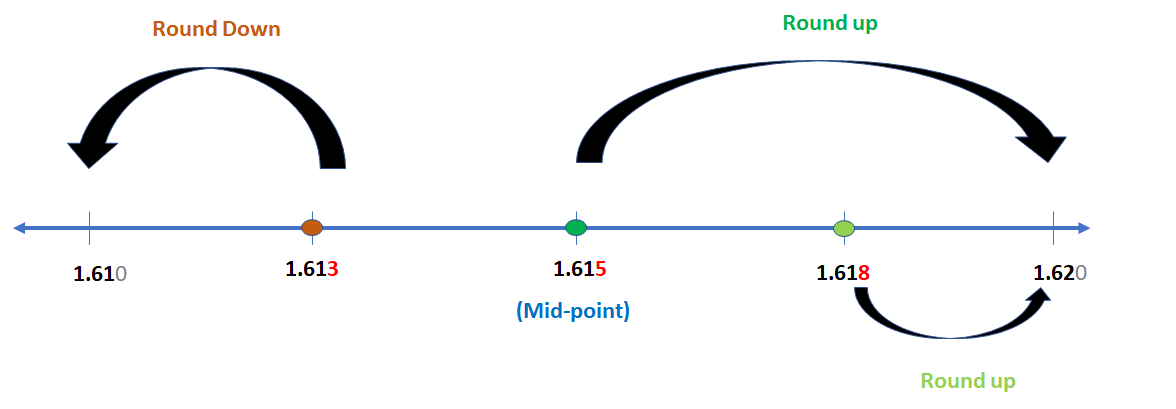
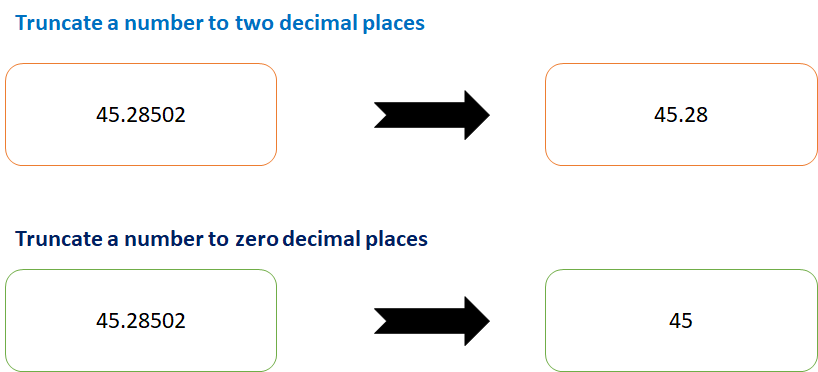
    We can truncate (remove decimal values), round down (5.5 to 6) and round up (5.5 to 5) in ABAP. To achieve these functionalities, ABAP has provided keywords like FLOOR, CEIL and TRUNC. These keywords are implemented in given ABAP program:

    Round Down and Round Up Decimal Number in SAP ABAP
    Round Down and Round Up Decimal Number in SAP ABAP – Image Illustration


    Truncate, Round Down and Round Up Decimal Number in SAP ABAP
    Truncate, Round Down and Round Up Decimal Number in SAP ABAP – Image Illustration

    ABAP Program

    Data: tp_deci3 type p decimals 3,
    tp_deci2 type p decimals 2.
    tp_deci3 = '123.456'.
    tp_deci2 = ( floor( tp_deci3 * 100 ) ) / 100. "always rounded down
    Write tp_deci2.
    tp_deci2 = ( ceil( tp_deci3 * 100 ) ) / 100. "Always rounded up
    Write tp_deci2.
    tp_deci2 = ( trunc( tp_deci3 * 100 ) ) / 100. "Truncate a number
    Write tp_deci2.
    

    Explanation

    In the program, mentioned above, we have implemented following, step by step:

    1. Initially, we have defined two variables: tp_deci3 and tp_deci2. Both of these variables are of type i.e. packed (like float, it can have decimal values too).  tp_deci3 can have 3 decimal places while  tp_deci2 can have 2 decimal places.
    2. Now, we have simply implemented the ABAP keywords: FLOOR, CEIL and TRUNC; one by one. [How it works has been illustrated via images, above].
    3. Later, we have printed the result as output.
  • Program to find Armstrong Number in ABAP

    Preface – This post is part of the ABAP Programs series.

    Sometimes, there is a need to know if the number provided by user is Armstrong number. In that case we program to find Armstrong Number in ABAP. It is not a question that is merely asked in an interview but an important keyword that is used in day to day programming.

    Introduction

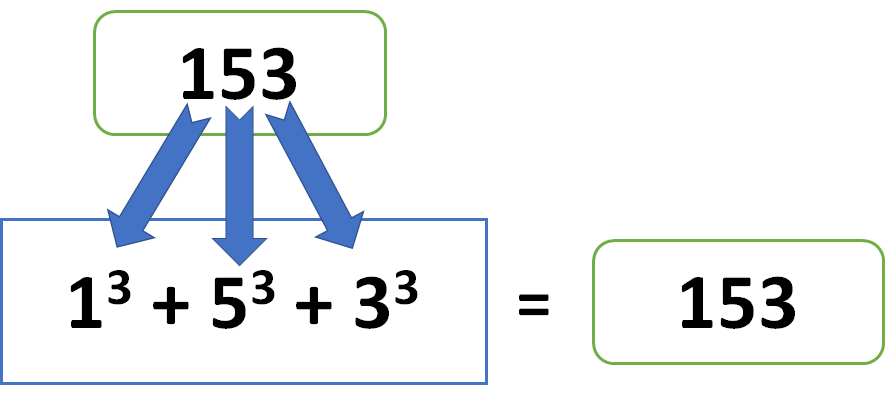
    Armstrong Number is a number whose sum of cube of individual number is equal to the entire number itself.

    For example: 153 = 13 + 53 + 33

    This can be achieved in ABAP with the help of loop in ABAP and truncate in ABAP. The given program implements the same:

    Program to find Armstrong Number
    Armstrong Number – Image Illustration

    ABAP Program to find Armstrong Number

    PARAMETERS: lv_data1(10) type p.
    Data: lv_digit(10) type i,
          lv_final(1) type i,
          lv_arm(10) type i,
          lv_data2(10) type p.
    lv_data2 = lv_data1.
    while lv_data2 <> 0.
        lv_digit = lv_data2 MOD 10.
        lv_arm = lv_arm + ( lv_digit  * lv_digit  * lv_digit ).
        lv_data2 = trunc( lv_data2 / 10 ).
        ENDWHILE.
    
    If lv_data1 EQ lv_arm.
      Write: 'It is an Armstrong Number'.
      Else.
        Write: 'It is not an Armstrong Number'.
        ENDIF.
    

    Explanation

    In the program, mentioned above, we have written a mathematical algorithm. The above program is explained below, step by step:

    1. Initially, we have defined a parameter lv_data1 of type i.e. packed (another form of float) and length 10. This parameter will be used to take the input.
    2. Later, we have defined four variables: lv_digit, lv_final, lv_arm, lv_data2. These variables will be used in the algorithm discussed in further step.
    3. To find if the number is Armstrong number or not, we will have to take out each individual number from the input. Then, get the summation of their cube.
    4. If the summation achieved in above step is equal to the original number, then we print ‘It is an Armstrong Number’ else we print ‘It is not an Armstrong Number’.